
Android布局权重
我想代表一张桌子。我在一个具有垂直方向的LinearLayout中有一个父容器,并且每一行进一步由一个水平方向&权重为100的LinearLayout表示。我已经使用重量,以确保左列和右列获得50%的屏幕宽度。但是右侧的列对于某些行没有正确对齐。我能做些什么使它们像在桌子上一样对齐?
下面表示的每个LinearLayout行的代码都是这样显示的
<LinearLayout
    android:orientation="horizontal"
    android:weightSum="100"
    android:layout_width="match_parent"
    android:layout_height="wrap_content">
    <TextView
        android:layout_weight="50"
        android:layout_width="wrap_content"
        android:layout_height="wrap_content"
        android:text="BOM ID"
        android:id="@+id/tvBOMID" />

    <EditText
        android:layout_width="wrap_content"
        android:layout_height="wrap_content"
        android:id="@+id/etBOMID"
        android:hint="BOM ID"
        android:layout_weight="50" />

</LinearLayout>
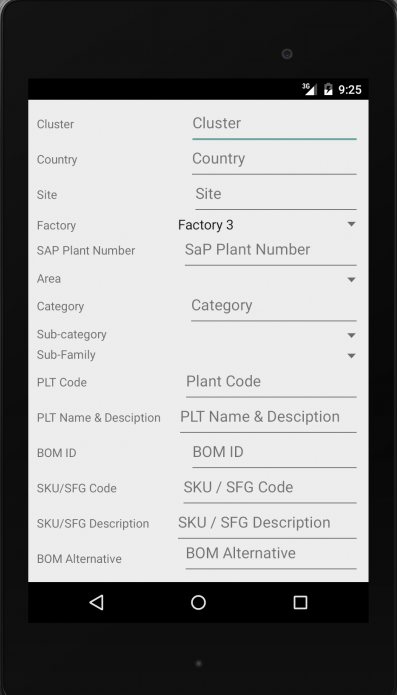
回答 4
Stack Overflow用户
发布于 2014-12-15 04:24:16
只需给TextView、EditText相同的权重,并将宽度设为0dp:
<LinearLayout
    android:orientation="horizontal"
    android:layout_width="match_parent"
    android:layout_height="wrap_content">
    <TextView
        android:layout_weight="1"
        android:layout_width="0dp"
        android:layout_height="wrap_content"
        android:text="BOM ID"
        android:id="@+id/tvBOMID" />

    <EditText
        android:layout_width="0dp"
        android:layout_height="wrap_content"
        android:id="@+id/etBOMID"
        android:hint="BOM ID"
        android:layout_weight="1" />

</LinearLayout>Stack Overflow用户
发布于 2014-12-15 04:26:46
要解决这一问题,请将布局的布局宽度更改为0dp,以增加权重,其他一切看起来都很好。在使用权重时,将宽度或高度(由权重决定)设置为0dp。
Stack Overflow用户
发布于 2014-12-15 04:44:11
在Android系统中,我们有非常好的重量概念。
我们只在LinearLayout中给予权重。
并以简单的方式对平面布局和垂直布局进行了加权,给出了布局的高度和宽度。
在重量上,你想给一个0 0dp的高度或宽度,你想给一个weight.if,你不给0dp,而不是它不影响布局。
Widht明智重量.
给1 1权重,所以文本视图占50%,编辑文本50 %的总宽度的父布局。
给予12权重,文本视图占33.33%,编辑文本占父布局总宽度的66.66%。
给出1 3权重,这样文本视图占25%,编辑文本占父布局总宽度的75%。
高分体重.
给1 1权重,所以文本视图占50%,编辑文本50%的总高度的父母布局。
给予12权重,文本视图占33.33%,编辑文本占父布局总高度的66.66%。
给予1 3权重,所以文本视图占25%,编辑文本占家长布局总高度的75%。
,在你的例子中,,你想要宽度0 0dp,重量是1。
    **You just add this code**

    android:layout_weight="1"
    android:layout_width="0dp"
在代码下面
<LinearLayout
    android:orientation="horizontal"
    android:layout_width="match_parent"
    android:layout_height="wrap_content">
    <TextView
        android:layout_weight="1"
        android:layout_width="0dp"
        android:layout_height="wrap_content"
        android:text="BOM ID"
        android:id="@+id/tvBOMID" />

    <EditText
        android:layout_width="0dp"
        android:layout_height="wrap_content"
        android:id="@+id/etBOMID"
        android:hint="BOM ID"
        android:layout_weight="1" />

</LinearLayout>https://stackoverflow.com/questions/27477274
复制相似问题
腾讯云开发者

Copyright © 2013 - 2026 Tencent Cloud. All Rights Reserved. 腾讯云 版权所有
深圳市腾讯计算机系统有限公司 ICP备案/许可证号:粤B2-20090059  粤公网安备44030502008569号
腾讯云计算(北京)有限责任公司 京ICP证150476号 | 京ICP备11018762号