
两个父控件之间的WPF Grid.IsSharedSizeScope?
两个父控件之间的WPF Grid.IsSharedSizeScope?
提问于 2014-12-11 22:34:44
在我需要在两个组框中的网格之间共享列宽度的情况下,XAML看起来如下所示:
<GroupBox Header="Box A">
        <StackPanel Orientation="Horizontal">
            <!-- Labels -->
            <Grid>
                <Grid.ColumnDefinitions>
                    <ColumnDefinition SharedSizeGroup="Labels"></ColumnDefinition>
                </Grid.ColumnDefinitions>
                <Grid.RowDefinitions>
                    <RowDefinition SharedSizeGroup="Rows"></RowDefinition>
                </Grid.RowDefinitions>

                <Label Grid.Column="0" Grid.Row="0">Label A</Label>
            </Grid>

            <!-- Fields -->
            <ItemsControl Grid.IsSharedSizeScope="True" ItemsSource="{Binding Items}">
                <ItemsControl.ItemsPanel>
                    <ItemsPanelTemplate>
                        <StackPanel Orientation="Horizontal"></StackPanel>
                    </ItemsPanelTemplate>
                </ItemsControl.ItemsPanel>
                <ItemsControl.ItemTemplate>
                    <DataTemplate>
                        <Grid>
                            <Grid.RowDefinitions>
                                <RowDefinition SharedSizeGroup="Rows"></RowDefinition>
                            </Grid.RowDefinitions>

                            <TextBox Text="{Binding PropertyA}"></TextBox>
                        </Grid>
                    </DataTemplate>
                </ItemsControl.ItemTemplate>
            </ItemsControl>
        </StackPanel>
    </GroupBox>

    <GroupBox Header="Box B">
        <StackPanel Orientation="Horizontal">
            <!-- Labels -->
            <Grid>
                <Grid.ColumnDefinitions>
                    <ColumnDefinition SharedSizeGroup="Labels"></ColumnDefinition>
                </Grid.ColumnDefinitions>
                <Grid.RowDefinitions>
                    <RowDefinition SharedSizeGroup="Rows"></RowDefinition>
                </Grid.RowDefinitions>

                <Label Grid.Column="0" Grid.Row="0">Label B</Label>
            </Grid>

            <!-- Fields -->
            <ItemsControl Grid.IsSharedSizeScope="True" ItemsSource="{Binding Items}">
                <ItemsControl.ItemsPanel>
                    <ItemsPanelTemplate>
                        <StackPanel Orientation="Horizontal"></StackPanel>
                    </ItemsPanelTemplate>
                </ItemsControl.ItemsPanel>
                <ItemsControl.ItemTemplate>
                    <DataTemplate>
                        <Grid>
                            <Grid.RowDefinitions>
                                <RowDefinition SharedSizeGroup="Rows"></RowDefinition>
                            </Grid.RowDefinitions>

                            <TextBox Text="{Binding PropertyB}"></TextBox>
                        </Grid>
                    </DataTemplate>
                </ItemsControl.ItemTemplate>
            </ItemsControl>
        </StackPanel>
    </GroupBox>
我尝试过在包含子网格的StackPanel和GroupBox上将StackPanel设置为true,但这不起作用。我想知道在这种情况下,我应该采取什么方法来与“标签”的SharedSizeGroup共享网格列定义之间的大小?
谢谢,
亚历克斯。
回答 1
Stack Overflow用户
回答已采纳
发布于 2014-12-13 16:52:25
用一个GroupBox包围两个Grid,并设置Grid.IsSharedSizeScope。
<Page xmlns="http://schemas.microsoft.com/winfx/2006/xaml/presentation"
      xmlns:sys="clr-namespace:System;assembly=mscorlib"
      xmlns:x="http://schemas.microsoft.com/winfx/2006/xaml">
  <Grid Grid.IsSharedSizeScope="True">
    <Grid.Resources>
      <x:Array x:Key="xItems" Type="sys:String">
        <sys:String>Hello</sys:String>
        <sys:String>World ddd</sys:String>
      </x:Array>
      <x:Array x:Key="xItems2" Type="sys:String">
        <sys:String>Hello long fsdfhuzweb kbhui</sys:String>
        <sys:String>World</sys:String>
      </x:Array>
    </Grid.Resources>

    <Grid.ColumnDefinitions>
      <ColumnDefinition Width="*"/>
      <ColumnDefinition Width="*"/>
    </Grid.ColumnDefinitions>

    <GroupBox Grid.Column="0" Header="Box A">
      <StackPanel Orientation="Horizontal">
        <!-- Labels -->
        <Grid>
          <Grid.ColumnDefinitions>
            <ColumnDefinition SharedSizeGroup="Labels" />
          </Grid.ColumnDefinitions>
          <Label Grid.Column="0" Grid.Row="0">Label A</Label>
        </Grid>
        <!-- Fields -->
        <ItemsControl ItemsSource="{Binding Source={StaticResource xItems}}">
          <ItemsControl.ItemsPanel>
            <ItemsPanelTemplate>
              <StackPanel Orientation="Horizontal" />
            </ItemsPanelTemplate>
          </ItemsControl.ItemsPanel>
          <ItemsControl.ItemTemplate>
            <DataTemplate>
              <Grid>
                <Grid.ColumnDefinitions>
                  <ColumnDefinition SharedSizeGroup="Fields" />
                </Grid.ColumnDefinitions>
                <Grid.RowDefinitions>
                  <RowDefinition SharedSizeGroup="Rows" />
                </Grid.RowDefinitions>
                <TextBox Text="{Binding Mode=OneWay}" />
              </Grid>
            </DataTemplate>
          </ItemsControl.ItemTemplate>
        </ItemsControl>
      </StackPanel>
    </GroupBox>

    <GroupBox Grid.Column="1" Header="Box B">
      <StackPanel Orientation="Horizontal">
        <!-- Labels -->
        <Grid>
          <Grid.ColumnDefinitions>
            <ColumnDefinition SharedSizeGroup="Labels" />
          </Grid.ColumnDefinitions>
          <Grid.RowDefinitions>
            <RowDefinition SharedSizeGroup="Rows" />
          </Grid.RowDefinitions>
          <Label Grid.Column="0" Grid.Row="0">Label B long</Label>
        </Grid>
        <!-- Fields -->
        <ItemsControl ItemsSource="{Binding Source={StaticResource xItems2}}">
          <ItemsControl.ItemsPanel>
            <ItemsPanelTemplate>
              <StackPanel Orientation="Horizontal" />
            </ItemsPanelTemplate>
          </ItemsControl.ItemsPanel>
          <ItemsControl.ItemTemplate>
            <DataTemplate>
              <Grid>
                <Grid.ColumnDefinitions>
                  <ColumnDefinition SharedSizeGroup="Fields" />
                </Grid.ColumnDefinitions>
                <Grid.RowDefinitions>
                  <RowDefinition SharedSizeGroup="Rows" />
                </Grid.RowDefinitions>
                <TextBox Text="{Binding Mode=OneWay}" />
              </Grid>
            </DataTemplate>
          </ItemsControl.ItemTemplate>
        </ItemsControl>
      </StackPanel>
    </GroupBox>
  </Grid>
</Page>
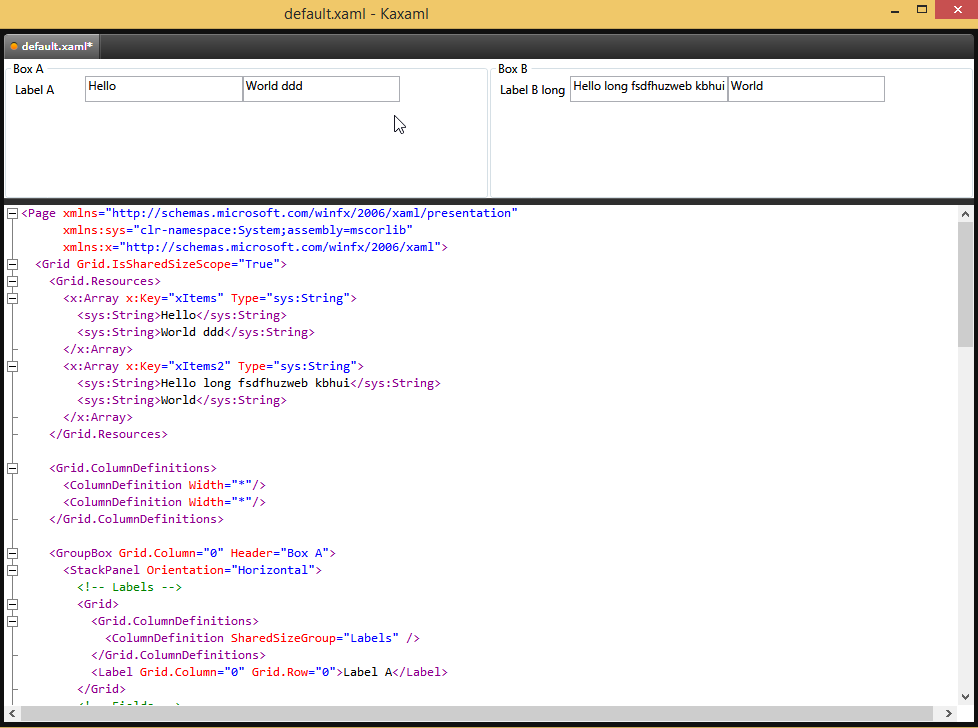
希望这能有所帮助。
页面原文内容由Stack Overflow提供。腾讯云小微IT领域专用引擎提供翻译支持
原文链接:
https://stackoverflow.com/questions/27433707
复制相关文章
相似问题
腾讯云开发者

Copyright © 2013 - 2026 Tencent Cloud. All Rights Reserved. 腾讯云 版权所有
深圳市腾讯计算机系统有限公司 ICP备案/许可证号:粤B2-20090059  粤公网安备44030502008569号
腾讯云计算(北京)有限责任公司 京ICP证150476号 | 京ICP备11018762号