
QFontMetrics返回不准确的结果
如果用户搜索某项内容,我的QTableWidget中有一个自定义委托,用于高亮度匹配。不幸的是,矩形位置通常并不适合,这发生在一些字符或短语上,或者取决于匹配的数量或前导字符串的大小。我找不到导致这件事的具体原因。以下是一个例子:
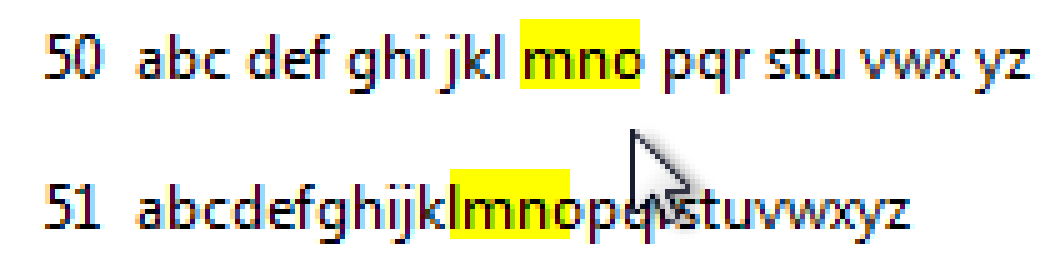
。
这是我的绘画例程(试图修复这个问题的所有尝试和错误都有点混乱):
void custom_delegate::paint(QPainter* painter, const QStyleOptionViewItem& option, const QModelIndex& index) const{

    const QTableWidget* table_widget = qobject_cast<const QTableWidget*>(qstyleoption_cast<const QStyleOptionViewItemV3*>(&option)->widget);
    const int cell_width = table_widget->columnWidth(index.column());

    // basic table cell rectangle
    QRect rect_a = option.rect;

    // adjust rectangle to match text begin
    QStyle* style;
    if(table_widget != 0){
        style = table_widget->style();
    }else{
        style = QApplication::style();
    }
    const int text_horizontal_margin = style->pixelMetric(QStyle::PM_FocusFrameHMargin, 0, table_widget) + 1;
    QRect rect_b = rect_a.adjusted(text_horizontal_margin, 0, -text_horizontal_margin, 0);

    // adjust rectangle to match text height
    QFont cell_font = index.model()->data(index, Qt::FontRole).value<QFont>();
    cell_font.setPointSize(9);
    QFontMetrics fm(cell_font);
    const int height = fm.height();

    rect_b.setY(rect_a.y() + (rect_a.height() - height)/2);
    rect_b.setHeight(height);

    // displayed text
    std::string cell_text = qstrtostr(fm.elidedText(index.model()->data(index, Qt::DisplayRole).toString(),Qt::ElideRight,rect_a.width()));
    int found_pos = find_ci(cell_text, this->filter_string, 0);
    int old_pos = 0;
    int found_width = 0;
    QRect rect_c = rect_b;

    // find occurence of filter string in cell_text
    while(found_pos != std::string::npos){

        std::string front = cell_text.substr(0, found_pos);
        rect_c.setX(rect_b.x() + fm.tightBoundingRect(QString::fromStdString(front)).width());
        rect_c.setWidth(fm.width(QString::fromStdString(cell_text.substr(found_pos, this->filter_string.size()))));
        painter->fillRect(rect_c, Qt::yellow);
        old_pos = found_pos+1;
        found_pos = find_ci(cell_text, this->filter_string, old_pos);
    }
}
注释: filter_string是搜索的字符串,find_ci只是一个包含不区分大小写的std::string::find包装器,但在这里并不重要,因为这个测试用例是完全小写的,我使用std::string处理非qt内容。
编辑:,对于宽度计算,我尝试了fm.tightBoundingRect().width()、fm.boundingRect.width()和fm.width(),它们的结果不同,但从不正确。
我用的是Qt 5.2
回答 1
Stack Overflow用户
发布于 2015-08-18 16:55:58
在我的例子中,我通过以下黑客获得了想要的结果:
auto initialRect = fm.boundingRect(text);
auto improvedRect = fm.boundingRect(initialRect, 0, text);还不完全清楚为什么boundingRect返回正确的结果,但这可能只是偶然的,因为正如文档所述:
这个函数返回的边界矩形比由简单的
boundingRect()函数计算的要大一些。此功能使用最大的左和右字体轴承,这是必要的多行文本正确对齐。此外,fontHeight()和lineSpacing()用于计算高度,而不是单个字符的高度。
您建议的width方法也将返回更大的结果,但似乎不正确,因为只有在需要下一个单词的位置时才应该使用它:
.
width()返回到应该绘制下一个字符串的距离。
另外,有时您是否将painter.device()的结果传递给QFontMetrics构造函数很重要。
https://stackoverflow.com/questions/27336001
复制相似问题
腾讯云开发者

Copyright © 2013 - 2026 Tencent Cloud. All Rights Reserved. 腾讯云 版权所有
深圳市腾讯计算机系统有限公司 ICP备案/许可证号:粤B2-20090059  粤公网安备44030502008569号
腾讯云计算(北京)有限责任公司 京ICP证150476号 | 京ICP备11018762号