
如何使我的应用程序通用?
如何使我的应用程序通用?
提问于 2014-12-05 17:17:53
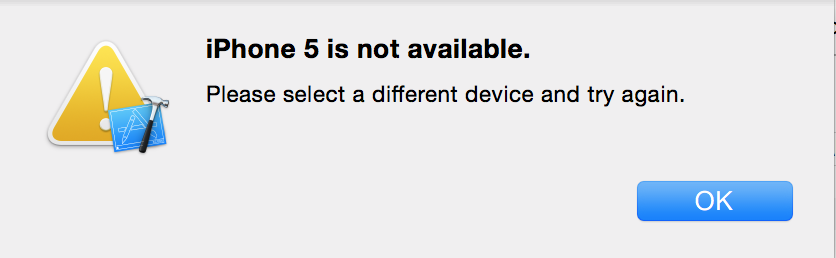
我试图使我的应用程序通用,同时也适用于IOS 8 IOS 7。这个宏在IOS模拟器中工作得很好,但是当我试图在IOS 7.1模拟器中打开它时,我会在Xcode 6.1中打开这条消息,下面是图片。
我有一个宏:
#define IS_IPAD (UI_USER_INTERFACE_IDIOM() == UIUserInterfaceIdiomPad)
#define IS_IPHONE (UI_USER_INTERFACE_IDIOM() == UIUserInterfaceIdiomPhone) // iPhone and       iPod touch style UI

#define IS_IPHONE_5_IOS7 (IS_IPHONE && [[UIScreen mainScreen] bounds].size.height == 568.0f)
#define IS_IPHONE_6_IOS7 (IS_IPHONE && [[UIScreen mainScreen] bounds].size.height == 667.0f)
#define IS_IPHONE_6P_IOS7 (IS_IPHONE && [[UIScreen mainScreen] bounds].size.height == 736.0f)
#define IS_IPHONE_4_AND_OLDER_IOS7 (IS_IPHONE && [[UIScreen mainScreen] bounds].size.height < 568.0f)

#define IS_IPHONE_5_IOS8 (IS_IPHONE && ([[UIScreen mainScreen] nativeBounds].size.height/[[UIScreen mainScreen] nativeScale]) == 568.0f)
#define IS_IPHONE_6_IOS8 (IS_IPHONE && ([[UIScreen mainScreen] nativeBounds].size.height/[[UIScreen mainScreen] nativeScale]) == 667.0f)
#define IS_IPHONE_6P_IOS8 (IS_IPHONE && ([[UIScreen mainScreen] nativeBounds].size.height/[[UIScreen mainScreen] nativeScale]) == 736.0f)
#define IS_IPHONE_4_AND_OLDER_IOS8 (IS_IPHONE && ([[UIScreen mainScreen] nativeBounds].size.height/[[UIScreen mainScreen] nativeScale]) < 568.0f)

#define IS_IPHONE_5 ( ( [ [ UIScreen mainScreen ] respondsToSelector: @selector( nativeBounds ) ] ) ? IS_IPHONE_5_IOS8 : IS_IPHONE_5_IOS7 )
#define IS_IPHONE_6 ( ( [ [ UIScreen mainScreen ] respondsToSelector: @selector( nativeBounds ) ] ) ? IS_IPHONE_6_IOS8 : IS_IPHONE_6_IOS7 )
#define IS_IPHONE_6P ( ( [ [ UIScreen mainScreen ] respondsToSelector: @selector( nativeBounds ) ] ) ? IS_IPHONE_6P_IOS8 : IS_IPHONE_6P_IOS7 )
#define IS_IPHONE_4_AND_OLDER ( ( [ [ UIScreen mainScreen ] respondsToSelector: @selector( nativeBounds ) ] ) ? IS_IPHONE_4_AND_OLDER_IOS8 : IS_IPHONE_4_AND_OLDER_IOS7 )
我该如何解决这个问题?
回答 2
Stack Overflow用户
回答已采纳
发布于 2014-12-06 05:05:10
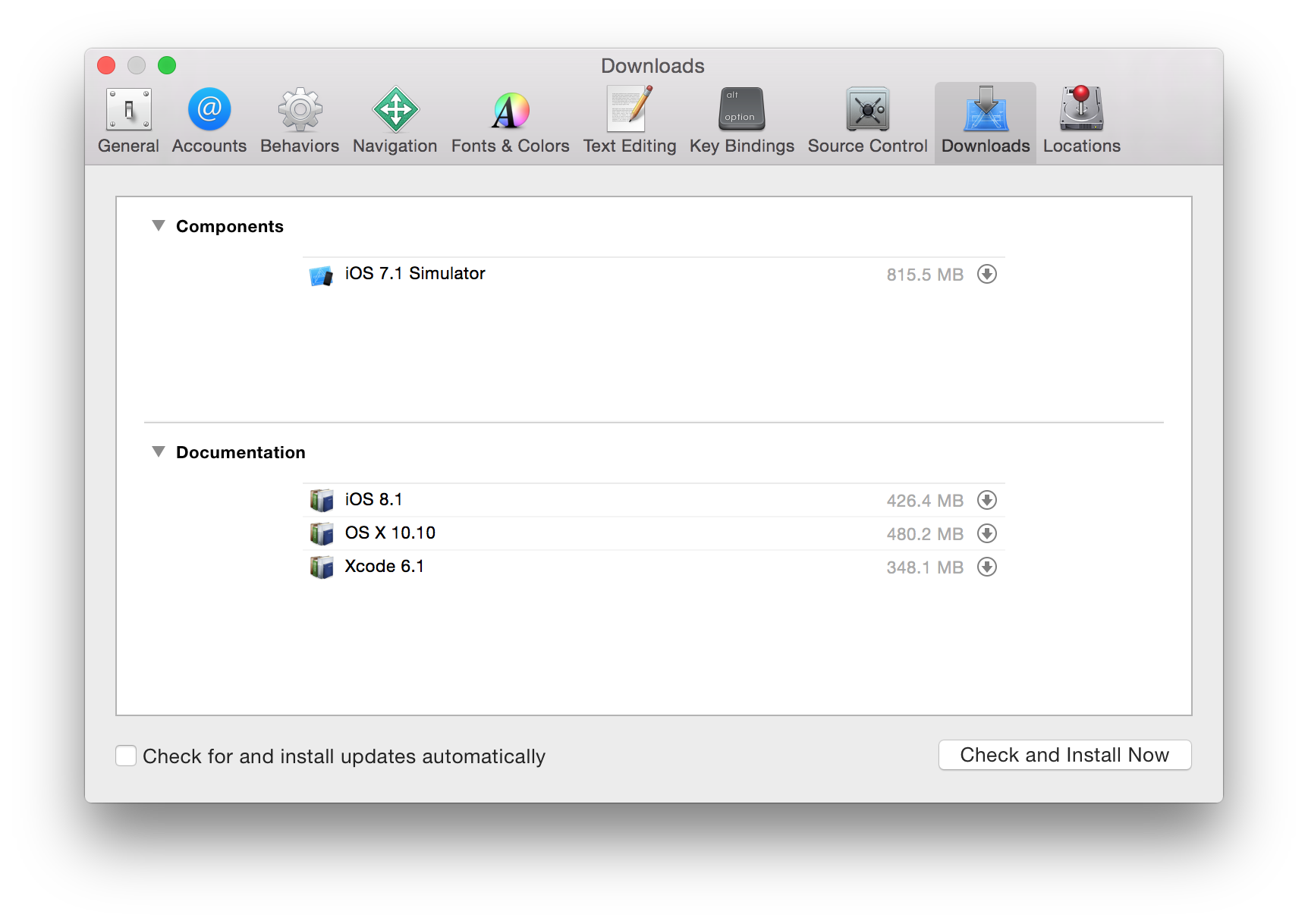
可能您的计算机上没有安装7.1模拟器(默认情况下没有安装它)。内部首选项>下载,查看它是否安装在组件下面。
Stack Overflow用户
发布于 2014-12-05 17:20:37
您在这里描述的问题不是您的应用程序作为一个通用应用程序的角色(这意味着它在iPhone和iPad上是原生的--该部分工作得很好),而是作为一个允许在比其基本SDK更老的系统上运行的应用程序。
只需设置部署目标即可。最简单的方法是编辑项目--参见Info选项卡上的Deployment弹出。
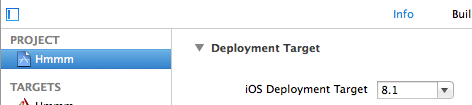
在这个屏幕截图中,部署目标是8.1,这意味着我们甚至不能在iOS 8上运行,更不用说iOS 7了!通过将其设置为7.0,您将允许使用iOS 7.0。
页面原文内容由Stack Overflow提供。腾讯云小微IT领域专用引擎提供翻译支持
原文链接:
https://stackoverflow.com/questions/27321312
复制相关文章
相似问题
腾讯云开发者

Copyright © 2013 - 2026 Tencent Cloud. All Rights Reserved. 腾讯云 版权所有
深圳市腾讯计算机系统有限公司 ICP备案/许可证号:粤B2-20090059  粤公网安备44030502008569号
腾讯云计算(北京)有限责任公司 京ICP证150476号 | 京ICP备11018762号