
ControlTemplate FindAncestor绑定无效
ControlTemplate FindAncestor绑定无效
提问于 2014-12-03 11:19:57
我试图将RadioButtons嵌入到RichTextBox段落中,但RadioButton宽度和高度值没有应用:
<Style x:Key="styleRb" TargetType="{x:Type RadioButton}">
    <Setter Property="Focusable" Value="False"></Setter>
    <Setter Property="Margin" Value="3,0,3,-1"></Setter>
    <Setter Property="Padding" Value="0,0,0,0"></Setter>
    <Setter Property="HorizontalAlignment" Value="Center"></Setter>
    <Setter Property="VerticalAlignment" Value="Center"></Setter>
    <Setter Property="Template">
        <Setter.Value>
            <ControlTemplate TargetType="{x:Type RadioButton}">
                <BulletDecorator Background="Transparent">
                    <BulletDecorator.Bullet>
                        <!--Values are applied:-->
                        <!--<Grid Width="13" Height="13">-->
                        <!--Values are not applied:-->
                        <Grid Width="{Binding RelativeSource={RelativeSource Mode=FindAncestor, AncestorType={x:Type Paragraph}},
                                              Path=FontSize}"
                              Height="{Binding RelativeSource={RelativeSource Mode=FindAncestor, AncestorType={x:Type Paragraph}},
                                               Path=FontSize}">
                            <Ellipse Stroke="Black" StrokeThickness="2.0"
                                     Fill="Gold" Opacity="1.0">
                            </Ellipse>
                        </Grid>
                    </BulletDecorator.Bullet>
                </BulletDecorator>
            </ControlTemplate>
        </Setter.Value>
    </Setter>
</Style>
嵌入-代码如下:
RadioButton rb = new RadioButton();
rb.Style = (Style)Application.Current.FindResource("styleRb");
InlineUIContainer container = new InlineUIContainer(rb, rtbInsertionPosition);回答 1
Stack Overflow用户
发布于 2014-12-03 15:21:10
段落元素实际上并不参与视觉树。因此,绑定无法在树中找到类型为段落的元素。这就是绑定失败的原因。另一个名为ParagraphVisual的控件代替段落呈现,而不是段落。您可以很容易地使用Snoop找到它。
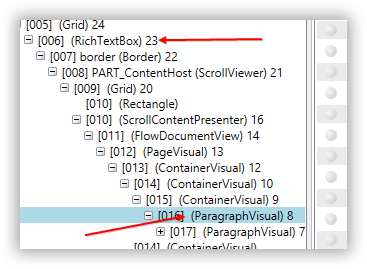
段落标记只是一个带文本的占位符。ParagraphVisual是一个用于绘制文本的内部类,因此不能在XAML中使用该类型。
http://referencesource.microsoft.com/#PresentationFramework/Framework/MS/Internal/PtsHost/ParagraphVisual.cs
页面原文内容由Stack Overflow提供。腾讯云小微IT领域专用引擎提供翻译支持
原文链接:
https://stackoverflow.com/questions/27270426
复制相关文章
相似问题
腾讯云开发者

Copyright © 2013 - 2026 Tencent Cloud. All Rights Reserved. 腾讯云 版权所有
深圳市腾讯计算机系统有限公司 ICP备案/许可证号:粤B2-20090059  粤公网安备44030502008569号
腾讯云计算(北京)有限责任公司 京ICP证150476号 | 京ICP备11018762号