
量角器测试成功运行,但量角器覆盖报告是完全空的。
我正在尝试将我当前的AngularJS项目与Protractor覆盖范围集成起来。请在下面找到package.json和我的量角器-配置。
Package.json
"devDependencies": {
    "chromedriver": "~2.8.1",
    "grunt": "~0.4.0",
    "grunt-contrib-clean": "~0.4.0",
    "grunt-contrib-copy": "~0.5.0",
    "grunt-contrib-jshint": "~0.2.0",
    "grunt-contrib-concat": "~0.1.3",
    "grunt-contrib-uglify": "~0.1.1",
    "grunt-contrib-watch": "~0.3.1",
    "grunt-html2js": "~0.1.0",
    "grunt-karma": "~0.4.4",
    "grunt-protractor-runner": "~1.1.4",
    "grunt-contrib-less": "~0.11.3",
    "grunt-shell": "~0.6.0",
    "selenium": "~2.20.0",
    "grunt-protractor-coverage": "^0.2.1",
    "grunt-istanbul": "^0.2.5",
    "grunt-express-server": "~0.4.5",
    "protractor": "~1.4.0",
    "grunt-contrib-connect": "~0.7.1"
  }
量角器Config
exports.config = {

    seleniumServerJar: '../../node_modules/selenium/lib/runner/selenium-server-standalone-2.20.0.jar',
    chromeDriver: '../../node_modules/chromedriver/lib/chromedriver/chromedriver',
    baseUrl: 'http://localhost:3000/',

    capabilities: {
        'browserName': 'chrome',
        'chromeOptions': {
            'args': ['incognito', 'disable-extensions', 'start-maximized']
        }
    },

    onPrepare: function() {
        exports.server = require('../../server.js');
    },

    specs: ['../e2e/**/*.spec.js'],

    jasmineNodeOpts: {
        onComplete: function () {},
        isVerbose: true,
        showColors: true,
        includeStackTrace: true,
        defaultTimeoutInterval: 90000
    }
};
我的Grunt任务
grunt.registerTask('test', ['clean:coverage', 'copy:instrument', 'instrument',  'protractor_coverage:chrome', 'makeReport']);

    copy: {
        instrument: {
            files: [{
                src: ['src/app/**/*', '!src/app/**/*.js'],
                dest: 'coverage/e2e/instrumented/'
            }]
        },
    },

    clean: {
        coverage: ['coverage', 'instrumented', 'reports']
    }


    instrument: {
        files: 'src/app/**/*.js',
        options: {
            lazy: true,
            basePath: 'coverage/e2e/instrumented'
        }
    },

    makeReport: {
        src: 'coverage/e2e/instrumented/*.json',
        options: {
            type: 'lcov',
            dir: 'coverage/e2e/reports',
            print: 'detail'
        }
    },


    protractor_coverage: {
        options: {
            configFile: 'test/config/protractor-config.js', // Default config file
            keepAlive: true, // If false, the grunt process stops when the test fails.
            noColor: false, // If true, protractor will not use colors in its output.
            coverageDir: 'coverage/e2e/instrumented',
            args: {}
        },
        chrome: {
            options: {
                args: {
                    baseUrl: 'http://localhost:3000/',
                    // Arguments passed to the command
                    'browser': 'chrome'
                }
            }
        },
    },
当我尝试运行咕噜任务时,所有的测试都成功地运行,但是量角器覆盖报告完全是空的。我尝试了几种选择,但我不能让报告出现。
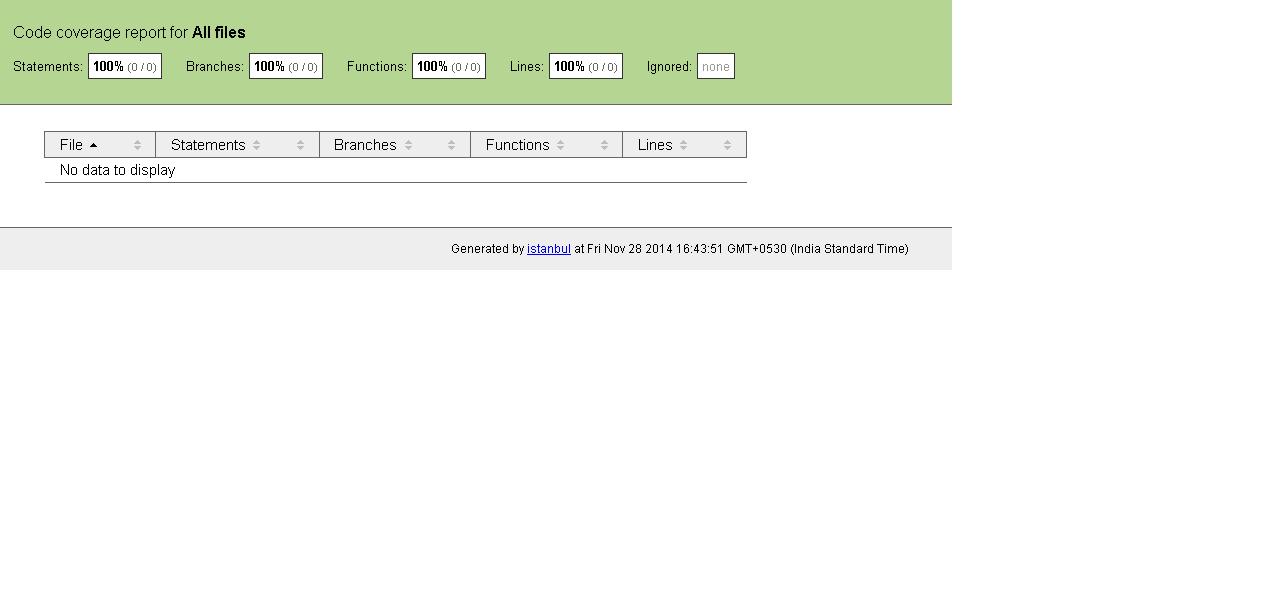
问题:,我是不是做错什么了?如何使量角器覆盖加载我的src js文件?
回答 3
Stack Overflow用户
发布于 2015-05-06 09:01:52
这里有个很棒的人,有一个对我有用的黑客(http://javahow.net/questions/22350680/code-coverage-for-protractor-tests-in-angularjs)
基本上,您添加了一个e2e测试,它从浏览器中写出收集的覆盖率,如下所示:
'use strict';

var fs = require('fs');

describe('Output the code coverage objects', function() {
  it('should output the coverage object.', function() {
    browser.driver.executeScript("return __coverage__;").then(function(val) {
      fs.writeFileSync("coverage/e2e/coverageE2E.json", JSON.stringify(val));
    });
  });
});我也发布了这个问题的解决方案,以防对他们也有帮助:Protractor coverage not generating report
Stack Overflow用户
发布于 2014-11-28 13:13:38
可以尝试添加运行{},如下所示:
protractor_coverage: {
    options: {
        ......
    },
    chrome: {
       ......
    },
    run: {}
},Stack Overflow用户
发布于 2015-07-31 23:42:04
只是想加入西蒙旺蒂克的答案。覆盖变量不是。相反,在默认情况下,它似乎添加了日期/时间。您需要做的是在您的gruntfile中设置覆盖率变量,在“仪器任务”下添加coverageVariable,如下所示。
instrument: {
        files: ['js/*.js'],
        options: {
            lazy: true,
            basePath: "./instrumented",
            coverageVariable: '__coverage__' //<<--- sets it to specific value
        }
    },
https://stackoverflow.com/questions/27187974
复制相似问题
腾讯云开发者

Copyright © 2013 - 2026 Tencent Cloud. All Rights Reserved. 腾讯云 版权所有
深圳市腾讯计算机系统有限公司 ICP备案/许可证号:粤B2-20090059  粤公网安备44030502008569号
腾讯云计算(北京)有限责任公司 京ICP证150476号 | 京ICP备11018762号