
如何在SST中设置results_directory?
如何在SST中设置results_directory?
提问于 2014-11-25 18:58:06
问这个问题有点愚蠢,因为对于基本的selenium,我没有问题保存屏幕截图,但是对于SST,我使用了take_screenshot('screenshot_name.png'),它告诉我应该设置results_directory。问题是如何设置results_directory。我发现的所有示例都将其设置为“无”,但这并不能满足我的测试需求。
下面是我的代码是如何编写的:
import unittest
from sst.actions import *
from sst import cases, config

config.results_directory = None

class TestMyTest(cases.SSTTestCase):

def test_mytestcase_home_page(self):
    go_to('http://www.mywebpage.com')
    assert_title_contains('MyWebPage')
    #Main page is displayed
take_screenshot(filename='C/Users/Brenda/test/SST Test Project/results/home_page.png',add_timestamp=True)回答 1
Stack Overflow用户
回答已采纳
发布于 2014-11-26 05:43:37
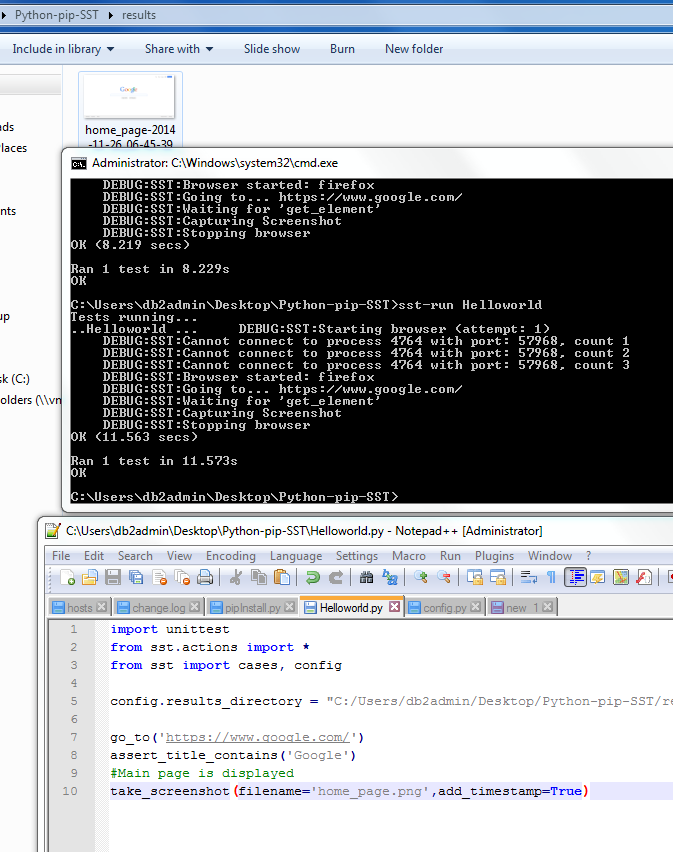
我有下面的脚本为我工作使用谷歌。诀窍是将结果目录添加到位于@{dir}\Python27\Lib\site-packages\sst\config.py的实际配置文件中,并添加results_directory = "C:\Users\{me}\Desktop\Python-pip-SST\results"。
import unittest
from sst.actions import *
from sst import cases, config

#config.results_directory = "C:\Users\{me}\Desktop\Python-pip-SST\results"

go_to('https://www.google.com/')
assert_title_contains('Google')
#Main page is displayed
take_screenshot(filename='home_page.png',add_timestamp=True)
而且,您还应该能够覆盖测试的结果路径。您的工作代码应该如下所示
import unittest
from sst.actions import *
from sst import cases, config

#Just to be safe side try not to use any spaces in filename
config.results_directory = "C:/Users/Brenda/test/SSTTestProject/results"

class TestMyTest(cases.SSTTestCase):

def test_mytestcase_home_page(self):
    go_to('http://www.mywebpage.com')
    assert_title_contains('MyWebPage')
    #Main page is displayed
    take_screenshot(filename="home_page.png",add_timestamp=True)
我添加了截图,如果这对你有帮助的话。更改filepath innconfig文件或从test中更改对我来说很好。
页面原文内容由Stack Overflow提供。腾讯云小微IT领域专用引擎提供翻译支持
原文链接:
https://stackoverflow.com/questions/27134553
复制相关文章
相似问题
腾讯云开发者

Copyright © 2013 - 2026 Tencent Cloud. All Rights Reserved. 腾讯云 版权所有
深圳市腾讯计算机系统有限公司 ICP备案/许可证号:粤B2-20090059  粤公网安备44030502008569号
腾讯云计算(北京)有限责任公司 京ICP证150476号 | 京ICP备11018762号