
CSS中不同大小的文本之间的等距
如何使用CSS在不同大小的行之间获得相等的间距?下面是我的基本html:
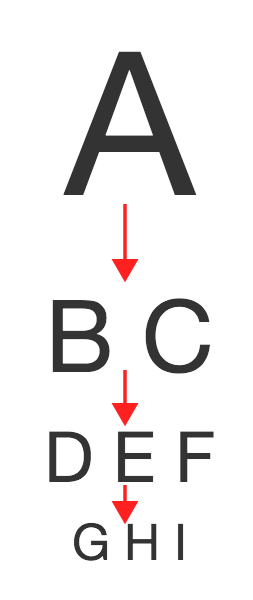
  <div style="font-size: 200%">A</div>
  <div style="font-size: 100%">B C</div>
  <div style="font-size: 50%">D E F</div>
  <div style="font-size: 25%">G H I</div>
我希望每一行之间的间距相同,尽管字体大小不同(即下面的红色箭头应该相等)。我不知道如何用CSS行高属性来完成这个任务。
回答 6
Stack Overflow用户
发布于 2014-11-19 22:05:36
我想其他的答案都差不多了,但是线高有点不同。我的想法是,直线高度是来自字母的中心的空间的数量。所以,如果你的线高是50 if,那么在信的中间有25 if的空格,在信的中间有25 if的空格。这使得这一行50 the高。
因此,为了使它们之间的空格相等,我将使用边距底部,并将线条高度设置为看起来就像它与字母的顶部和底部正好对接的东西(可能会根据您使用的字体而有所不同)。在下面的示例中,我将行高设置为.7 (您可以看到它如何与字母的实际基线和顶部高度与红色边框对接。然后,我给出了一个rem单元的边距值,这样它相对于原始页面的字体大小,而不是具有唯一字体大小的div本身。
body {
  font-size: 24px;
}

div {
    line-height: .7;
    margin-bottom: 1rem;
    border: 1px solid red;
}<div style="font-size: 200%">A</div>
<div style="font-size: 100%">B C</div>
<div style="font-size: 50%">D E F</div>
<div style="font-size: 25%">G H I</div>
Stack Overflow用户
发布于 2014-11-19 21:54:09
使用固定线高度:
div {
    line-height: 50px;
}
示例:
body {
  font-size: 24px;
}

div {
    line-height: 50px;
    border-bottom: 1px solid #f2f2f2;
}<div style="font-size: 200%">A</div>
<div style="font-size: 100%">B C</div>
<div style="font-size: 50%">D E F</div>
<div style="font-size: 25%">G H I</div>
Stack Overflow用户
发布于 2014-11-19 22:00:21
根据您需要支持的浏览器,您可以使用rem单元,这是非常强大的。
它使用文档的基本字体大小并将其乘以。***
body {
  font-size: 16px;
}

.large-font {
  font-size: 500%;
  margin-bottom: 10rem; /* this will be 160 pixels! */
}

.tiny-font {
  font-size: 50%;
  margin-bottom: 10rem; /* this will still be 160 pixels! */
}
这是非常灵活的,因为如果您更改基本字体大小:边距将与它一起缩放(而像素值是固定的)。
https://stackoverflow.com/questions/27027607
复制相似问题
腾讯云开发者

Copyright © 2013 - 2026 Tencent Cloud. All Rights Reserved. 腾讯云 版权所有
深圳市腾讯计算机系统有限公司 ICP备案/许可证号:粤B2-20090059  粤公网安备44030502008569号
腾讯云计算(北京)有限责任公司 京ICP证150476号 | 京ICP备11018762号