
如何给DBGrid特殊的细胞着色?
如何给DBGrid特殊的细胞着色?
提问于 2014-11-19 20:08:08
我有一个列,它只有“是”和“否”值。如果列值为“是”,则只有该单元格背景颜色为红色,否则“否”,则背景色为黄色,但此代码颜色为整行:
if ADOTable1.FieldByName('Clubs').AsString = 'yes' then
begin
  DBGrid1.Canvas.Brush.Color := clRed;
  DBGrid1.DefaultDrawColumnCell(Rect, DataCol, Column, State);
end;
编辑
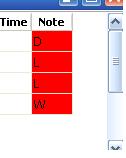
谢谢你的回复。我真正的代码就像那样。“格”列只有"L,D,W“。
if Column.FieldName = 'netice' then
 begin
 if ADOTable1.FieldByName('netice').AsString = 'L' then
 DBGrid1.Canvas.Brush.Color := clgreen ;
 if ADOTable1.FieldByName('netice').AsString = 'D' then
 DBGrid1.Canvas.Brush.Color := clRed ;
 if ADOTable1.FieldByName('netice').AsString = 'W' then
 DBGrid1.Canvas.Brush.Color := clYellow ;
 end;
 DBGrid1.DefaultDrawColumnCell(Rect, DataCol, Column, State);
 end;
但我需要L-绿色,D-红色,W-黄色,我使用德尔菲2010。
回答 2
Stack Overflow用户
回答已采纳
发布于 2014-11-19 21:15:15
您需要添加一个条件来限制画笔颜色的更改仅限于您选择的列。在代码中,可以是:
procedure TForm1.DBGrid1DrawColumnCell(Sender: TObject; const Rect: TRect;
  DataCol: Integer; Column: TColumn; State: TGridDrawState);
var
  Field: TField;
begin
  // store the currently rendered cell's column assigned field reference
  // (if any) to the local variable (there's quite expensive getter)
  Field := Column.Field;
  // if the rendered cell's column has assigned a field and this field's
  // name is 'Clubs' (compared without case sensitivity), then, and only
  // then change the brush color...
  if Assigned(Field) and SameText(Field.FieldName, 'Clubs') then
  begin
    if Field.AsString = 'yes' then
      DBGrid1.Canvas.Brush.Color := clRed
    else
      DBGrid1.Canvas.Brush.Color := clYellow;
  end;
  DBGrid1.DefaultDrawColumnCell(Rect, DataCol, Column, State);
end;在Column.FieldName之前,我更喜欢这样做,因为Column.FieldName还没有保证链接的数据集中存在这样的字段。因此,以这种方式直接访问该字段更安全。
Stack Overflow用户
发布于 2014-11-19 20:49:47
你可以这样做:
if Column.FieldName = 'Clubs' then
begin
  if ADOTable1.FieldByName('Clubs').AsString = 'yes' then
    DBGrid1.Canvas.Brush.Color := clRed
  else
    DBGrid1.Canvas.Brush.Color := clYellow;
end;
DBGrid1.DefaultDrawColumnCell(Rect, DataCol, Column, State);页面原文内容由Stack Overflow提供。腾讯云小微IT领域专用引擎提供翻译支持
原文链接:
https://stackoverflow.com/questions/27026043
复制相关文章
相似问题
腾讯云开发者

Copyright © 2013 - 2026 Tencent Cloud. All Rights Reserved. 腾讯云 版权所有
深圳市腾讯计算机系统有限公司 ICP备案/许可证号:粤B2-20090059  粤公网安备44030502008569号
腾讯云计算(北京)有限责任公司 京ICP证150476号 | 京ICP备11018762号