
如何处理VBA中的可选XML属性?
如何处理VBA中的可选XML属性?
提问于 2014-11-18 09:24:44
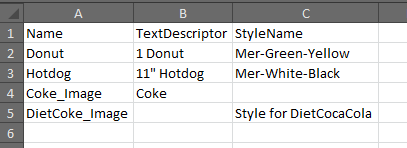
我编写了一些代码将一些数据从XML文件导入excel,直到它尝试读取不存在的属性;它们在文件中是可选的,我不能将它们添加到其中,因此需要在代码中处理它们。
我尝试过用If Is Not Nothing来处理对象,但这是行不通的,If <> ""或If <> Null也没有成功。
如果有人能给我任何帮助,我将非常感激。
Public Sub import()

    Dim oDoc As MSXML2.DOMDocument
    Dim fSuccess As Boolean
    Dim oRoot As MSXML2.IXMLDOMNode
    Dim oSoftkey As MSXML2.IXMLDOMNode
    Dim oAttributes As MSXML2.IXMLDOMNamedNodeMap
    Dim oSoftkeyName As MSXML2.IXMLDOMNode
    Dim oSoftkeyDescriptor As MSXML2.IXMLDOMNode
    Dim oSoftkeyStyleName As MSXML2.IXMLDOMNode

    Dim oChildren As MSXML2.IXMLDOMNodeList
    Dim oChild As MSXML2.IXMLDOMNode
    Dim intI As Integer
    On Error GoTo HandleErr

    Set oDoc = New MSXML2.DOMDocument

    oDoc.async = False
    oDoc.validateOnParse = False
    fSuccess = oDoc.Load(ActiveWorkbook.Path & "\keys.xml")

    If Not fSuccess Then
      GoTo ExitHere
    End If

    intI = 2
    ActiveSheet.Cells(1, 1).CurrentRegion.ClearContents
    ActiveSheet.Cells(1, 1) = "Name"
    ActiveSheet.Cells(1, 2) = "TextDescriptor"
    ActiveSheet.Cells(1, 3) = "StyleName"

    ' Get the root of the XML tree.
    ' Set oRoot = oDoc.DocumentElement
    Set oRoot = oDoc.SelectSingleNode("//IMS_Softkeys")

    ' Each IMS_Softkey in IMS_Softkeys
    For Each oSoftkey In oRoot.ChildNodes

      Set oAttributes = oSoftkey.Attributes

      Set oSoftkeyName = oAttributes.getNamedItem("Name")
      Set oSoftkeyDescriptor = oAttributes.getNamedItem("TextDescriptor")
      Set oSoftkeyStyleName = oAttributes.getNamedItem("StyleName")

      ActiveSheet.Cells(intI, 1).Value = oSoftkeyName.Text

      'Can't handle optional attribute "TextDescriptor" or "SoftkeyStyle"
      ActiveSheet.Cells(intI, 2).Value = oSoftkeyDescriptor.Text
      ActiveSheet.Cells(intI, 3).Value = oSoftkeyStyleName.Text

      intI = intI + 1
    Next oSoftkey
ExitHere:
    Exit Sub
HandleErr:
    MsgBox "Error " & Err.Number & ": " & Err.Description
    Resume ExitHere
    Resume
End Sub
一个示例XML文件(keys.xml):
<BATCH>
<IMS_BATCH>
<IMS_Softkeys>
<IMS_Softkey Name="Donut" StyleName="Mer-Green-Yellow" TextDescriptor="1 Donut" />
<IMS_Softkey Name="Hotdog" StyleName="Mer-White-Black" TextDescriptor="11" Hotdog" />
<IMS_Softkey Name="Coke_Image" TextDescriptor="Coke" />
<IMS_Softkey Name="DietCoke_Image" StyleName="Style for DietCocaCola" />
</IMS_Softkeys>
</IMS_BATCH>
</BATCH>回答 1
Stack Overflow用户
回答已采纳
发布于 2014-11-18 09:36:18
它们是对象,在VBA中,您可以使用以下语法检查它们是否为空(已分配)
If Not (Object Is Nothing) Then
因此,如果要检查是否从XML检索和分配了属性,则可以:
' Print only if the `oSoftKeyDescriptor` is not nothing
If Not (oSoftkeyDescriptor Is Nothing) Then
    ActiveSheet.Cells(intI, 2).Value = oSoftkeyDescriptor.Text
End If

If Not (oSoftkeyStyleName Is Nothing) Then
    ActiveSheet.Cells(intI, 3).Value = oSoftkeyStyleName.Text
End If
我相信这就是你想要的结果
页面原文内容由Stack Overflow提供。腾讯云小微IT领域专用引擎提供翻译支持
原文链接:
https://stackoverflow.com/questions/26990689
复制相关文章
相似问题
腾讯云开发者

Copyright © 2013 - 2026 Tencent Cloud. All Rights Reserved. 腾讯云 版权所有
深圳市腾讯计算机系统有限公司 ICP备案/许可证号:粤B2-20090059  粤公网安备44030502008569号
腾讯云计算(北京)有限责任公司 京ICP证150476号 | 京ICP备11018762号