
Visual basic循环进度条
Visual basic循环进度条
提问于 2014-11-14 11:02:22
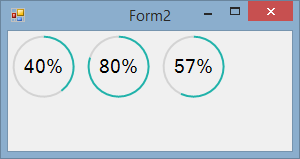
我试着用好的UI制作一个软件,但我在VB方面不是专业的.如何制作一个圆形进度条?
例如

回答 4
Stack Overflow用户
回答已采纳
发布于 2014-11-14 13:40:55
用GDI+画你自己的怎么样?
您可以稍后将其转换为您自己的用户控件,但这将使您开始工作。这应该是相当清楚的解释:
Private Sub Form2_Paint(sender As Object, e As PaintEventArgs) Handles Me.Paint
    DrawProgress(e.Graphics, New Rectangle(5, 5, 60, 60), 40)
    DrawProgress(e.Graphics, New Rectangle(80, 5, 60, 60), 80)
    DrawProgress(e.Graphics, New Rectangle(155, 5, 60, 60), 57)
End Sub

Private Sub DrawProgress(g As Graphics, rect As Rectangle, percentage As Single)
    'work out the angles for each arc
    Dim progressAngle = CSng(360 / 100 * percentage)
    Dim remainderAngle = 360 - progressAngle

    'create pens to use for the arcs
    Using progressPen As New Pen(Color.LightSeaGreen, 2), remainderPen As New Pen(Color.LightGray, 2)
        'set the smoothing to high quality for better output
        g.SmoothingMode = Drawing2D.SmoothingMode.AntiAlias
        'draw the blue and white arcs
        g.DrawArc(progressPen, rect, -90, progressAngle)
        g.DrawArc(remainderPen, rect, progressAngle - 90, remainderAngle)
    End Using

    'draw the text in the centre by working out how big it is and adjusting the co-ordinates accordingly
    Using fnt As New Font(Me.Font.FontFamily, 14)
        Dim text As String = percentage.ToString + "%"
        Dim textSize = g.MeasureString(text, fnt)
        Dim textPoint As New Point(CInt(rect.Left + (rect.Width / 2) - (textSize.Width / 2)), CInt(rect.Top + (rect.Height / 2) - (textSize.Height / 2)))
        'now we have all the values draw the text
        g.DrawString(text, fnt, Brushes.Black, textPoint)
    End Using
End Sub
输出
Stack Overflow用户
发布于 2017-02-06 14:19:01
下面是一个示例,说明如何在需要时更新进度循环栏,而不会因为刷新而闪烁。
基于马特的密码
只需复制窗体画图事件中的代码,就可以正确地更改矩形大小和位置,以托管窗体中的圆圈。百分比是一个全局变量,当它发生变化时,可以调用me.refresh()方法来触发重新绘制!
Private Sub Form1_Paint(sender As Object, e As PaintEventArgs) Handles MyBase.Paint

    Dim g As Graphics = e.Graphics
    Dim rect As New Rectangle(70, 45, 90, 90)


    Dim curvatura_progress = CSng(360 / 100 * percent)
    Dim curvatura_rimanente = 360 - curvatura_progress


    Using tratto_progresso As New Pen(Color.Lime, 4), tratto_rimanente As New Pen(Color.White, 4)

        g.SmoothingMode = Drawing2D.SmoothingMode.AntiAlias

        g.DrawArc(tratto_progresso, rect, -90, curvatura_progress)
        g.DrawArc(tratto_rimanente, rect, curvatura_progress - 90, curvatura_rimanente)
    End Using

           Using fnt As New Font(Me.Font.FontFamily, 14)

        Dim text As String = percent.ToString + "%"

                    Dim textSize = g.MeasureString(text, fnt)
        Dim textPoint As New Point(CInt(rect.Left + (rect.Width / 2) - (textSize.Width / 2)), CInt(rect.Top + (rect.Height / 2) - (textSize.Height / 2)))

        g.DrawString(text, fnt, Brushes.Black, textPoint)

    End Using

End SubStack Overflow用户
发布于 2015-01-13 01:55:38
@faresabb2 2在Form2中。
e.Graphics.SmoothingMode = System.Drawing.Drawing2D.SmoothingMode.HighQuality页面原文内容由Stack Overflow提供。腾讯云小微IT领域专用引擎提供翻译支持
原文链接:
https://stackoverflow.com/questions/26928523
复制相关文章
相似问题
腾讯云开发者

Copyright © 2013 - 2026 Tencent Cloud. All Rights Reserved. 腾讯云 版权所有
深圳市腾讯计算机系统有限公司 ICP备案/许可证号:粤B2-20090059  粤公网安备44030502008569号
腾讯云计算(北京)有限责任公司 京ICP证150476号 | 京ICP备11018762号