
动态改变mkpolyline的lineWidth
我有地图在我的应用程序,其中是移动的每个用户的位置,我已经成功地绘制了一个源和目的地的多分界线。使用下列代码
- (MKOverlayView *)mapView:(MKMapView *)mapView viewForOverlay:(id < MKOverlay >)overlay{

    MKPolylineView *view1 = [[MKPolylineView alloc] initWithOverlay:overlay];

        view1.lineWidth = 27.0;
        view1.strokeColor = [UIColor colorWithRed:55.0/255.0 green:168.0/255.0 blue:219.0/255.0 alpha:1];

    return view1;
}
但我的问题是,当地图移动,意味着我在改变地图的区域随着用户的移动,然后有时多线显示不好的时间,它的显示比实际的尺寸更厚,如你可以在下面的图像。
我是附在下面的图像,请让我知道我可以做什么平滑折线时,地图是移动的。
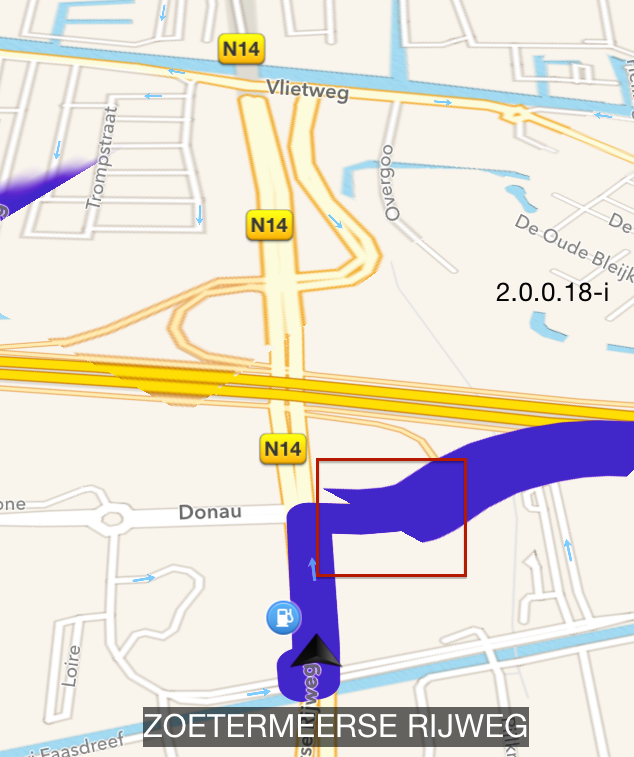
编辑
正如Matt建议的那样,我创建了MKPolylineRenderer的子类并实现了drawMapRect方法,如下所示:
-(void)drawMapRect:(MKMapRect)mapRect zoomScale:(MKZoomScale)zoomScale inContext:(CGContextRef)context{


    CGMutablePathRef fullPath = CGPathCreateMutable();
    BOOL pathIsEmpty = YES;

    //merging all the points as entire path
    for (int i=0;i< self.polyline.pointCount;i++){
        CGPoint point = [self pointForMapPoint:self.polyline.points[i]];
        if (pathIsEmpty){
            CGPathMoveToPoint(fullPath, nil, point.x, point.y);
            pathIsEmpty = NO;
        } else {
            CGPathAddLineToPoint(fullPath, nil, point.x, point.y);
        }
    }

    //get bounding box out of entire path.
    CGRect pointsRect = CGPathGetBoundingBox(fullPath);
    CGRect mapRectCG = [self rectForMapRect:mapRect];
    //stop any drawing logic, cuz there is no path in current rect.
    if (!CGRectIntersectsRect(pointsRect, mapRectCG))return;

    UIColor *darker = [UIColor blackColor];
    CGFloat baseWidth = 10 / zoomScale;

    // draw the dark colour thicker
    CGContextAddPath(context, self.path);
    CGContextSetStrokeColorWithColor(context, darker.CGColor);
    CGContextSetLineWidth(context, baseWidth * 1.5);
    CGContextSetLineCap(context, self.lineCap);
    CGContextStrokePath(context);

    // now draw the stroke color with the regular width
    CGContextAddPath(context, self.path);
    CGContextSetStrokeColorWithColor(context, [UIColor redColor].CGColor);
    CGContextSetLineWidth(context, baseWidth);
    CGContextSetLineCap(context, self.lineCap);
    CGContextStrokePath(context);

    [super drawMapRect:mapRect zoomScale:zoomScale inContext:context];
}但同样的问题见下图:
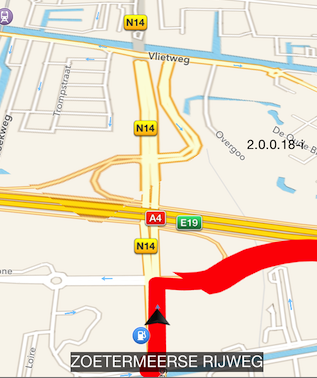
好的,我想我有问题了,我的折线被添加了一次,但是由于用户的速度我改变了MKMapView的缩放级别,缩放级别改变了,但是折线宽度没有刷新,
那么如何动态地改变mkpolyline ??的lineWidth呢?
回答 3
Stack Overflow用户
发布于 2014-11-10 14:37:21
问题是,您将lineWidth设置为固定宽度(非常大的固定宽度)。这会随着地图的缩放而变大或变小。
相反,实现您自己的MKOverlayRenderer子类,并重写drawMapRect:zoomScale:inContext:。它接收到一个zoomScale参数,因此您可以调整行的宽度,以使其看起来更好地适应当前的比例。
Stack Overflow用户
发布于 2015-08-24 13:42:59
子类MKPolylineRenderer和重写applyStrokePropertiesToContext:atZoomScale:,使其忽略缩放,并以恒定宽度绘制线条:
@interface ConstantWidthPolylineRenderer : MKPolylineRenderer
@end

@implementation ConstantWidthPolylineRenderer

- (void)applyStrokePropertiesToContext:(CGContextRef)context
                           atZoomScale:(MKZoomScale)zoomScale
{
    [super applyStrokePropertiesToContext:context atZoomScale:zoomScale];
    CGContextSetLineWidth(context, self.lineWidth);
}

@end
现在使用它并欣赏它平滑的渲染:
- (MKOverlayRenderer *)mapView:(MKMapView *)mapView rendererForOverlay:(id<MKOverlay>)overlay
{
    MKPolyline *polyline = (MKPolyline *)overlay;
    ConstantWidthPolylineRenderer *renderer = [[ConstantWidthPolylineRenderer alloc] initWithPolyline:polyline];
    renderer.strokeColor = [UIColor redColor];
    renderer.lineWidth = 40;
    return renderer;
}Stack Overflow用户
发布于 2014-11-10 14:27:08
您需要使用MKPolylineRenderer而不是MKPolylineView
- (MKOverlayRenderer *)mapView:(MKMapView *)mapView rendererForOverlay:(id < MKOverlay >)overlay {
    @try {

        MKPolylineRenderer *renderer = [[[MKPolylineRenderer alloc] initWithOverlay:overlay];
        renderer.lineWidth = 27.0;
        renderer.strokeColor = [UIColor colorWithRed:55.0/255.0 green:168.0/255.0 blue:219.0/255.0 alpha:1];

        return renderer;
    }
    @catch (NSException *exception) {
        NSLog(@"exception :%@",exception.debugDescription);
    }
}
读这一篇:
MKPolylineRenderer类提供了MKPolyline覆盖对象的可视化表示形式。这个渲染器只画线;它不填充。您可以通过修改从父类继承的属性来更改多边形的颜色和其他绘图属性。您通常按原样使用这个类,而不对它进行子类处理。
MKPolylineView类为MKPolyline注释对象提供可视化表示。此视图笔画注释所表示的路径。(本类不填充路径所包围的区域。)您可以通过修改从MKOverlayPathView类继承的属性来更改路径的颜色和其他绘图属性。这个类通常按原样使用,而不是子类。
https://stackoverflow.com/questions/26845883
复制相似问题
腾讯云开发者

Copyright © 2013 - 2026 Tencent Cloud. All Rights Reserved. 腾讯云 版权所有
深圳市腾讯计算机系统有限公司 ICP备案/许可证号:粤B2-20090059  粤公网安备44030502008569号
腾讯云计算(北京)有限责任公司 京ICP证150476号 | 京ICP备11018762号