
如何在InternetExplorer对象中格式化表?
如何在InternetExplorer对象中格式化表?
提问于 2014-11-05 14:53:52
我正在寻找一些关于我编写的脚本的输出格式的帮助。脚本工作,但我的问题是关于输出结果。
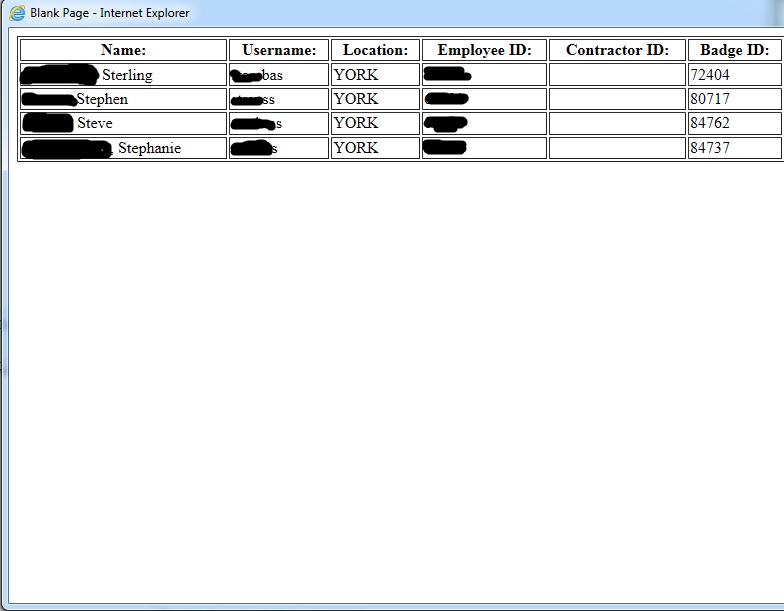
有了这个脚本,我让它从AD中获取数据,并将结果输出到objIE表单中。我这么做是为了让信息看起来很整洁。我的问题是如何将HTML编码到VBScript (而不是VBS到HTML中)。下面有一个结果的图片,但不确定我如何进行风格编辑(下图)。
这是我的密码:
Call FindPCsThatUserLoggedInto

Sub FindPCsThatUserLoggedInto()
  'Get name to search for
  strUser = InputBox("Please Enter User's First Name")

  If strUser <> "" Then
    strLast = InputBox("Please Enter User's Last Name")

    If strLast <> "" Then
      'Set location parameter
      strLocation = ("Location")

      'Set AD Constant
      Const ADS_SCOPE_SUBTREE = 2

      'Create objects
      Set objConnection = CreateObject("ADODB.Connection")
      Set objCommand = CreateObject("ADODB.Command")

      'Open Active Directory
      objConnection.Provider = "ADsDSOObject"
      objConnection.Open "Active Directory Provider"

      'Set Active Directory connection object
      Set objCommand.ActiveConnection = objConnection

      ' Set AD Command properties
      objCommand.Properties("Page Size") = 1000
      objCommand.Properties("Searchscope") = ADS_SCOPE_SUBTREE

      'Begin building HTML string headers
      s = "<table style = ""width:100%"" border = ""1""><tr><th>Name:</th><th>Username:</th><th>Location:</th><th>Employee ID:</th><th>Contractor ID:</th><th>Badge ID:</th></tr>"

      'Issue AD command
      objCommand.CommandText = "SELECT ADSPath FROM 'LDAP://dc=,dc=,dc=com' WHERE givenName = '" & strUser & "*' AND sn = '" & strLast & "*' And physicalDeliveryOfficeName = '" & strLocation & "'"

      'Set RecordSet object to results
      Set objRecordSet = objCommand.Execute

      'Make sure there are records returned
      If objRecordSet.Recordcount > 0 Then
        'Point to first record
        objRecordSet.MoveFirst

        'Loop through all records
        Do Until objRecordSet.EOF
          'Set user object
          Set objUser = GetObject(objRecordSet.Fields("ADSPath").Value)

          'Create temporary user string of the user name reversed twice
          strUser = strReverse(objUser.samaccountname) & strReverse(objUser.samaccountname)

          'Create temporary badge # reversed twice
          strBadge = strReverse(objUser.BadgeID) & strReverse(objUser.BadgeID)

          'Create TEMPID interlacing the first 5 characters of the two temp strings
          strTEMPID = MID(strUser,1,1)&MID(strBadge,1,1)&MID(strUser,2,1)&MID(strBadge,2,1)&MID(strUser,3,1)&MID(strBadge,3,1)&MID(strUser,4,1)&MID(strBadge,4,1)&MID(strUser,5,1)&MID(strBadge,5,1)

          'Populate HTML table with results
          s = s & "<tr><td>" & objUser.DisplayName & "</td><td>" & objUser.samaccountname & "</td><td>" & objUser.physicalDeliveryOfficeName & "</td><td>" & objUser.EmployeeNumber & "</td><td>" & objUser.ContractorID & "</td><td>" & objUser.BadgeID & "</td><td>"

          'Move to next record
          objRecordSet.MoveNext
        Loop

        'Finish HTML string
        s = s & "</table>"

        'Create IE object and assign our HTML string to the body
        Set objIE = CreateObject("InternetExplorer.Application")
        objIE.Navigate("about:blank")
        objIE.ToolBar = 0
        objIE.StatusBar = 0
        Set objDoc = objIE.Document.Body
        objDoc.InnerHTML = s
        objIE.Visible = True
      Else
        'Inform user of no records
        MsgBox "No users matching that criteria exist in AD."
      End If
    End If
  End If
End Sub
结果如下:
下面是我希望输出的样子:
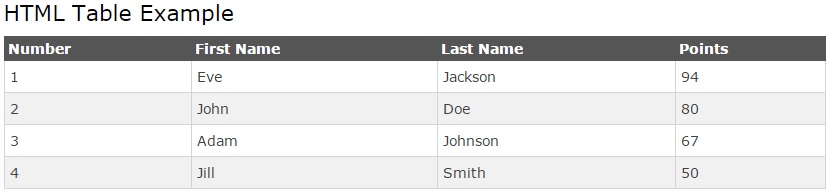
我知道创建这个的HTML代码--我只是不确定如何将HTML代码放在VBScript中以使其输出。
回答 1
Stack Overflow用户
回答已采纳
发布于 2014-11-05 17:54:52
您通常通过HTML中的CSS进行这种格式设置。使用InternetExplorer.Application对象,您可以定义如下样式表:
Set objIE = CreateObject("InternetExplorer.Application")
objIE.Navigate "about:blank"
...

Set css = objIE.Document.CreateStyleSheet
css.AddRule "table", "border: 1px solid lightgray; border-collapse: collapse;"
css.AddRule "th", "color: black; background-color: white; font-weight: bold;"
css.AddRule "th, td", "border: 1px solid lightgray;"
css.AddRule "tr:nth-child(odd)", "background-color: lightgray;"
css.AddRule "tr:nth-child(even)", "background-color: white;"

...:nth-child伪类允许您在偶数行和奇数行之间交替行颜色。
页面原文内容由Stack Overflow提供。腾讯云小微IT领域专用引擎提供翻译支持
原文链接:
https://stackoverflow.com/questions/26760137
复制相关文章
相似问题
腾讯云开发者

Copyright © 2013 - 2026 Tencent Cloud. All Rights Reserved. 腾讯云 版权所有
深圳市腾讯计算机系统有限公司 ICP备案/许可证号:粤B2-20090059  粤公网安备44030502008569号
腾讯云计算(北京)有限责任公司 京ICP证150476号 | 京ICP备11018762号