
JTextArea不能正确地使用JTextArea
在Java中,我目前正在创建一个登录/注册程序(希望在将来扩展它),但遇到了一个问题。
我试图使文本出现在屏幕上的动画类型作家风格的方式。
当我运行这个类的main方法时,文本显示得很好,当我在键监听器中运行它时,它会失败,等待文本出现,然后更新框架,这样我就可以看到它。
源代码如下:
Login.class
public class Login implements KeyListener {

int BACK_WIDTH = java.awt.Toolkit.getDefaultToolkit().getScreenSize().width;
int BACK_HEIGHT = java.awt.Toolkit.getDefaultToolkit().getScreenSize().height;

JFrame back_frame = new JFrame();

LoginTerminal login = new LoginTerminal();

public Login() {
    back_frame.setSize(BACK_WIDTH, BACK_HEIGHT);
    back_frame.setLocation(0, 0);
    back_frame.getContentPane().setBackground(Color.BLACK);
    back_frame.setUndecorated(true);
    //back_frame.setVisible(true);

    back_frame.addKeyListener(this);
    login.addKeyListener(this);
    login.setLocationRelativeTo(null);
    login.setVisible(true);
    login.field.addKeyListener(this);

    login.slowPrint("Please login to continue...\n"
               + "Type 'help' for more information.\n");
}

public void keyPressed(KeyEvent e) {
    int i = e.getKeyCode();

    if(i == KeyEvent.VK_ESCAPE) {
        System.exit(0);
    }

    if(i == KeyEvent.VK_ENTER) {
        login.slowPrint("\nCommands\n"
                 + "-----------\n"
                 + "register\n"
                 + "login\n");
    }
}

public void keyReleased(KeyEvent e) {}

public void keyTyped(KeyEvent e) {}

}
LoginTerminal.class
public class LoginTerminal implements KeyListener {

CustomFrame frame = new CustomFrame(Types.TERMINAL);

JTextArea log = new JTextArea();
public JTextField field = new JTextField();

public void setVisible(boolean bool) {
    frame.setVisible(bool);
}

public void addKeyListener(KeyListener listener) {
    frame.addKeyListener(listener);
}

public void slowPrint(String str) {
    for(int i = 0; i < str.length(); i++) {
        log.append("" + str.charAt(i));

        try {
            Thread.sleep(50);
        } catch (InterruptedException e) {
            e.printStackTrace();
        }

        if (i == str.length() - 1) {
            log.append("\n");
        }
    }
}

public void setLocation(int x, int y) {
    frame.setLocation(x, y);
}

public void setLocationRelativeTo(Component c) {
    frame.setLocationRelativeTo(c);
}

public LoginTerminal() {
    try {

        InputStream is = LoginTerminal.class.getResourceAsStream("/fonts/dungeon.TTF");
        Font font = Font.createFont(Font.TRUETYPE_FONT, is);
        font = font.deriveFont(Font.PLAIN, 10);

        frame.add(field);
        frame.add(log);

        log.setBackground(Color.BLACK);
        log.setForeground(Color.WHITE);
        log.setWrapStyleWord(true);
        log.setLineWrap(true);
        log.setBounds(4, 20 + 4, frame.getWidth() - 8, frame.getHeight() - 50);
        log.setFont(font);
        log.setEditable(false);
        log.setCaretColor(Color.BLACK);

        field.setBackground(Color.BLACK);
        field.setForeground(Color.WHITE);
        field.setBounds(2, frame.getHeight() - 23, frame.getWidth() - 5, 20);
        field.setFont(font);
        field.setCaretColor(Color.BLACK);
        field.addKeyListener(this);
        field.setText("  >  ");

    } catch (FontFormatException e) {
        e.printStackTrace();
    } catch (IOException e) {
        e.printStackTrace();
    }
}

public void dumpToLog() {
    log.append(field.getText() + "\n");
    field.setText("  >  ");
}

public void keyPressed(KeyEvent e) {
    int i = e.getKeyCode();

    if(i == KeyEvent.VK_ENTER && field.isFocusOwner()) {
        if(field.getText().equals("  >  HELP") || field.getText().equals("  >  help")) {
            dumpToLog();


        } else {
            dumpToLog();
        }
    }


    if(!field.getText().startsWith("  >  ")) {
        field.setText("  >  ");
    }
}

public void keyReleased(KeyEvent e) {}
public void keyTyped(KeyEvent e) {}

}
Main.class
public class Main {

    public static void main(String[] args) {
        new Login();
    }

}
我的问题是:
public Login() {
    login.slowPrint("Please login to continue...\n"
               + "Type 'help' for more information.\n");
}
当我运行它时,它会像预期的那样工作。
下面是同一个类(Login.class)中的
public void keyPressed(KeyEvent e) {
    int i = e.getKeyCode();

    if(i == KeyEvent.VK_ENTER) {
        login.slowPrint("\nCommands\n"
                 + "-----------\n"
                 + "register\n"
                 + "login\n");
    }
}
它会结冰,等待完成。
我认为可能是Thread.sleep(50);在LoginTerminal.class中,标题声明是因为这是触发输入动画的原因。
希望我在这里说得很清楚。谢谢大家的帮助!
编辑
这就是造成计时器错误的原因..。
public void timerPrint(String text) {
Timer timer = new Timer(50, new ActionListener() {
    @Override
    public void actionPerformed(ActionEvent e) {
        if (index < text.length() - 1 && index >= 0) {
            String newChar = Character.toString(text.charAt(index));
            textArea.append(newChar);
            index++;
        } else {
            textArea.setText(null);
            index = 0;
           // You could stop the timer here...
        }
   }
});
timer.start();
}
构造器计时器(int,新的ActionListener(){})是未定义的
编辑编辑,整个类:
package com.finn.frametypes;

import java.awt.Color;
import java.awt.Component;
import java.awt.Font;
import java.awt.FontFormatException;
import java.awt.event.KeyEvent;
import java.awt.event.KeyListener;
import java.awt.event.ActionEvent;
import java.io.IOException;
import java.io.InputStream;

import javax.swing.JTextArea;
import javax.swing.JTextField;
import javax.swing.Timer;

import com.finn.gui.CustomFrame;
import com.finn.gui.Types;

public class LoginTerminal implements KeyListener {

CustomFrame frame = new CustomFrame(Types.TERMINAL);

JTextArea log = new JTextArea();
public JTextField field = new JTextField();

public void setVisible(boolean bool) {
    frame.setVisible(bool);
}

public void addKeyListener(KeyListener listener) {
    frame.addKeyListener(listener);
}
public void timerPrint(String text) {
Timer timer = new Timer(50, new ActionListener() {
    @Override
    public void actionPerformed(ActionEvent e) {
        if (index < text.length() - 1 && index >= 0) {
            String newChar = Character.toString(text.charAt(index));
            textArea.append(newChar);
            index++;
        } else {
            textArea.setText(null);
            index = 0;
           // You could stop the timer here...
        }
   }
});
timer.start();
}

public void slowPrint(String str) {
    for(int i = 0; i < str.length(); i++) {
        log.append("" + str.charAt(i));

        try {
            Thread.sleep(50);
        } catch (InterruptedException e) {
            e.printStackTrace();
        }

        if (i == str.length() - 1) {
            log.append("\n");
        }
    }
}

public void setLocation(int x, int y) {
    frame.setLocation(x, y);
}

public void setLocationRelativeTo(Component c) {
    frame.setLocationRelativeTo(c);
}

public LoginTerminal() {
    try {

        InputStream is = LoginTerminal.class.getResourceAsStream("/fonts/dungeon.TTF");
        Font font = Font.createFont(Font.TRUETYPE_FONT, is);
        font = font.deriveFont(Font.PLAIN, 10);

        frame.add(field);
        frame.add(log);

        log.setBackground(Color.BLACK);
        log.setForeground(Color.WHITE);
        log.setWrapStyleWord(true);
        log.setLineWrap(true);
        log.setBounds(4, 20 + 4, frame.getWidth() - 8, frame.getHeight() - 50);
        log.setFont(font);
        log.setEditable(false);
        log.setCaretColor(Color.BLACK);

        field.setBackground(Color.BLACK);
        field.setForeground(Color.WHITE);
        field.setBounds(2, frame.getHeight() - 23, frame.getWidth() - 5, 20);
        field.setFont(font);
        field.setCaretColor(Color.BLACK);
        field.addKeyListener(this);
        field.setText("  >  ");

    } catch (FontFormatException e) {
        e.printStackTrace();
    } catch (IOException e) {
        e.printStackTrace();
    }
}

public void dumpToLog() {
    log.append(field.getText() + "\n");
    field.setText("  >  ");
}

public void keyPressed(KeyEvent e) {
    int i = e.getKeyCode();

    if(i == KeyEvent.VK_ENTER && field.isFocusOwner()) {
        if(field.getText().equals("  >  HELP") || field.getText().equals("  >  help")) {
            dumpToLog();


        } else {
            dumpToLog();
        }
    }


    if(!field.getText().startsWith("  >  ")) {
        field.setText("  >  ");
    }
}

public void keyReleased(KeyEvent e) {}
public void keyTyped(KeyEvent e) {}

}
答案
如果将来有人会阅读这些内容,并且希望在Java中使用慢打印,请使用以下内容:
int index;

public void timerPrint(final String text) {
    Timer timer = new Timer(50, new ActionListener() {
        public void actionPerformed(ActionEvent e) {
            if (index < text.length() - 1 && index >= 0) {
                String newChar = Character.toString(text.charAt(index));
                textarea.append(newChar);
                index++;
            } else {
                index = 0;
                ((Timer)e.getSource()).stop();
            }
       }
    });
    timer.start();
}回答 1
Stack Overflow用户
发布于 2014-11-05 10:23:41
Swing是一个单线程框架,也就是说,任何阻塞事件分派线程的内容都会阻止UI被更新,或者阻止您的程序响应新线程
有关更多详细信息,请参阅在Swing中并发。
您不应该在EDT中执行任何阻塞(Thread.sleep)或长时间运行的进程。
Swing也不是线程安全的,这意味着您永远不应该从EDT上下文之外更新UI。
这让你陷入一个难题..。
幸运的是,还有其他选择。对于您的情况,最简单的解决方案可能是使用Swing Timer,它可以用来安排定期回调到EDT,在那里您可以执行更新。
有关更多细节,请参见如何使用摆动计时器
例如..。
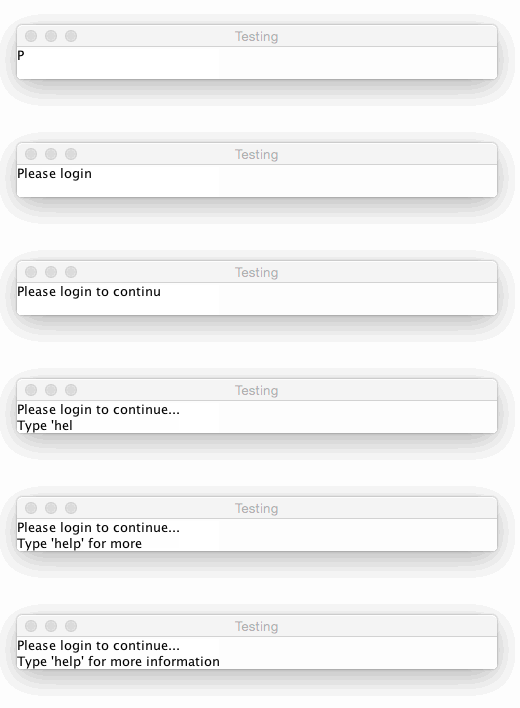
import java.awt.BorderLayout;
import java.awt.EventQueue;
import java.awt.event.ActionEvent;
import java.awt.event.ActionListener;
import javax.swing.JFrame;
import javax.swing.JPanel;
import javax.swing.JTextArea;
import javax.swing.Timer;
import javax.swing.UIManager;
import javax.swing.UnsupportedLookAndFeelException;

public class ScrollingText100 {

    public static void main(String[] args) {
        new ScrollingText100();
    }

    public ScrollingText100() {
        EventQueue.invokeLater(new Runnable() {
            @Override
            public void run() {
                try {
                    UIManager.setLookAndFeel(UIManager.getSystemLookAndFeelClassName());
                } catch (ClassNotFoundException | InstantiationException | IllegalAccessException | UnsupportedLookAndFeelException ex) {
                    ex.printStackTrace();
                }

                JFrame frame = new JFrame("Testing");
                frame.setDefaultCloseOperation(JFrame.EXIT_ON_CLOSE);
                frame.add(new TestPane());
                frame.pack();
                frame.setLocationRelativeTo(null);
                frame.setVisible(true);
            }
        });
    }

    public class TestPane extends JPanel {

        private String text;
        private int index;
        private JTextArea textArea;

        public TestPane() {
            setLayout(new BorderLayout());
            textArea = new JTextArea(2, 40);
            add(textArea);

            text = "Please login to continue...\n" + "Type 'help' for more information.\n";
            Timer timer = new Timer(50, new ActionListener() {
                @Override
                public void actionPerformed(ActionEvent e) {
                    if (index < text.length() - 1 && index >= 0) {
                        String newChar = Character.toString(text.charAt(index));
                        textArea.append(newChar);
                        index++;
                    } else {
                        textArea.setText(null);
                        index = 0;
                        // You could stop the timer here...
                    }
                }
            });
            timer.start();
        }

    }

}
更新的
如果我能正确理解你的要求,就像这样.
import java.awt.BorderLayout;
import java.awt.Color;
import java.awt.EventQueue;
import java.awt.event.ActionEvent;
import java.awt.event.ActionListener;
import javax.swing.JFrame;
import javax.swing.JScrollPane;

import javax.swing.JTextArea;
import javax.swing.JTextField;
import javax.swing.Timer;
import javax.swing.UIManager;
import javax.swing.UnsupportedLookAndFeelException;

public class LoginTerminal {

    private JTextArea log = new JTextArea(20, 40);
    private JTextField field = new JTextField();

    private int index;
    private StringBuilder textToDisplay;
    private Timer timer;

    public static void main(String[] args) {
        new LoginTerminal();
    }

    public LoginTerminal() {
        EventQueue.invokeLater(new Runnable() {
            @Override
            public void run() {
                try {
                    UIManager.setLookAndFeel(UIManager.getSystemLookAndFeelClassName());
                } catch (ClassNotFoundException | InstantiationException | IllegalAccessException | UnsupportedLookAndFeelException ex) {
                    ex.printStackTrace();
                }

                textToDisplay = new StringBuilder(128);
                timer = new Timer(50, new ActionListener() {
                    @Override
                    public void actionPerformed(ActionEvent e) {
                        if (textToDisplay.length() > 0) {
                            String newChar = Character.toString(textToDisplay.charAt(0));
                            textToDisplay.delete(0, 1);
                            log.append(newChar);
                        } else {
                            ((Timer) e.getSource()).stop();
                        }
                    }
                });

                JFrame frame = new JFrame("Testing");
                frame.setDefaultCloseOperation(JFrame.EXIT_ON_CLOSE);

                frame.add(field, BorderLayout.NORTH);
                frame.add(new JScrollPane(log));

                log.setBackground(Color.BLACK);
                log.setForeground(Color.WHITE);
                log.setWrapStyleWord(true);
                log.setLineWrap(true);
                log.setEditable(false);
                log.setCaretColor(Color.BLACK);

                field.setBackground(Color.BLACK);
                field.setForeground(Color.WHITE);
                field.setCaretColor(Color.BLACK);
                field.addActionListener(new ActionListener() {
                    @Override
                    public void actionPerformed(ActionEvent e) {
                        if ("  >  HELP".equalsIgnoreCase(field.getText())) {
                            dumpToLog();
                        } else {
                            dumpToLog();
                        }
                    }
                });
                field.setText("  >  ");

                frame.pack();
                frame.setLocationRelativeTo(null);
                frame.setVisible(true);
            }
        });
    }

    public void timerPrint(String text) {

        textToDisplay.append(text).append("\n");
        if (!timer.isRunning()) {
            timer.start();
        }
    }

    public void slowPrint(String str) {
        for (int i = 0; i < str.length(); i++) {
            log.append("" + str.charAt(i));

            try {
                Thread.sleep(50);
            } catch (InterruptedException e) {
                e.printStackTrace();
            }

            if (i == str.length() - 1) {
                log.append("\n");
            }
        }
    }

    public void dumpToLog() {
        timerPrint(field.getText());
    }

}
可能是你真正想要的。
注意,KeyListener不是JTextComponent的好选择,在这种情况下,ActionListener是一个更好的选择。
https://stackoverflow.com/questions/26754146
复制相似问题
腾讯云开发者

Copyright © 2013 - 2026 Tencent Cloud. All Rights Reserved. 腾讯云 版权所有
深圳市腾讯计算机系统有限公司 ICP备案/许可证号:粤B2-20090059  粤公网安备44030502008569号
腾讯云计算(北京)有限责任公司 京ICP证150476号 | 京ICP备11018762号