
是否有一种方法可以在IDE中显示用户表单而不是主机应用程序?
是否有一种方法可以在IDE中显示用户表单而不是主机应用程序?
提问于 2014-11-03 20:07:00
我在一个*.xlam外接程序中创建了一个用户表单,并在IDE中创建了一个新的命令栏和按钮,但是当我单击该按钮时,用户表单将在Excel中打开,焦点将被迫从IDE中移开。是否有一种方法可以在IDE中打开用户表单而不是主机应用程序,而不必求助于.Net COM外接程序?
下面是创建命令栏和按钮并处理按钮单击事件的代码。
Option Explicit

Public WithEvents cmdBarEvents As VBIDE.CommandBarEvents

Private Sub Class_Initialize()
    CreateCommandBar
End Sub

Private Sub Class_Terminate()
    Application.VBE.CommandBars("VBIDE").Delete
End Sub

Private Sub CreateCommandBar()

    Dim bar As CommandBar
    Set bar = Application.VBE.CommandBars.Add("VBIDE", MsoBarPosition.msoBarFloating, False, True)
    bar.Visible = True

    Dim btn As CommandBarButton
    Set btn = bar.Controls.Add(msoControlButton, , , , True)
    btn.Caption = "Show Form"
    btn.OnAction = "ShowForm"
    btn.FaceId = 59

    Set cmdBarEvents = Application.VBE.Events.CommandBarEvents(btn)

End Sub

Private Sub cmdBarEvents_Click(ByVal CommandBarControl As Object, handled As Boolean, CancelDefault As Boolean)

    CallByName Me, CommandBarControl.OnAction, VbMethod

End Sub

Public Sub ShowForm()
    Dim frm As New UserForm1
    frm.Show
End Sub
你可能需要这行代码来删除命令栏..。
Application.VBE.CommandBars("VBIDE").Delete回答 1
Stack Overflow用户
回答已采纳
发布于 2014-11-03 21:56:40
这是另一种选择。
在用户表单上放置一个按钮。为了演示的目的,我使用这个
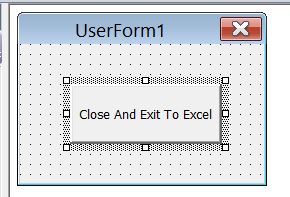
接下来,将此代码放入userform中。
Private Sub CommandButton1_Click()
    Unload Me
    Application.Visible = True
End Sub
接下来将其粘贴到类模块的顶部。
Private Declare Function FindWindow Lib "user32" Alias "FindWindowA" _
(ByVal lpClassName As String, ByVal lpWindowName As String) As Long
Dim Ret As Long, ChildRet As Long

Private Declare Function SetWindowPos Lib "user32" (ByVal hwnd As Long, _
ByVal hWndInsertAfter As Long, ByVal x As Long, ByVal y As Long, _
ByVal cx As Long, ByVal cy As Long, ByVal wFlags As Long) As Long

Private Const HWND_TOPMOST = -1
Private Const SWP_NOACTIVATE = &H10
Private Const SWP_SHOWWINDOW = &H40最后,将Sub ShowForm()更改为
Public Sub ShowForm()
    Dim frm As New UserForm1
    Dim Ret As Long

    frm.Show vbModeless

    Application.Visible = False

    Ret = FindWindow("ThunderDFrame", frm.Caption)

    SetWindowPos Ret, HWND_TOPMOST, 100, 100, 250, 200, _
    SWP_NOACTIVATE Or SWP_SHOWWINDOW
End Sub
这就是你得到的
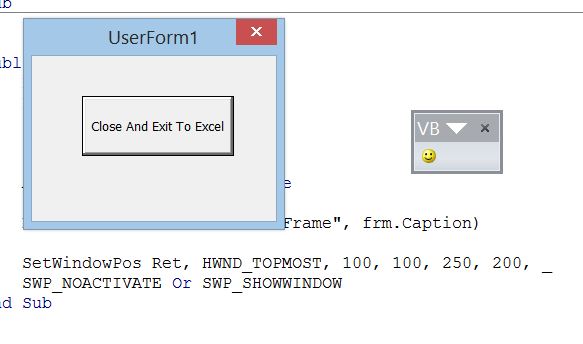
编辑
更多的想法。若要防止用户在单击笑脸时创建更多的用户表单,请将Sub ShowForm()更改为下面的内容。(替代方法是禁用笑脸,并在表单卸载时重新启用它?)
Public Sub ShowForm()
    Dim frm As New UserForm1
    Dim Ret As Long
    Dim formCaption As String

    '~~> Set Userform Caption
    formCaption = "Blah Blah"

    On Error Resume Next
    Ret = FindWindow("ThunderDFrame", formCaption)
    On Error GoTo 0

    '~~> If already there in an instance then exit sub
    If Ret <> 0 Then Exit Sub

    frm.Show vbModeless
    frm.Caption = formCaption

    Application.Visible = False

    Ret = FindWindow("ThunderDFrame", frm.Caption)

    SetWindowPos Ret, HWND_TOPMOST, 100, 100, 250, 200, _
    SWP_NOACTIVATE Or SWP_SHOWWINDOW
End Sub页面原文内容由Stack Overflow提供。腾讯云小微IT领域专用引擎提供翻译支持
原文链接:
https://stackoverflow.com/questions/26722253
复制相关文章
相似问题
腾讯云开发者

Copyright © 2013 - 2026 Tencent Cloud. All Rights Reserved. 腾讯云 版权所有
深圳市腾讯计算机系统有限公司 ICP备案/许可证号:粤B2-20090059  粤公网安备44030502008569号
腾讯云计算(北京)有限责任公司 京ICP证150476号 | 京ICP备11018762号