
斯威夫特TableViewController reuseIdentifier从不起作用
我在Swift工作,用一个带有一个原型单元的TableViewController。单元格具有在情节提要中指定的重用标识符,但它从不正确地排队列。我总是得到“意外发现为零,而展开一个可选的值”错误。
我正确地注册了这门课程如下:
self.tableView.registerClass(UITableViewCell.self, forCellReuseIdentifier: "myNewCell")违规代码是:
override func tableView(tableView: UITableView, cellForRowAtIndexPath indexPath: NSIndexPath) -> UITableViewCell
{
    let cell = tableView.dequeueReusableCellWithIdentifier("myNewCell") as UITableViewCell

    let textField = cell.viewWithTag(123) as UITextField
    textField.text = "test"

    return cell
}
我觉得我已经尝试过这里的一切,但它从来没有正确地给出一个带有标识符的单元格。即使使用回退(如果为零,则创建一个带有该标识符的单元格)仍然会出现错误。它显然很难获得一个带有标识符的单元格,但是它已经注册并指定在情节提要中.任何帮助都是非常感谢的!
回答 2
Stack Overflow用户
发布于 2014-10-31 17:16:21
使用单元格原型时,不调用registerClass。故事板为你做的。如果单元原型指定了它的标识符,那么只需要所有的dequeueReusableCellWithIdentifier,它就可以在没有事故的情况下找到您的单元原型。
我建议检查故事板中标识符的拼写/大写,并确保它与cellForRowAtIndexPath代码中使用的内容相同。
我注意到您正在尝试使用标签号访问一个单元格的标签。现在,在处理自定义单元格布局时,我们通常会创建自己的表视图子类,例如:
//  CustomTableViewCell.swift

import UIKit

class CustomTableViewCell: UITableViewCell {

    @IBOutlet weak var customTextField: UITextField!    // note, I would use something other than textLabel to avoid confusion with base class

}
然后,我们将转到单元原型并指定它的基类:
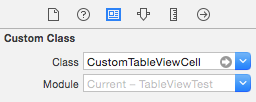
我们还设置了单元原型的标识符:
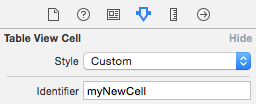
然后,我们将单元原型和自定义类@IBOutlet之间的出口连接起来。
在完成了所有这些之后,cellForRowAtIndexPath将是:
override func tableView(tableView: UITableView, cellForRowAtIndexPath indexPath: NSIndexPath) -> UITableViewCell {
    let cell = tableView.dequeueReusableCellWithIdentifier("myNewCell", forIndexPath: indexPath) as CustomTableViewCell

    cell.customTextField.text = "Row \(indexPath.row)"

    return cell
}Stack Overflow用户
发布于 2014-10-31 17:34:09
如果dequeueReusableCellWithIdentifier给您带来了问题,那么就不要使用它。
override func tableView(tableView: UITableView, cellForRowAtIndexPath indexPath: NSIndexPath) -> UITableViewCell
{
let cell = UITableViewCell()

let textField = cell.viewWithTag(123) as UITextField
textField.text = "test"

return cell
}https://stackoverflow.com/questions/26679554
复制相似问题
腾讯云开发者

Copyright © 2013 - 2026 Tencent Cloud. All Rights Reserved. 腾讯云 版权所有
深圳市腾讯计算机系统有限公司 ICP备案/许可证号:粤B2-20090059  粤公网安备44030502008569号
腾讯云计算(北京)有限责任公司 京ICP证150476号 | 京ICP备11018762号