
飞到Appbar后面
飞到Appbar后面
提问于 2014-10-31 15:09:02
当您希望应用程序扩展到全屏(包括状态栏和应用程序栏)时,您必须这样做:
var applicationView = Windows.UI.ViewManagement.ApplicationView.GetForCurrentView();
applicationView.SetDesiredBoundsMode(Windows.UI.ViewManagement.ApplicationViewBoundsMode.UseCoreWindow);
然后,如果您想在应用程序中的任何地方或应用程序中的任何地方进行飞出,它们将显示在appbar后面:
    <Page.BottomAppBar>
        <CommandBar>
            <AppBarButton Icon="Preview" Label="Preview">
                <AppBarButton.Flyout>
                    <MenuFlyout>
                        <MenuFlyoutItem Text="Fit width" />
                        <MenuFlyoutItem Text="Fit height" />
                        <MenuFlyoutItem Text="Fit page" />
                    </MenuFlyout>
                </AppBarButton.Flyout>
            </AppBarButton>
        </CommandBar>
    </Page.BottomAppBar>
结果:
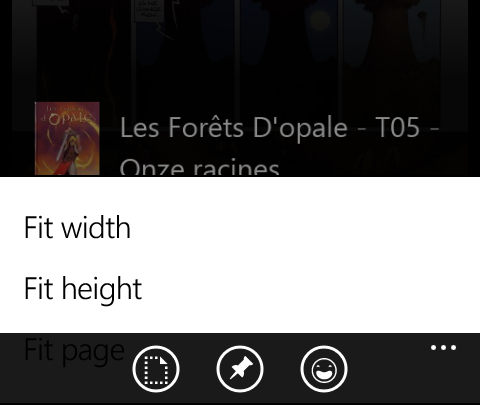
在列表视图中的项目上,也会出现同样的情况。它们将显示在应用程序栏后面:
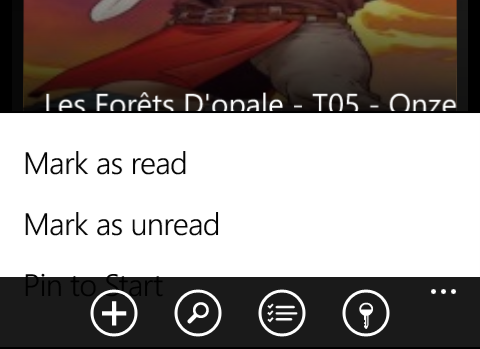
如何在应用程序的顶部显示闪光灯?
回答 1
Stack Overflow用户
回答已采纳
发布于 2014-11-06 10:19:59
我似乎不能解决我的问题(或谁可以帮助)。所以我就这么做了,如果它能帮到某人:
<Page.BottomAppBar>
        <CommandBar>
            <AppBarButton Icon="Preview" Label="Preview">
                <AppBarButton.Flyout>
                    <MenuFlyout Opened="MenuFlyout_Opened" Closed="MenuFlyout_Closed">
                        <MenuFlyoutItem Text="Fit width" />
                        <MenuFlyoutItem Text="Fit height" />
                        <MenuFlyoutItem Text="Fit page" />
                    </MenuFlyout>
                </AppBarButton.Flyout>
            </AppBarButton>
        </CommandBar>
    </Page.BottomAppBar>

private void MenuFlyout_Opened(object sender, object e)
{
  BottomAppBar.Visibility = Windows.UI.Xaml.Visibility.Collapsed;
}

private void MenuFlyout_Closed(object sender, object e)
{
  BottomAppBar.Visibility = Windows.UI.Xaml.Visibility.Visible;
}
现在,我的飞出完全出现了,因为没有更多的应用程序。对于mvvm列表视图项,我是在行为操作中这样做的:
<DataTemplate x:Key="MvvmItemTemplate">
        <Grid>

            <i:Interaction.Behaviors>
                <icore:EventTriggerBehavior EventName="Holding">
                    <local:OpenFlyoutAction />
                </icore:EventTriggerBehavior>
            </i:Interaction.Behaviors>

            <FlyoutBase.AttachedFlyout>
                <MenuFlyout>
                    <MenuFlyoutItem ..... Command="{Binding MarkRead}" />
                    <MenuFlyoutItem ..... Command="{Binding MarkUnread}" />
                    <MenuFlyoutItem ..... Command="{Binding PinToStart}" />
                </MenuFlyout>
            </FlyoutBase.AttachedFlyout>
        </Grid>
    </DataTemplate>


public class OpenFlyoutAction : DependencyObject, IAction
    {
        public object Execute(object sender, object parameter)
        {
            // Show menu
            FlyoutBase.ShowAttachedFlyout((FrameworkElement)sender);

            // sometimes the appbar is stuck behind the appbar, so hide the appbar
            (sender as FrameworkElement).GetFirstAncestorOfType<Page>().BottomAppBar.Visibility = Visibility.Collapsed;

            // show the appbar again when flyout is closed
            var flyout = FlyoutBase.GetAttachedFlyout((FrameworkElement)sender);
            EventHandler<object> showBar = null;
            showBar = delegate (object s, object e)
            {
                (sender as FrameworkElement).GetFirstAncestorOfType<Page>().BottomAppBar.Visibility = Visibility.Visible;
                // unsubscribe handler:
                flyout.Closed -= showBar;
            };
            flyout.Closed += showBar;

            return null;
        }
}页面原文内容由Stack Overflow提供。腾讯云小微IT领域专用引擎提供翻译支持
原文链接:
https://stackoverflow.com/questions/26677814
复制相关文章
相似问题
腾讯云开发者

Copyright © 2013 - 2026 Tencent Cloud. All Rights Reserved. 腾讯云 版权所有
深圳市腾讯计算机系统有限公司 ICP备案/许可证号:粤B2-20090059  粤公网安备44030502008569号
腾讯云计算(北京)有限责任公司 京ICP证150476号 | 京ICP备11018762号