
分裂StyledDocument
我目前正在编写一个程序,它接受JTextPane中的样式文本,并且在不可编辑的JTextPane.中显示相同的样式文本,问题是我实际上想解析输入和显示之间的文档。基本上,我希望能够在维护格式的同时将DefaultStyledDocument分解成两个文档。,我该怎么做?
SSCE说明要点:
import java.awt.Color;
import javax.swing.text.DefaultStyledDocument;
import javax.swing.text.SimpleAttributeSet;
import javax.swing.text.StyleConstants;


public class SSCCE extends javax.swing.JFrame {


    public SSCCE() {
        initComponents();
        try {
        DefaultStyledDocument doc = new DefaultStyledDocument();
        SimpleAttributeSet attr = new SimpleAttributeSet();
        StyleConstants.setBold(attr, true);
        doc.insertString(0, "This is bold.\n\n", attr);
        StyleConstants.setItalic(attr, true);
        doc.insertString(doc.getLength() - 1, "This is bold and italicized.\n", attr);
        doc.insertString(doc.getLength() - 1, "--\n", null); //This is a delimeter, for splitting the doucment
        StyleConstants.setBold(attr, false);
        StyleConstants.setForeground(attr, Color.red);
        doc.insertString(doc.getLength() - 1, "This is italicized and red.\n", attr);
        StyleConstants.setBold(attr, true);
        StyleConstants.setItalic(attr, false);
        doc.insertString(doc.getLength() -1 , "This is bold and red.\n", attr);
        txpInput.setDocument(doc); //txpInput is a JTextPane
        } catch (Exception e) {
            e.printStackTrace();
        }

    }

    @SuppressWarnings("unchecked")
    private void initComponents() {

        jScrollPane1 = new javax.swing.JScrollPane();
        jPanel1 = new javax.swing.JPanel();
        jScrollPane2 = new javax.swing.JScrollPane();
        txpInput = new javax.swing.JTextPane();
        jScrollPane3 = new javax.swing.JScrollPane();
        txpOutput1 = new javax.swing.JTextPane();
        jLabel1 = new javax.swing.JLabel();
        btnOutput = new javax.swing.JButton();
        jScrollPane4 = new javax.swing.JScrollPane();
        txpOutput2 = new javax.swing.JTextPane();

        setDefaultCloseOperation(javax.swing.WindowConstants.EXIT_ON_CLOSE);

        jScrollPane2.setViewportView(txpInput);

        txpOutput1.setEditable(false);
        jScrollPane3.setViewportView(txpOutput1);

        jLabel1.setText("Output:");

        btnOutput.setText("Output");
        btnOutput.addActionListener(new java.awt.event.ActionListener() {
            public void actionPerformed(java.awt.event.ActionEvent evt) {
                btnOutputActionPerformed(evt);
            }
        });

        txpOutput2.setEditable(false);
        jScrollPane4.setViewportView(txpOutput2);

        javax.swing.GroupLayout jPanel1Layout = new javax.swing.GroupLayout(jPanel1);
        jPanel1.setLayout(jPanel1Layout);
        jPanel1Layout.setHorizontalGroup(
            jPanel1Layout.createParallelGroup(javax.swing.GroupLayout.Alignment.LEADING)
            .addGroup(jPanel1Layout.createSequentialGroup()
                .addContainerGap()
                .addGroup(jPanel1Layout.createParallelGroup(javax.swing.GroupLayout.Alignment.LEADING)
                    .addComponent(jScrollPane3, javax.swing.GroupLayout.Alignment.TRAILING)
                    .addComponent(jLabel1, javax.swing.GroupLayout.Alignment.TRAILING, javax.swing.GroupLayout.DEFAULT_SIZE, javax.swing.GroupLayout.DEFAULT_SIZE, Short.MAX_VALUE)
                    .addComponent(jScrollPane2)
                    .addGroup(jPanel1Layout.createSequentialGroup()
                        .addComponent(btnOutput, javax.swing.GroupLayout.PREFERRED_SIZE, 174, javax.swing.GroupLayout.PREFERRED_SIZE)
                        .addGap(0, 462, Short.MAX_VALUE))
                    .addComponent(jScrollPane4))
                .addContainerGap())
        );
        jPanel1Layout.setVerticalGroup(
            jPanel1Layout.createParallelGroup(javax.swing.GroupLayout.Alignment.LEADING)
            .addGroup(jPanel1Layout.createSequentialGroup()
                .addContainerGap()
                .addComponent(jScrollPane2, javax.swing.GroupLayout.PREFERRED_SIZE, 105, javax.swing.GroupLayout.PREFERRED_SIZE)
                .addPreferredGap(javax.swing.LayoutStyle.ComponentPlacement.RELATED)
                .addComponent(jLabel1)
                .addPreferredGap(javax.swing.LayoutStyle.ComponentPlacement.RELATED)
                .addComponent(btnOutput)
                .addGap(9, 9, 9)
                .addComponent(jScrollPane3, javax.swing.GroupLayout.PREFERRED_SIZE, 135, javax.swing.GroupLayout.PREFERRED_SIZE)
                .addPreferredGap(javax.swing.LayoutStyle.ComponentPlacement.RELATED)
                .addComponent(jScrollPane4, javax.swing.GroupLayout.PREFERRED_SIZE, 135, javax.swing.GroupLayout.PREFERRED_SIZE)
                .addContainerGap(79, Short.MAX_VALUE))
        );

        jScrollPane1.setViewportView(jPanel1);

        javax.swing.GroupLayout layout = new javax.swing.GroupLayout(getContentPane());
        getContentPane().setLayout(layout);
        layout.setHorizontalGroup(
            layout.createParallelGroup(javax.swing.GroupLayout.Alignment.LEADING)
            .addComponent(jScrollPane1)
        );
        layout.setVerticalGroup(
            layout.createParallelGroup(javax.swing.GroupLayout.Alignment.LEADING)
            .addComponent(jScrollPane1)
        );

        pack();
    }

    private void btnOutputActionPerformed(java.awt.event.ActionEvent evt) {
        //Comment out the body of this method to get code to run
        //This needs to parse the text and output it to the two output JTextPanes
        DefaultStyledDocument inputDoc = (DefaultStyledDocument) txpInput.getDocument();
        DefaultStyledDocument[] output = inputDoc.split("--"); //Invalid, is there an equivalent
        txpOutput1.setDocument(ouput[0]);
        txpOutput2.setDocument(ouput[1]);
        this.validate();
        this.repaint();
    }

    public static void main(String args[]) {
        /* Set the Nimbus look and feel */
        try {
            for (javax.swing.UIManager.LookAndFeelInfo info : javax.swing.UIManager.getInstalledLookAndFeels()) {
                if ("Nimbus".equals(info.getName())) {
                    javax.swing.UIManager.setLookAndFeel(info.getClassName());
                    break;
                }
            }
        } catch (ClassNotFoundException ex) {
            java.util.logging.Logger.getLogger(SSCCE.class.getName()).log(java.util.logging.Level.SEVERE, null, ex);
        } catch (InstantiationException ex) {
            java.util.logging.Logger.getLogger(SSCCE.class.getName()).log(java.util.logging.Level.SEVERE, null, ex);
        } catch (IllegalAccessException ex) {
            java.util.logging.Logger.getLogger(SSCCE.class.getName()).log(java.util.logging.Level.SEVERE, null, ex);
        } catch (javax.swing.UnsupportedLookAndFeelException ex) {
            java.util.logging.Logger.getLogger(SSCCE.class.getName()).log(java.util.logging.Level.SEVERE, null, ex);
        }
        /* Create and display the form */
        java.awt.EventQueue.invokeLater(new Runnable() {
            public void run() {
                new SSCCE().setVisible(true);
            }
        });
    }

    // Variables declaration - do not modify
    private javax.swing.JButton btnOutput;
    private javax.swing.JLabel jLabel1;
    private javax.swing.JPanel jPanel1;
    private javax.swing.JScrollPane jScrollPane1;
    private javax.swing.JScrollPane jScrollPane2;
    private javax.swing.JScrollPane jScrollPane3;
    private javax.swing.JScrollPane jScrollPane4;
    private javax.swing.JTextPane txpInput;
    private javax.swing.JTextPane txpOutput1;
    private javax.swing.JTextPane txpOutput2;
    // End of variables declaration
}
注意:我使用Netbeans构建器,因此生成了长时间的代码。
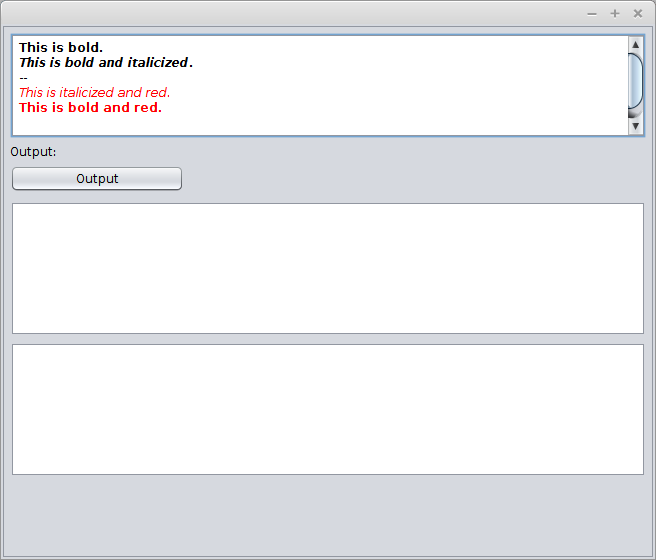
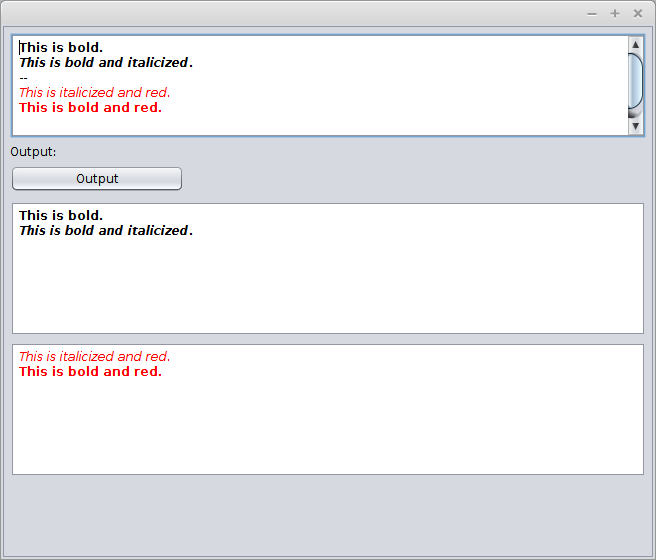
基本上,在这个示例中,我向输入的JTextPane输入一些格式化的文本。然后,我希望能够将格式化的文本拆分到两个输出窗格中,而不会丢失格式。在SCCE中,当用户按下按钮"Output“时,数据应该被复制,由--行拆分。在这个示例中,我使用了一个不存在的split()方法,但我认为它可以理解这一点。
这是预期的输入(对于这个特定的例子):
这是预期的产出:
我最初以为这问题有一个可能的答案。但我试过了却发现它不起作用。最后,如何在维护样式的同时拆分样式文档。
回答 1
Stack Overflow用户
发布于 2014-12-09 12:06:21
从相同的内容源创建两个StyledDocument副本。
找到文档分隔符。
在第一个文档中,删除分隔符之前的所有内容。
在第二个文档中,删除分隔符后的所有内容。
更新:您可以使用代码合并文档,但有2个目标文档,并根据筛选规则将源文档的插入重定向到所需的实例。
https://stackoverflow.com/questions/26644832
复制相似问题
腾讯云开发者

Copyright © 2013 - 2026 Tencent Cloud. All Rights Reserved. 腾讯云 版权所有
深圳市腾讯计算机系统有限公司 ICP备案/许可证号:粤B2-20090059  粤公网安备44030502008569号
腾讯云计算(北京)有限责任公司 京ICP证150476号 | 京ICP备11018762号