
希望在Firefox上下文菜单中提供多个搜索引擎。经常切换SE以设置上下文菜单中的活动SE是令人厌烦的。
希望在Firefox上下文菜单中提供多个搜索引擎。经常切换SE以设置上下文菜单中的活动SE是令人厌烦的。
提问于 2014-10-29 06:24:23
如何在Firefox上下文菜单中提供多个搜索引擎。在Firefox 33.0.2中,当您右键单击一个高级术语时,只有一个搜索引擎--搜索框中的活动搜索引擎--是活动的。我不断地在我的前三大搜索引擎-维基百科,dictionary.com和城市字典,取决于我想要查找什么。这太累人了。我希望能够在上下文菜单中选择我选择的搜索引擎的一个子集作为活动。也许不是所有的人。我比其他人用得更多。
回答 1
Stack Overflow用户
回答已采纳
发布于 2014-10-29 20:49:04
好的,下面是复制粘贴代码(来自https://gist.github.com/Noitidart/dc2b70918147a491d847)
- 您需要为便签启用环境选项。单击Ctrl + Shift +i打开面板,在此面板中单击Gear图标:

- 然后选中“启用chrome和add调试”复选框:
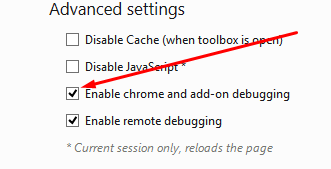
- 然后用Shift + F4打开便签。复制粘贴下面的代码。然后在菜单栏中转到“环境”菜单并选择“浏览器”。然后点击Ctrl + R运行代码。
瞧。如果你能把这句话变成评论的话,那就太棒了。如果你需要帮忙,请告诉我。:)我这样做了,所以你会想让它成为一个副词,否则你必须在每次启动浏览器时运行这段代码:P (我不把你的设置保存到pref系统:P所以每次运行这个代码都会很烦人:P,所以使用它做一个插件的动机!:P)
若要删除上下文菜单项,请注释掉所有内容,并取消注释doUnregister()。这将是有用的,当你把它变成一个引导插件。
function _loadSearch(searchText, useNewTab, purpose) {
    useNewTab = true;
    purpose = 'contextmenu';
    searchText = this.parentNode.querySelector('#context-searchselect').searchTerms;
    let engine;

    // If the search bar is visible, use the current engine, otherwise, fall
    // back to the default engine.
    /*
    if (isElementVisible(this.searchBar))
      engine = Services.search.currentEngine;
    else
      engine = Services.search.defaultEngine;
    */
    engine = Services.search.getEngineByName(this.getAttribute('engine_name'));

    let submission = engine.getSubmission(searchText, null, purpose); // HTML response

    // getSubmission can return null if the engine doesn't have a URL
    // with a text/html response type.  This is unlikely (since
    // SearchService._addEngineToStore() should fail for such an engine),
    // but let's be on the safe side.
    if (!submission) {
      return null;
    }

    let inBackground = Services.prefs.getBoolPref("browser.search.context.loadInBackground");
    Services.wm.getMostRecentWindow('navigator:browser').openLinkIn(submission.uri.spec,
               useNewTab ? "tab" : "current",
               { postData: submission.postData,
                 inBackground: inBackground,
                 relatedToCurrent: true });

    return engine;
}


function showMyContexts(e) {
    console.log('pop showing, e:', e)
    var parentContext = e.target;
  //var win = e.view;
  var searchContext = parentContext.querySelector('#context-searchselect');
    if (!searchContext.hasAttribute('hidden')) {
      //var searchTermsQuoted = searchContext.searchTerms;
   //var searchTermsQuoted = searchContext.getAttribute('label').match(/".*"/);
        //show them
      var currentlyVisAccessKeys = parentContext.parentNode.querySelectorAll('#' + parentContext.id + ' > menuitem[accesskey]:not([hidden]):not(.myContextWeev)');
      console.log('currentlyVisAccessKeys:', currentlyVisAccessKeys)
      var usedKeys = [];
      for (var i=0; i<currentlyVisAccessKeys.length; i++) {
          usedKeys.push(currentlyVisAccessKeys[i].getAttribute('accesskey').toUpperCase());
      }
      console.log('usedKeys:', usedKeys);
        var myContexts = parentContext.querySelectorAll('.myContextWeev');
        for (var i=0; i<myContexts.length; i++) {
            myContexts[i].removeAttribute('hidden');
        var engine_name = myContexts[i].getAttribute('engine_name');
      var newLbl = searchContext.getAttribute('label').replace(Services.search.currentEngine.name, engine_name); //win.gNavigatorBundle.getFormattedString("contextMenuSearch", [Services.search.currentEngine.name, 'rawrr']); //myContexts[i].getAttribute('label').replace(/".*"/,  searchTermsQuoted);
        for (var j=0; j<engine_name.length; j++) {
            var tryKey = engine_name[j].toUpperCase();
            if (usedKeys.indexOf(tryKey) == -1) {
                myContexts[i].setAttribute('accesskey', tryKey);
                break;
            }
        }
      myContexts[i].setAttribute('label', newLbl);
      console.log('removing hiddnes')
        }
    }
}

function hideMyContexts(e) {
    console.log('pop hiding')
    var parentContext = e.target;
    //hide them
    var myContexts = parentContext.querySelectorAll('.myContextWeev');
    for (var i=0; i<myContexts.length; i++) {
        myContexts[i].setAttribute('hidden', 'true');
      console.log('hid it')
    }
}

/*start - windowlistener*/
var windowListener = {
    //DO NOT EDIT HERE
    onOpenWindow: function (aXULWindow) {
        // Wait for the window to finish loading
        let aDOMWindow = aXULWindow.QueryInterface(Ci.nsIInterfaceRequestor).getInterface(Ci.nsIDOMWindowInternal || Ci.nsIDOMWindow);
        aDOMWindow.addEventListener("load", function () {
            aDOMWindow.removeEventListener("load", arguments.callee, false);
            windowListener.loadIntoWindow(aDOMWindow, aXULWindow);
        }, false);
    },
    onCloseWindow: function (aXULWindow) {},
    onWindowTitleChange: function (aXULWindow, aNewTitle) {},
    register: function () {
        // Load into any existing windows
        let XULWindows = Services.wm.getXULWindowEnumerator(null);
        while (XULWindows.hasMoreElements()) {
            let aXULWindow = XULWindows.getNext();
            let aDOMWindow = aXULWindow.QueryInterface(Ci.nsIInterfaceRequestor).getInterface(Ci.nsIDOMWindowInternal || Ci.nsIDOMWindow);
            windowListener.loadIntoWindow(aDOMWindow, aXULWindow);
        }
        // Listen to new windows
        Services.wm.addListener(windowListener);
    },
    unregister: function () {
        // Unload from any existing windows
        let XULWindows = Services.wm.getXULWindowEnumerator(null);
        while (XULWindows.hasMoreElements()) {
            let aXULWindow = XULWindows.getNext();
            let aDOMWindow = aXULWindow.QueryInterface(Ci.nsIInterfaceRequestor).getInterface(Ci.nsIDOMWindowInternal || Ci.nsIDOMWindow);
            windowListener.unloadFromWindow(aDOMWindow, aXULWindow);
        }
        //Stop listening so future added windows dont get this attached
        Services.wm.removeListener(windowListener);
    },
    //END - DO NOT EDIT HERE
    loadIntoWindow: function (aDOMWindow, aXULWindow) {
        if (!aDOMWindow) {
            return;
        }
        var contextSearchselect = aDOMWindow.document.getElementById('context-searchselect');
        if (contextSearchselect) {
            var insertBeforeEl = contextSearchselect.nextSibling;
          var parentContext = contextSearchselect.parentNode; //should be id `contentAreaContextMenu`
          parentContext.addEventListener('popupshowing', showMyContexts, false);
          parentContext.addEventListener('popuphiding', hideMyContexts, false);
          for (var i=0; i<addTheseEngineNamesToContext.length; i++) {
          var myContext = aDOMWindow.document.createElement('menuitem'); //contextSearchselect.cloneNode(true);
          myContext.setAttribute('class', 'myContextWeev');
          myContext.setAttribute('hidden', 'true');
          myContext.setAttribute('engine_name', addTheseEngineNamesToContext[i]);
              myContext.addEventListener('command', _loadSearch, false);
          parentContext.insertBefore(myContext, insertBeforeEl);
        }
        }
    },
    unloadFromWindow: function (aDOMWindow, aXULWindow) {
        if (!aDOMWindow) {
            return;
        }
        var contextSearchselect = aDOMWindow.document.getElementById('context-searchselect');
        if (contextSearchselect) {
          var parentContext = contextSearchselect.parentNode; //should be id `contentAreaContextMenu`
          parentContext.removeEventListener('popupshowing', showMyContexts, false);
          parentContext.removeEventListener('popuphiding', hideMyContexts, false);
          var myContexts = parentContext.querySelectorAll('.myContextWeev');
          for (var i=0; i<myContexts.length; i++) {
            parentContext.removeChild(myContexts[i]);
          }
        }
    }
};
/*end - windowlistener*/

var addTheseEngineNamesToContext = [];

function doRegister() {
var engines = Services.search.getVisibleEngines();
var engineNames = [];
engines.forEach(function(engine) {
  engineNames.push(engine.name);
});


var check = {value: false};
var input = {value: "1"};
var result = Services.prompt.prompt(null, "Engine Count", "How many search engines to add to the conext menu? (Max: " + engines.length + ")", input, null, check);
if (result) {
  if (isNaN(input.value) || input.value == '') {
    Services.prompt.alert(null, "Error", "Must enter a number");
  } else {
    if (input.value > 0 && input.value <= engines.length) {
      for (var i=0; i<input.value; i++) {
        var selected = {};
        var result = Services.prompt.select(null, "Select Engine " + (i + 1), "Select the engine to add to menu in position " + (i + 1), engineNames.length, engineNames, selected);
        if (result) {
          console.log(selected);
          addTheseEngineNamesToContext.push(engineNames[selected.value]);
          if (i == input.value-1) {
            Services.prompt.alert(null, "ok windowListener.register", addTheseEngineNamesToContext);
            windowListener.register();
          }
        } else {
          Services.prompt.alert(null, "Cancelled", "Cancelled");
        }
      }

    } else {
      Services.prompt.alert(null, "Error", "You only have " + engines.length + " search engines, must enter a number between 1 and " + engines.length);
    }
  }
}
}

function doUnregister() {
    windowListener.unregister();
}

doRegister();
//doUnregister();页面原文内容由Stack Overflow提供。腾讯云小微IT领域专用引擎提供翻译支持
原文链接:
https://stackoverflow.com/questions/26623926
复制相关文章
相似问题
腾讯云开发者

Copyright © 2013 - 2026 Tencent Cloud. All Rights Reserved. 腾讯云 版权所有
深圳市腾讯计算机系统有限公司 ICP备案/许可证号:粤B2-20090059  粤公网安备44030502008569号
腾讯云计算(北京)有限责任公司 京ICP证150476号 | 京ICP备11018762号