
Internet explorer 9封装在div表中,其中包含输入、选择/取消选择错误
Internet explorer 9封装在div表中,其中包含输入、选择/取消选择错误
提问于 2014-10-28 11:55:41
我有一个表格,它由单元格中的输入组成。
在输入(或选择/取消选择)表的父div之间移动之后(在IE9中,我没有在另一个IE版本中测试它)出现了奇怪的错误,如果溢出: auto;属性已设置,并且存在水平滚动,则表的父div开始展开。
它的外观:
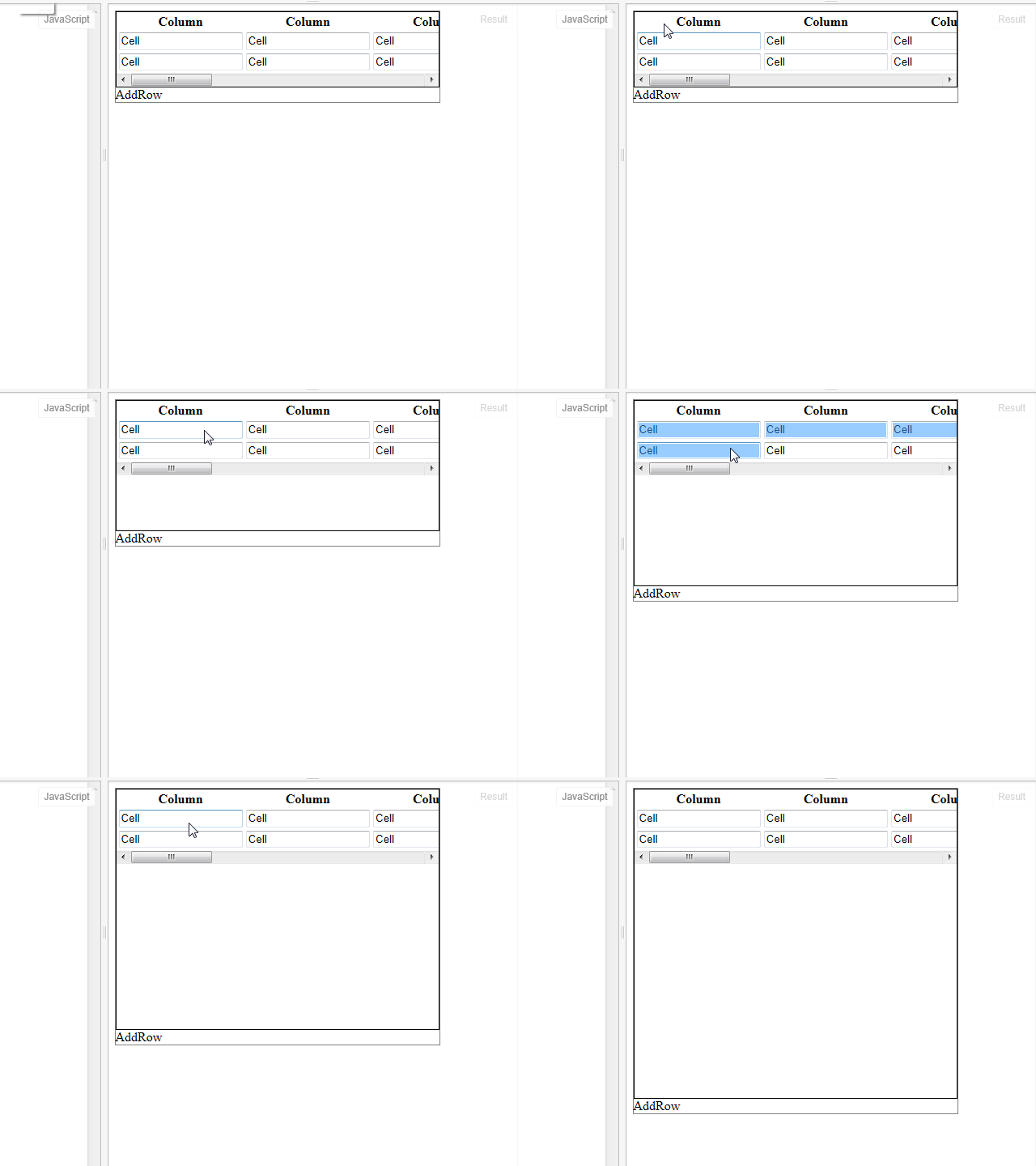
链接到样本尝试在表中选择一些行
HTML:
<div class="maindiv">
    <div class="gridwrapper">
        <table>
            <thead>
                <tr>
                    <th>Column</th>
                    <th>Column</th>
                    <th>Column</th>
                    <th>Column</th>
                    <th>Column</th>
                    <th>Column</th>
                    <th>Column</th>
                    <th>Column</th>
                    <th>Column</th>
                </tr>
            </thead>
            <tbody>
                <tr>
                    <td><input type='text' value='Cell'/></td>
                    <td><input type='text' value='Cell'/></td>
                    <td><input type='text' value='Cell'/></td>
                    <td><input type='text' value='Cell'/></td>
                    <td><input type='text' value='Cell'/></td>
                    <td><input type='text' value='Cell'/></td>
                    <td><input type='text' value='Cell'/></td>
                    <td><input type='text' value='Cell'/></td>
                    <td><input type='text' value='Cell'/></td>
                </tr>
                <tr>
                    <td><input type='text' value='Cell'/></td>
                    <td><input type='text' value='Cell'/></td>
                    <td><input type='text' value='Cell'/></td>
                    <td><input type='text' value='Cell'/></td>
                    <td><input type='text' value='Cell'/></td>
                    <td><input type='text' value='Cell'/></td>
                    <td><input type='text' value='Cell'/></td>
                    <td><input type='text' value='Cell'/></td>
                    <td><input type='text' value='Cell'/></td>
                </tr>
            </tbody>
        </table>
    </div>
    <div class="bottomdiv">
        <label>AddRow</label>
    </div>
</div>
CSS:
.gridwrapper {
    max-height: 150px;
    overflow: auto;
    border: 1px solid black;
}
.maindiv {
    width: 400px;
    border: 1px solid gray;
}
table {
    width: 100%;
}
有人知道怎么解决这个问题吗?
回答 2
Stack Overflow用户
回答已采纳
发布于 2016-06-06 13:07:52
最小高度: 0%;修复ie9中的这个错误
.gridwrapper {
    min-height: 0%;
    max-height: 150px;
    overflow: auto;
    border: 1px solid black;
}Stack Overflow用户
发布于 2014-11-04 14:00:57
当溢出属性设置为auto时,我在IE9中看到这种行为。但是,当属性设置为滚动时,我无法在IE中再现该行为。
试试这个:
.gridwrapper {
    max-height: 150px;
    overflow: scroll;
    border: 1px solid black;
}页面原文内容由Stack Overflow提供。腾讯云小微IT领域专用引擎提供翻译支持
原文链接:
https://stackoverflow.com/questions/26607734
复制相关文章
相似问题
腾讯云开发者

Copyright © 2013 - 2026 Tencent Cloud. All Rights Reserved. 腾讯云 版权所有
深圳市腾讯计算机系统有限公司 ICP备案/许可证号:粤B2-20090059  粤公网安备44030502008569号
腾讯云计算(北京)有限责任公司 京ICP证150476号 | 京ICP备11018762号