
JavaMail异常javax.mail.AuthenticationFailedException 534-5.7.9应用程序-所需专用密码
我想用JavaMailAPI发送邮件
我已经做了一些编码,但这并不是抛出异常:-
消息发送Failedjavax.mail.AuthenticationFailedException: 534-5.7.9应用程序-特定密码所需。
package com.appreciationcard.service;

import java.util.Properties;

import javax.mail.Message;
import javax.mail.MessagingException;
import javax.mail.PasswordAuthentication;
import javax.mail.Session;
import javax.mail.Transport;
import javax.mail.internet.InternetAddress;
import javax.mail.internet.MimeMessage;
import com.appreciationcard.dao.DAOFactory;
import com.appreciationcard.forms.ComposeForm;

public class MailServiceImpl implements MailService {

public boolean mailsent(ComposeForm composeForm) {
    String to = composeForm.getTo();
    String from = composeForm.getFrom();
    String cc = composeForm.getCc();
    String bcc = composeForm.getBcc();
    String subject = composeForm.getSubject();
    String messages = composeForm.getMessage();
    Properties props = new Properties();
    props.put("mail.smtp.host", "smtp.gmail.com");
    props.put("mail.smtp.auth", "true");
    props.put("mail.smtp.starttls.enable", true);
    props.put("mail.smtp.port", "587");
    props.put("mail.transport.protocol", "smtp");
    props.put("mail.debug", "true");
    System.out.println("Properties" + props);
    Session session = Session.getDefaultInstance(props,
            new javax.mail.Authenticator() {
                protected PasswordAuthentication getPasswordAuthentication() {
                    return new PasswordAuthentication(
                            "tosudhansusekhar@gmail.com", "xxxx");
                }
            });
    try {
        MimeMessage message = new MimeMessage(session);
        message.setFrom(new InternetAddress("dynamicmihir@gmail.com"));
        message.addRecipient(Message.RecipientType.TO, new InternetAddress(
                to));
        message.setSubject(subject);
        message.setText(messages);
        Transport.send(message);
    } catch (MessagingException mex) {
        System.out.println("Message Sending Failed" + mex);
        mex.printStackTrace();
    }

}
}
我在服务器控制台上有异常
消息发送Failedjavax.mail.AuthenticationFailedException: 534-5.7.9应用程序-特定密码所需。
请登录534 5.7.9 http://support.google.com/accounts/bin/answer.py?answer=185833 o5sm11464195 pdr.50- gsmtp了解更多信息
会帮助我解决这个问题.
回答 5
Stack Overflow用户
发布于 2014-10-27 18:24:00
您已经为您的Google帐户启用了两阶段认证,因此应用程序将无法使用实际密码登录到您的Google帐户。Google希望您为您使用的每个应用程序生成一个特定于应用程序的密码(并给它一个名称),然后使用该密码从您的应用程序登录到您的Google帐户。这允许您在启用2步身份验证时不向第三方应用程序提供密码。
另一种方法是,您的应用程序支持重定向到Google页面,使用用户名、密码和应用程序生成的代码进行身份验证。
链接清楚地解释了该做什么。
Stack Overflow用户
发布于 2022-06-12 14:05:40
更新为2022年
- 两步验证 -您必须执行此步骤才能继续
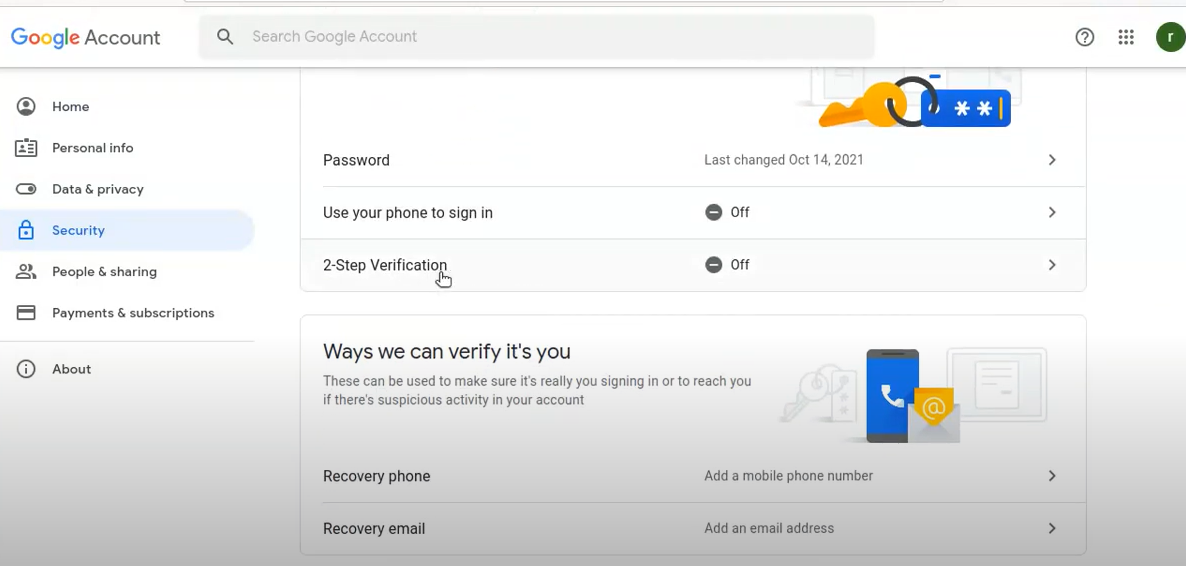
2)登录并添加电话号码并使用文本messege进行验证。
在蓝色"V“之后
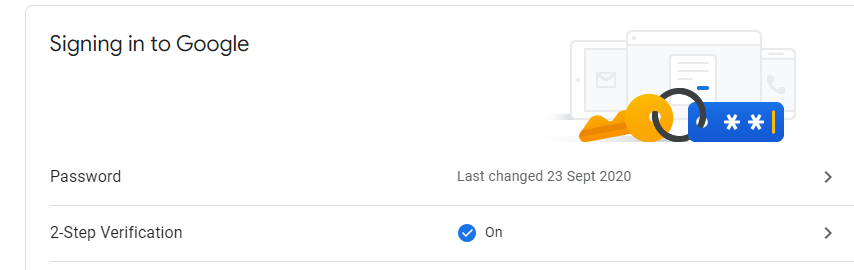
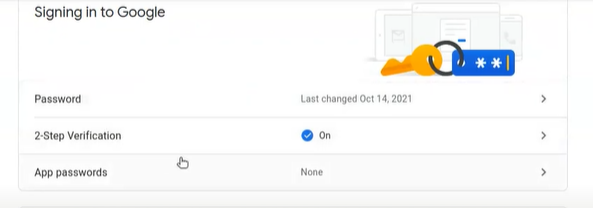
3)在“2步骤验证”下,单击"App密码“。
- 然后在"Select“中按"Other”
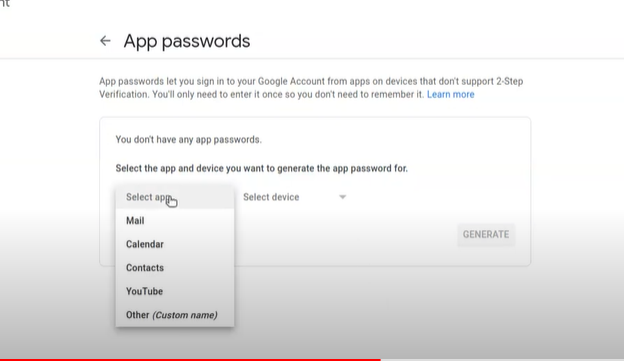
在打开的页面中编写描述并按下genarate
- 在打开的"Genarated密码“中,复制已创建的密码,并将其与通常的smpt密码一样使用(请检查未复制空格)。
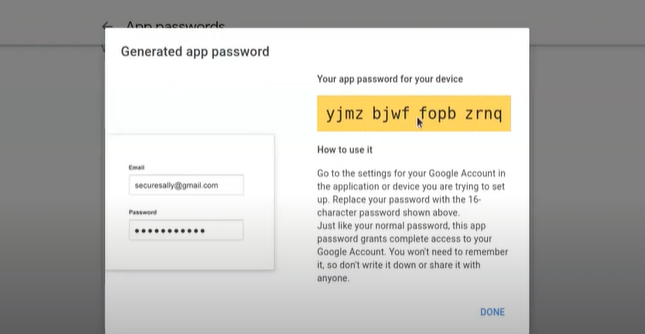
如何使用它,转到正在尝试设置的应用程序或设备中的Google帐户设置。用上面显示的16个字符的密码替换你的密码.就像你的普通密码一样,这个应用密码允许完全访问你的谷歌账户。你不需要记住它,所以不要把它写下来,也不要和任何人分享它。
Stack Overflow用户
发布于 2021-02-01 09:10:14
只需为您的帐户创建应用程序密码并使用该密码即可。
创建密码的步骤:
转到您的帐户设置(https://myaccount.google.com/) -->>安全性->>在登录到谷歌->> App >>输入您的凭据登录到您的帐户-->选择'App‘和'Device’->> Generate。
复制并粘贴密码到某个地方。
您可以使用此密码而不是帐户密码。
https://stackoverflow.com/questions/26594097
复制相似问题
腾讯云开发者

Copyright © 2013 - 2026 Tencent Cloud. All Rights Reserved. 腾讯云 版权所有
深圳市腾讯计算机系统有限公司 ICP备案/许可证号:粤B2-20090059  粤公网安备44030502008569号
腾讯云计算(北京)有限责任公司 京ICP证150476号 | 京ICP备11018762号