
PERL图查询(GD:: graph )
PERL图查询(GD:: graph )
提问于 2014-10-24 06:15:53
我正在使用我在网上找到的一个示例,并对其进行编辑,以查看GD::Graph提供的不同选项。这是我目前使用的代码。
#!/usr/local/bin/perl -w
# Change above line to point to your perl binary

use CGI ':standard';
use GD::Graph::bars;
use strict;

# Both the arrays should same number of entries.
my @data = (["Jan", "Feb", "Mar", "Apr", "May", "Jun", "Jul", "Aug",
             "Sep", "Oct", "Nov", "Dec"],
            [23, 5, 2, 20, 11, 33, 7, 31, 77, 18, 65, 52]);

my $mygraph = GD::Graph::bars->new(1000, 1000);
$mygraph->set(
    x_label     => 'Month',
    y_label     => 'Number of Hits',
    title       => 'Number of Hits in Each Month in 2002',
    bgclr   => 'black',
) or warn $mygraph->error;

my $myimage = $mygraph->plot(\@data) or die $mygraph->error;

print "Content-type: image/png\n\n";
#print $myimage->png;

open IMG, '>file.png';
print IMG $myimage->png;
close IMG;
可以看到,我试图将背景颜色设置为黑色,但无论我设置什么,背景保持不变。
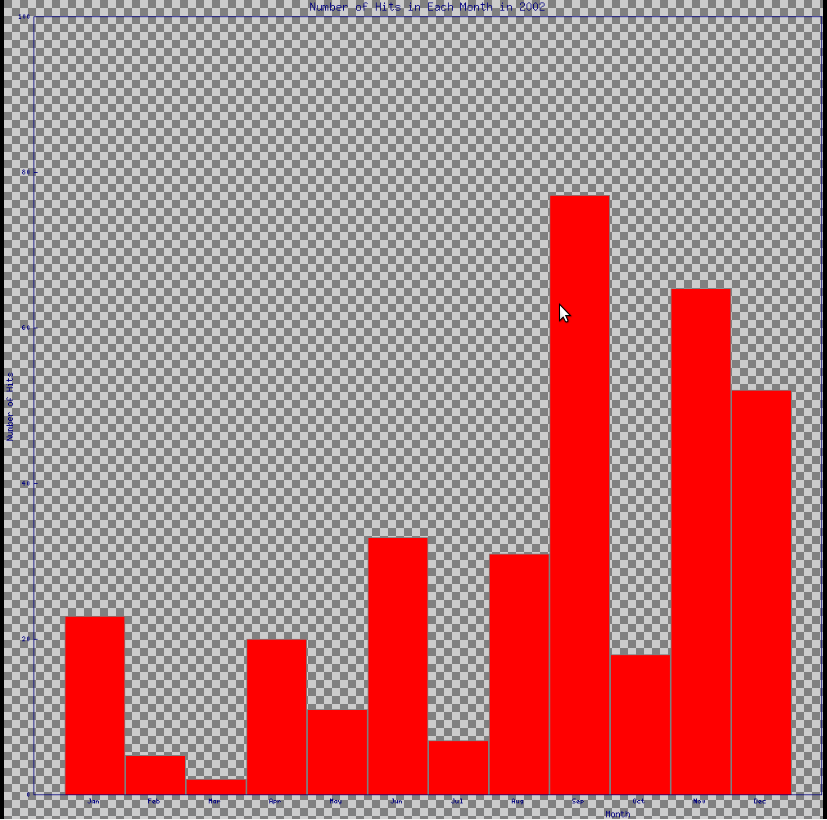
一般的背景是什么,我做错了什么。请指点。谢谢
回答 1
Stack Overflow用户
回答已采纳
发布于 2014-10-24 06:55:12
我必须显式地设置transparent => 0才能让它正常工作。你会认为bgclr会推翻这一点。
这并不是一个正确的答案,因为它更多的是一种解决办法,而不是你做错的任何事情。
对于此修补程序,需要进行一些代码清理:
#!/usr/bin/env perl
use strict;
use warnings;
use autodie;

use CGI ':standard';
use GD::Graph::bars;

# Both the arrays should same number of entries.
my @data = (
    [qw( Jan Feb Mar Apr May Jun Jul Aug Sep Oct Nov Dec )],
    [qw( 23  5   2   20  11  33  7   31  77  18  65  52  )],
);

my $mygraph = GD::Graph::bars->new( 1000, 1000 );
$mygraph->set(
    x_label     => 'Month',
    y_label     => 'Number of Hits',
    title       => 'Number of Hits in Each Month in 2002',
    bgclr       => 'black',
    transparent => 0,
) or warn $mygraph->error;

my $myimage = $mygraph->plot( \@data ) or die $mygraph->error;

print "Content-type: image/png\n\n";
print $myimage->png;

__END__
open my $fh, '>', 'file.png';
print $fh $myimage->png;
close $fh;页面原文内容由Stack Overflow提供。腾讯云小微IT领域专用引擎提供翻译支持
原文链接:
https://stackoverflow.com/questions/26542471
复制相关文章
相似问题
腾讯云开发者

Copyright © 2013 - 2026 Tencent Cloud. All Rights Reserved. 腾讯云 版权所有
深圳市腾讯计算机系统有限公司 ICP备案/许可证号:粤B2-20090059  粤公网安备44030502008569号
腾讯云计算(北京)有限责任公司 京ICP证150476号 | 京ICP备11018762号