
分阶段使用globalCompositeOperation
我画了很多关于我的背景的东西。形状,文字,图像。
我想使用与globalCompositeOperation在上下文中使用globalCompositeOperation方法所获得的效果相同的效果(使用clip对我来说很难,我也不知道是否可能在文本中使用)
用户可以画出很少的形状。然后开始一个掩模阶段。画更多的形状,文字..。这将画到面具,然后下一个抽签将被剪辑在蒙面阶段。然后继续定期画画..。
为了前夫。
用户画这张图
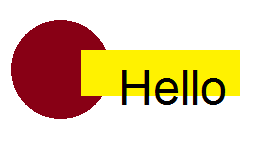
然后开始蒙面模式并绘制这2条红线。
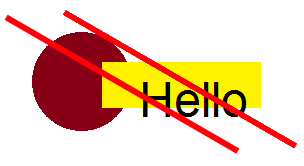
然后他停止在面具中画,开始画长方形来考虑面具。
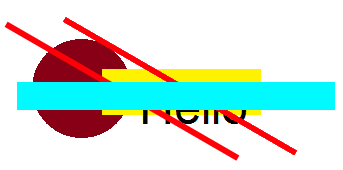
最后,应用掩码剪辑,结果应该如下所示
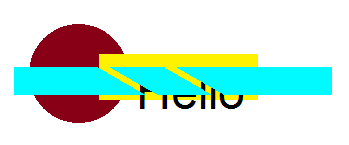
如果没有以前的图纸,我已经设法用线条裁剪了矩形。
// Starting the mask phase
ctx.strokeStyle = 'red';
ctx.lineWidth = 5;
ctx.beginPath();
ctx.moveTo(20, 20);
ctx.lineTo(240, 140);
ctx.moveTo(80, 20);
ctx.lineTo(300, 140);
ctx.stroke();

ctx.globalCompositeOperation = 'source-out';

ctx.fillStyle = 'cyan';
ctx.fillRect(50, 70, 250, 20);

// Setting the composition back
ctx.globalCompositeOperation = 'source-over';
但是当我在代码的开头添加我的绘图时,构图也会考虑到这一点。
ctx.fillStyle = 'brown';
ctx.beginPath();
ctx.arc(80, 80, 50, 50, 0, Math.PI * 2);
ctx.fill();
ctx.fillStyle = 'yellow';
ctx.fillRect(80, 60, 150, 40);
ctx.fillStyle = 'black';
ctx.font = '40pt arial';
ctx.fillText('Hello', 130, 110);


// How to tell the context to start from here the compisition ???
如果可能的话,如何区分上下文从某个点开始构图?
我可以再画一张画布,然后在那里画面具。然后在主画布上画新画布。但有更好的解决办法吗?
回答 1
Stack Overflow用户
发布于 2014-10-23 17:01:20
通过更改.globalCompositeOperation,可以在绘图流的任意点更改复合模式。但是,正如您已经发现的,任何新的复合模式也会影响现有的画布内容。
关于使用第二个“暂存画布”进行不会破坏现有内容的合成,您的直觉是正确的。
您可以使用内存中的画布来进行合成,并使用擦除的行创建您的直角行。然后,您可以将这个内存中的画布drawImage到主画布上。由于复合是在内存中的画布上完成的,所以现有的循环-hello内容并不会受到复合的影响。
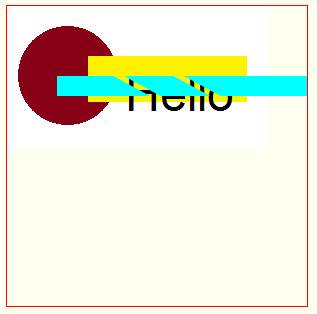
下面是示例代码和演示:
var canvas=document.getElementById("canvas");
var ctx=canvas.getContext("2d");
var cw=canvas.width;
var ch=canvas.height;

// create an in-memory canvas to do compositing
var c=document.createElement('canvas');
var cctx=c.getContext('2d');

var img=new Image();
img.onload=start;
img.src="https://dl.dropboxusercontent.com/u/139992952/multple/temp6a.png";
function start(){
  ctx.drawImage(img,0,0);
  addCompositedRectangle();
  ctx.drawImage(c,0,0);
}


function addCompositedRectangle(){

  // resize the in-memory canvas
  // Note: this automatically clears any previous content
  //       and also resets any previous compositing modes
  c.width=300; // largest width;
  c.height=140; // largest height;

  // Starting the mask phase
  cctx.strokeStyle = 'red';
  cctx.lineWidth = 5;
  cctx.beginPath();
  cctx.moveTo(20, 20);
  cctx.lineTo(240, 140);
  cctx.moveTo(80, 20);
  cctx.lineTo(300, 140);
  cctx.stroke();

  cctx.globalCompositeOperation = 'source-out';

  cctx.fillStyle = 'cyan';
  cctx.fillRect(50, 70, 250, 20);

  // Setting the composition back
  cctx.globalCompositeOperation = 'source-over';

}body{ background-color: ivory; padding:10px; }
#canvas{border:1px solid red;}<canvas id="canvas" width=300 height=300></canvas>
https://stackoverflow.com/questions/26532678
复制相似问题
腾讯云开发者

Copyright © 2013 - 2026 Tencent Cloud. All Rights Reserved. 腾讯云 版权所有
深圳市腾讯计算机系统有限公司 ICP备案/许可证号:粤B2-20090059  粤公网安备44030502008569号
腾讯云计算(北京)有限责任公司 京ICP证150476号 | 京ICP备11018762号