
Roboelectric和Android Studio
我已经试了几天了,但没有结果。我需要在Android中设置Robolectric (0.8.9,最新版本)。我学习了不同的教程-- Android单元与集成测试、用于单元测试的机电装置、带有Roboelectric的Android Gradle应用、如何运行机器人电气JUnit测试 --但总是有一些错误。
因此,我专门为测试创建了模块:
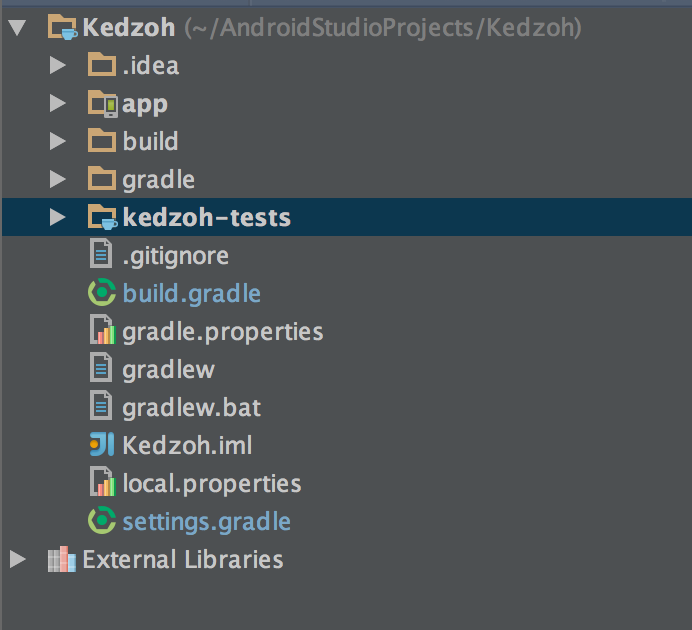
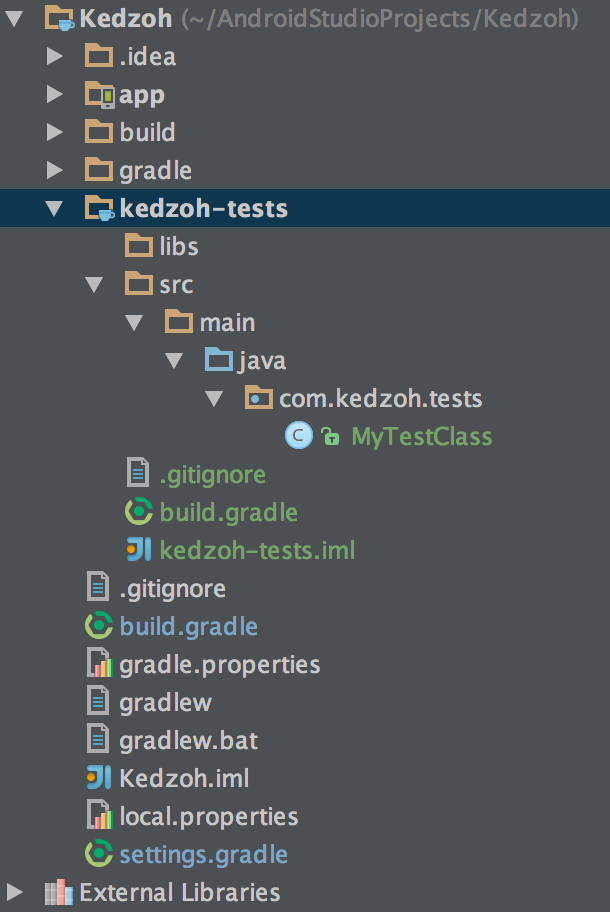
Kedzoh (项目) build.gradle
// Top-level build file where you can add configuration options common to all sub-    projects/modules.
buildscript {
repositories {
    jcenter()
}
dependencies {
    classpath 'com.android.tools.build:gradle:0.12.+'
    classpath 'org.robolectric:robolectric-gradle-plugin:0.12.+'
}
}

allprojects {
repositories {
    jcenter()
}
}
应用程序build.gradle:
apply plugin: 'com.android.application'
apply plugin: 'android'

android {
compileSdkVersion 19
buildToolsVersion '19.1.0'
defaultConfig {
    applicationId 'com.dev.kedzoh'
    minSdkVersion 9
    targetSdkVersion 19
    versionCode 14
    versionName '1.6.7'
}
buildTypes {
    release {
        runProguard false
        proguardFiles getDefaultProguardFile('proguard-android.txt'), 'proguard-rules.pro'
    }
}
productFlavors {
}
compileOptions {
    sourceCompatibility JavaVersion.VERSION_1_7
    targetCompatibility JavaVersion.VERSION_1_7
}
}

dependencies {
compile fileTree(dir: 'libs', include: ['*.jar'])

compile 'com.android.support:appcompat-v7:19.+'
compile 'com.google.android.gms:play-services:4.2.42'
compile 'com.squareup.retrofit:retrofit:1.6.1'
compile 'com.squareup.okhttp:okhttp:2.0.0'
compile 'com.squareup.okhttp:okhttp-urlconnection:2.0.0'
compile 'com.google.code.gson:gson:2.2.4'
compile 'com.squareup.picasso:picasso:2.3.3'
// You must install or update the Support Repository through the SDK manager to use this dependency.
compile 'com.android.support:support-v4:19.+'
compile 'com.google.guava:guava:18.0-rc1'
compile 'com.sothree.slidinguppanel:library:+'
compile 'com.larswerkman:HoloColorPicker:1.4'
}
kedzoh-test build.gradle:
apply plugin: 'java'

dependencies {
compile fileTree(dir: 'libs', include: ['*.jar'])

compile 'com.squareup.retrofit:retrofit:1.6.1'
compile 'com.squareup.okhttp:okhttp:2.0.0'
compile 'com.squareup.okhttp:okhttp-urlconnection:2.0.0'
compile 'com.google.code.gson:gson:2.2.4'
compile 'com.squareup.picasso:picasso:2.3.3'
// You must install or update the Support Repository through the SDK manager to use this dependency.
compile 'com.google.guava:guava:18.0-rc1'
compile 'com.sothree.slidinguppanel:library:+'
compile 'com.larswerkman:HoloColorPicker:1.4'

testCompile 'junit:junit:4.+'
testCompile 'org.robolectric:robolectric:2.2'
}此时,我无法导入Robolectric类,这会给我带来错误。当我在kedzoh-test build.gradle中添加apply plugin:'robolectric‘时,它要求使用'android’插件。在我添加它之后,它会抱怨没有Manifest,并且无法构建。我不确定这是否是正确的配置,因为它从来没有真正起作用。有谁能给出一些建议,如何在Android中设置Robolectric呢?
编辑:
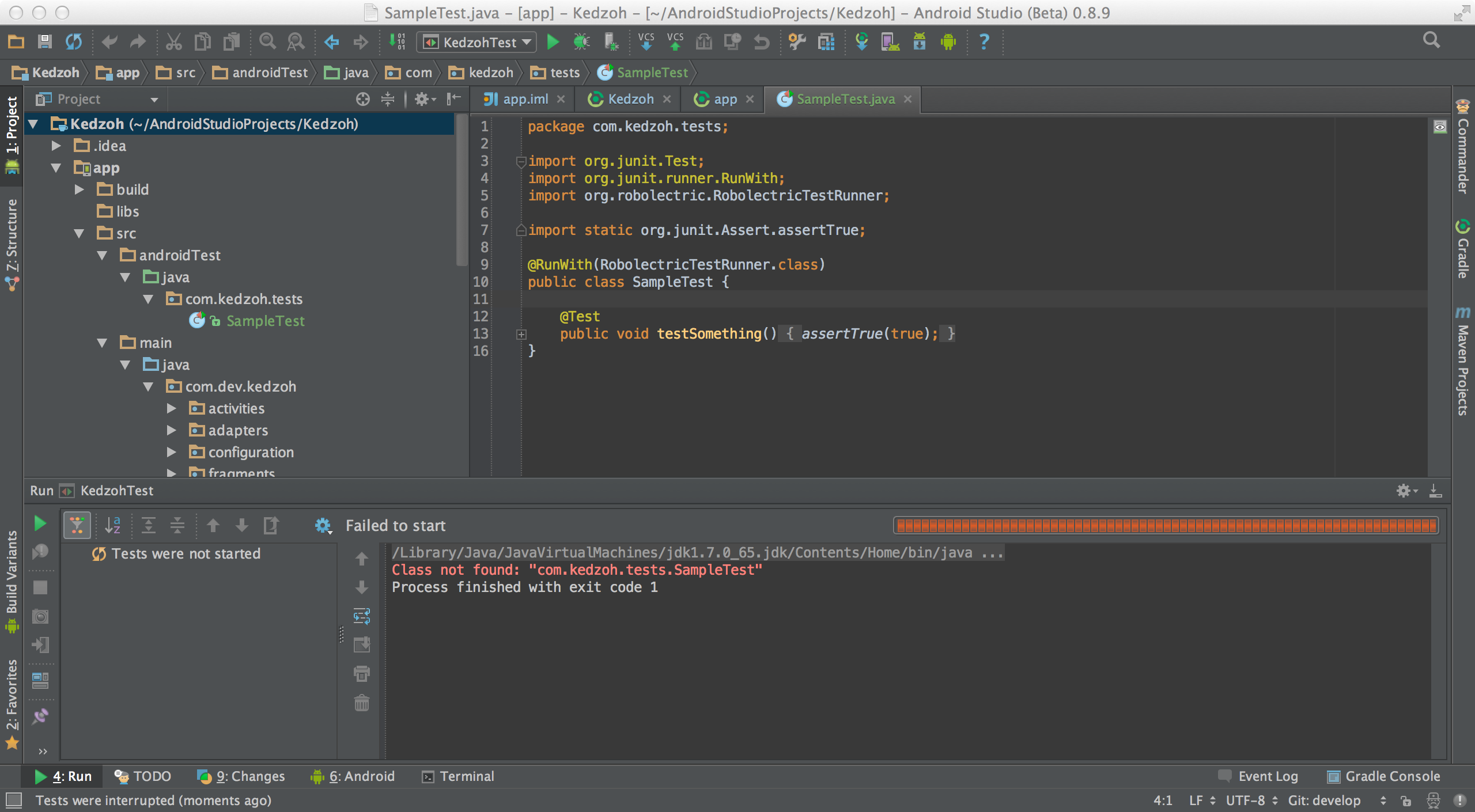
我尝试了下面的答案,但仍然坚持“未找到类”错误:
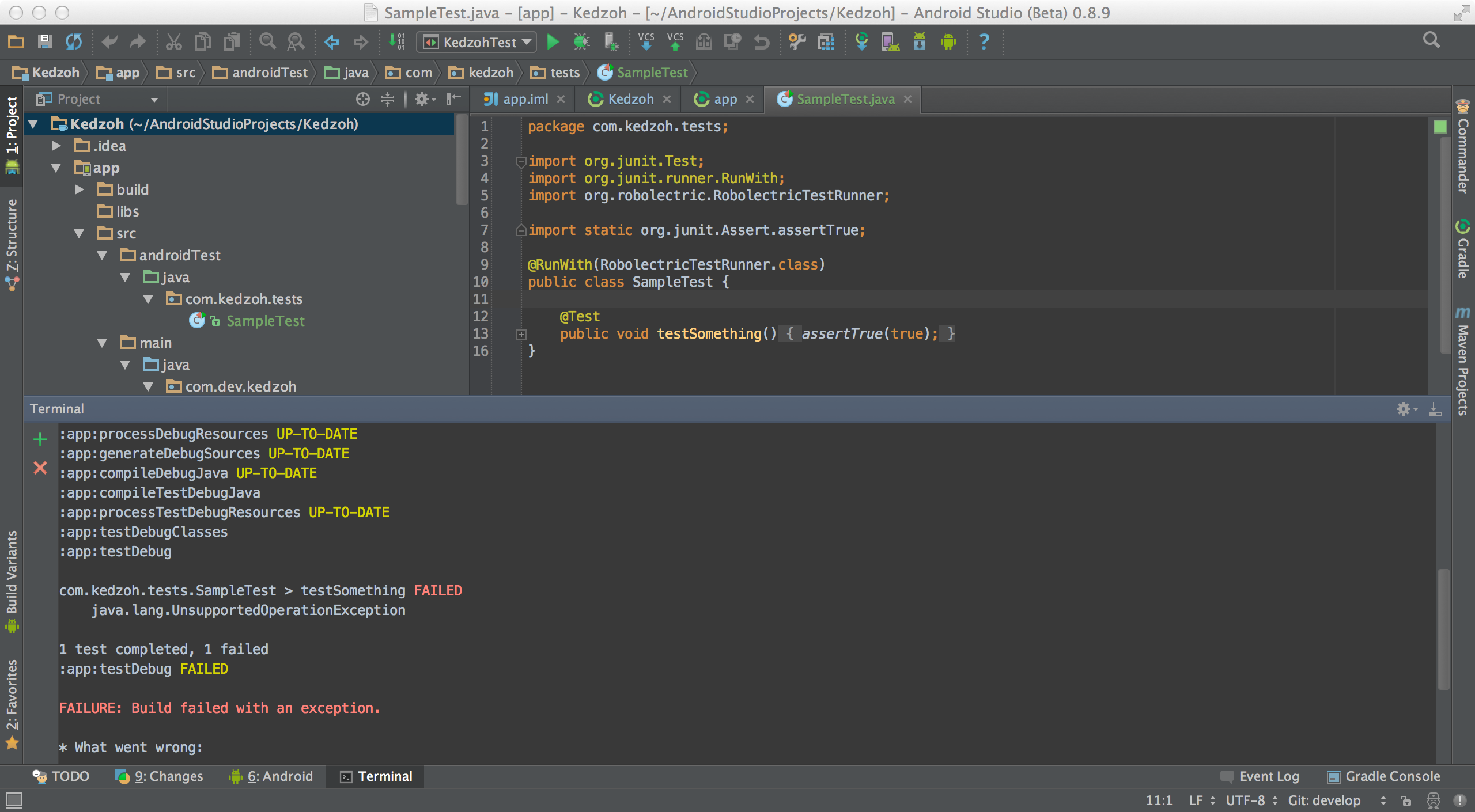
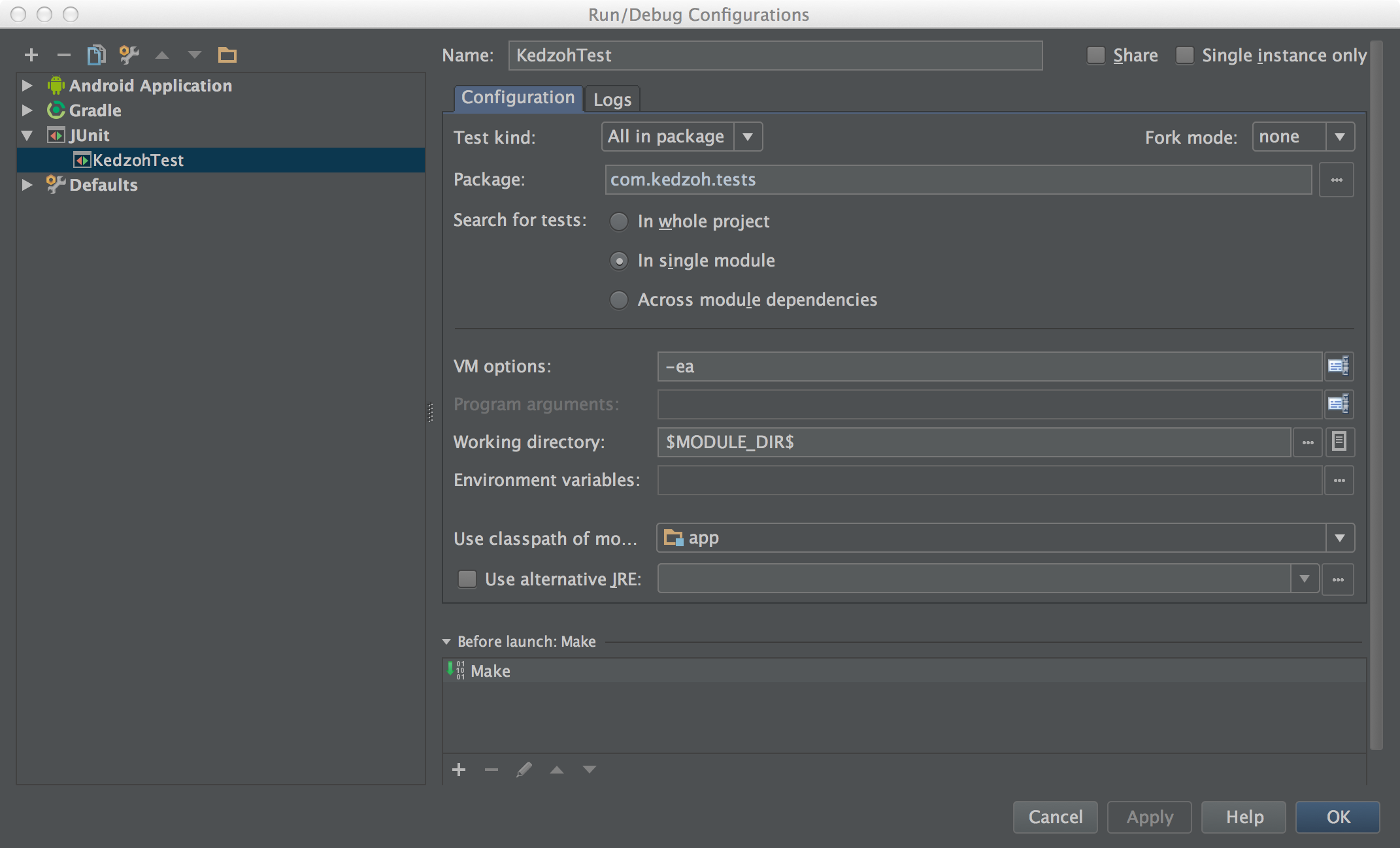
回答 2
Stack Overflow用户
发布于 2014-10-24 05:00:29
已经有不同的项目模板用于频密。你试过https://github.com/nenick/android-gradle-template了吗?
Stack Overflow用户
发布于 2014-10-21 12:13:17
我认为,通过在主“app”模块之外创建测试模块,可能会使您的生活变得更加困难和复杂。我所见过的大多数教程在应用模块中都有一个androidTest文件夹,它可以包含您的Robolectric测试。我所见过的基于Eclipse的所有旧教程似乎都指导我们创建与主项目分开的测试模块。
如果我使用Robolectric,我会像我为您创建的https://github.com/marcthomas2013/Kedzoh那样设置这个项目。我将使用androidTest文件夹来放置测试和配置gradle文件,如下所示。
注意,测试的依赖项是使用androidTestCompile声明包含的,而应用程序依赖项是通过编译来声明的。
此gradle文件中的另一项是包含和排除androidTest文件夹中类的频域部分。所有不在espresso文件夹中的内容都将使用gradlew测试目标运行,并且在调用gradlew connectedAndroidTest目标时,包括espresso文件夹在内的所有内容都将运行。
app gradle file
apply plugin: 'com.android.application'
apply plugin: 'robolectric'

android {
    packagingOptions {
        exclude 'LICENSE.txt'
        exclude 'META-INF/LICENSE'
        exclude 'META-INF/LICENSE.txt'
        exclude 'META-INF/NOTICE'
    }
    compileSdkVersion 19
    buildToolsVersion "19.1.0"

    defaultConfig {
        minSdkVersion 18
        targetSdkVersion 18
        versionCode 2
        versionName "1.0.0-SNAPSHOT"
        testInstrumentationRunner "com.google.android.apps.common.testing.testrunner.GoogleInstrumentationTestRunner"
    }

    buildTypes {
        release {
            runProguard false
        }
    }

    sourceSets {
        androidTest {
            setRoot('src/androidTest')
        }
    }
}

robolectric {
    include '**/*Test.class'
    exclude '**/espresso/**/*.class'
}

dependencies {
    repositories {
        mavenCentral()
    }
    compile 'com.sothree.slidinguppanel:library:2.0.1'

    androidTestCompile('junit:junit:4.11') {
        exclude module: 'hamcrest-core'
    }
    // Espresso
    androidTestCompile files('libs/espresso-1.1.jar')
    androidTestCompile files('libs/testrunner-1.1.jar')
    androidTestCompile files('libs/testrunner-runtime-1.1.jar')
    androidTestCompile 'com.google.guava:guava:14.0.1'
    androidTestCompile 'com.squareup.dagger:dagger:1.1.0'
    androidTestCompile 'org.hamcrest:hamcrest-integration:1.1'
    androidTestCompile 'org.hamcrest:hamcrest-core:1.1'
    androidTestCompile 'org.hamcrest:hamcrest-library:1.1'
    androidTestCompile('org.robolectric:robolectric:2.3') {
        exclude module: 'classworlds'
        exclude module: 'commons-logging'
        exclude module: 'httpclient'
        exclude module: 'maven-artifact'
        exclude module: 'maven-artifact-manager'
        exclude module: 'maven-error-diagnostics'
        exclude module: 'maven-model'
        exclude module: 'maven-project'
        exclude module: 'maven-settings'
        exclude module: 'plexus-container-default'
        exclude module: 'plexus-interpolation'
        exclude module: 'plexus-utils'
        exclude module: 'wagon-file'
        exclude module: 'wagon-http-lightweight'
        exclude module: 'wagon-provider-api'
    }
    androidTestCompile 'com.squareup:fest-android:1.0.+'
}项目构建文件,我们在这里包含了robolectric类路径,这样我们就可以在上面的配置文件中使用robolectric命令。
// Top-level build file where you can add configuration options common to all sub-projects/modules.

buildscript {
    repositories {
        jcenter()
        mavenCentral()
    }
    dependencies {
        classpath 'com.android.tools.build:gradle:0.12.2'
        classpath 'org.robolectric:robolectric-gradle-plugin:0.11.+'

        // NOTE: Do not place your application dependencies here; they belong
        // in the individual module build.gradle files
    }
}

allprojects {
    repositories {
        jcenter()
        mavenCentral()
    }
}
您能否解释您正在发生的错误,因为可能有许多可能的错误,基于您的工作方式,也有一个特殊的原因创建一个单独的测试模块。
我提供的项目是基于甲板级设置(https://github.com/robolectric/deckard-gradle)的,这里有许多关于JUnit冲突的提示,您可能会遇到麻烦。
为了能够在应用程序中调试单元测试,您必须在启动测试时手动调整类路径(一点也不漂亮!),基于本文guides/wiki/Robolectric-Installation-for-Unit-Testing中的信息。
您将需要运行单元测试,等待它失败,复制-classpath参数和它的值(它将很长,并以“开始和结束")并将其复制到运行配置中的VM选项中,然后在类路径的末尾添加一个;或a:取决于您的OS路径清除器并将路径添加到您的测试类(类似于<ABSOLUTE_PATH_TO_PROJECT>/build/test-classes ),这将将您的测试类添加到类路径中,然后Android应该能够运行它们。
这也是假设运行gradle testClasses的步骤是从文章http://blog.blundell-apps.com/how-to-run-robolectric-junit-tests-in-android-studio/完成的。
https://stackoverflow.com/questions/26484976
复制相似问题
腾讯云开发者

Copyright © 2013 - 2026 Tencent Cloud. All Rights Reserved. 腾讯云 版权所有
深圳市腾讯计算机系统有限公司 ICP备案/许可证号:粤B2-20090059  粤公网安备44030502008569号
腾讯云计算(北京)有限责任公司 京ICP证150476号 | 京ICP备11018762号