
如何在famo.us中创建六角自定义曲面
如何在famo.us中创建六角自定义曲面
提问于 2014-10-20 14:10:09
我正在测试"famo.us“Javascript,并且不知道如何做”自定义曲面“。
我的目标是创建六角形曲面(如果可能的话,用圆角),并将这些曲面放在一起,如下例所示:
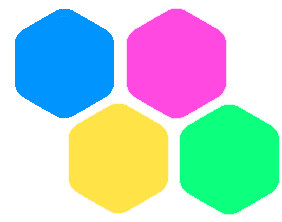
但是,我也需要点击每个表面,并根据不同的表面激活不同的动作。
同时也要在每个表面上放上图像!
现在,我知道如何使用矩形famo.us曲面,我知道如何修改它,旋转它,翻译它,等等。但是创建自定义曲面是可能的吗?
我的项目是famo.us /famo.us项目。
目前,我的想法是用3个矩形修改的曲面创建surfaceContainer,但是我不能用这个解决方案创建圆角,而且在上面设置图像也不容易。
有谁有主意吗?请分享。
回答 1
Stack Overflow用户
回答已采纳
发布于 2014-10-24 12:58:55
在Skalár Wag的帮助下,我用3个矩形制作了六角形,将边框半径和图像放在顶部。所有这些都包含在一个“fa容器面”中,以管理一个由六角形单击的事件。
下面是我使用的代码:
<!-- Hexa Tile Surface -->
    <fa-container-surface fa-click="onClickHexagonTile(hexagon.idx)">

        <!-- Hexagon Background -->
        <fa-modifier    fa-opacity="hexagon.opacity">

            <fa-container-surface>

                <fa-modifier    ng-repeat="rect in rects"
                                fa-origin="[0.5, 0.5]"
                                fa-size="[csts.hexagonTileWidth, 50]"
                                fa-rotate-z="rect.rotateZ">

                  <fa-surface   fa-background-color="hexagon.color"
                                class="hexagon-tile-rect"/>

                </fa-modifier>

            </fa-container-surface>

        </fa-modifier>

        <!-- Image -->
        <fa-modifier    fa-translate="[-30, -30, 0]"
                        fa-size="[60, 40]">

            <fa-image-surface   fa-image-url="{{hexagon.img}}"
                                fa-size="[60, 40]"
                                class="hexagon-tile-img"/>

        </fa-modifier>

        <!-- Text -->
        <fa-modifier    fa-translate="[-30, 10, 0]"
                        fa-size="[60, 20]">

            <fa-surface class="hexagon-tile-text">
                {{hexagon.text}}
            </fa-surface>

        </fa-modifier>

    </fa-container-surface>
在我的控制器里:
    ///////////////////////////////
    // Define constants

    $scope.csts = {
        hexagonTileHeight: 75,
        hexagonTileWidth: 80,
        hexagonTileMargin: 5,
    };

    ///////////////////////////////
    // Define Hexagonal definition

    // Math.PI / 3 = 60°
    $scope.rects = [
        {idx: 0, rotateZ: 0},
        {idx: 1, rotateZ: Math.PI / 3},
        {idx: 2, rotateZ: -Math.PI / 3}
    ];

    ///////////////////////////////
    // Define hexagonal list

    $scope.hexagonList = [
        {idx: 0, column: 0, line: 0, color: "#43D0FA", opacity: 1, img: './img/1.png', text:'1'},
        {idx: 1, column: 1, line: 0, color: "#14AF59", opacity: 1, img: './img/2.png', text:'2'},
        {idx: 2, column: 0, line: 1, color: "#E1553E", opacity: 1, img: './img/3.png', text:'3'}
    ];

    ///////////////////////////////
    // Hexagon tile events

    $scope.onClickHexagonTile = function($hexagonTileIdx) {
        console.log('Click on hexagon tile : ' + $hexagonTileIdx);
};页面原文内容由Stack Overflow提供。腾讯云小微IT领域专用引擎提供翻译支持
原文链接:
https://stackoverflow.com/questions/26467692
复制相关文章
相似问题
腾讯云开发者

Copyright © 2013 - 2026 Tencent Cloud. All Rights Reserved. 腾讯云 版权所有
深圳市腾讯计算机系统有限公司 ICP备案/许可证号:粤B2-20090059  粤公网安备44030502008569号
腾讯云计算(北京)有限责任公司 京ICP证150476号 | 京ICP备11018762号