
发票页脚不在底部打印
发票页脚不在底部打印
提问于 2014-10-17 17:46:33
我试图使用默认的window.print()打印发票。
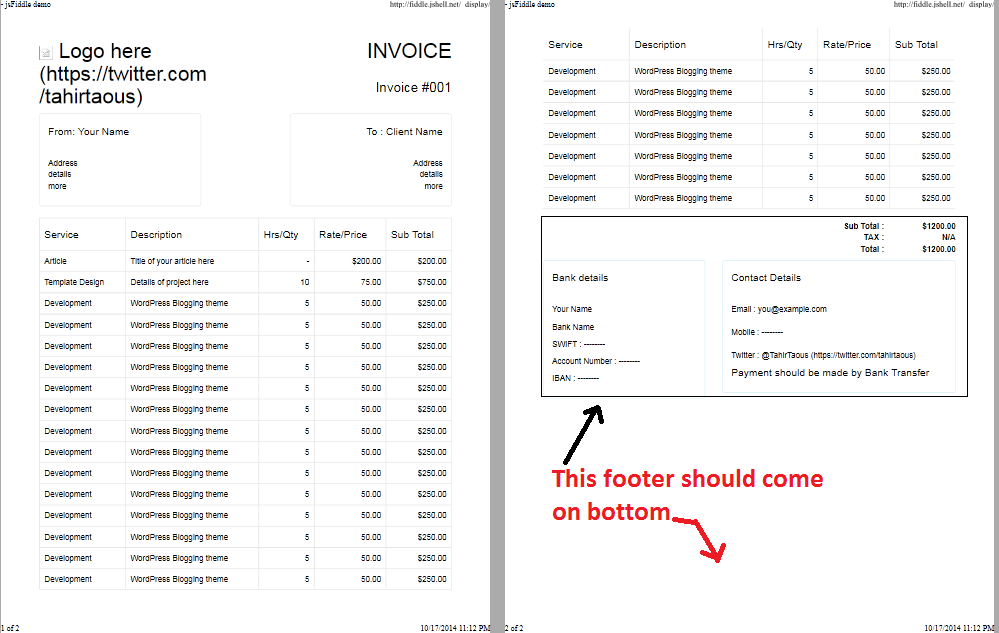
问题:发票打印良好,但页脚没有打印在打印页面底部,与原发票相同。
我想要的:在第一页或最后一页的每个条件下,页脚都应该位于底部(如果发票很长)
如果发票是冗长的,那么页脚应该出现在最后一页底部。
JS小提琴:
我使用的是Twitter的引导布局
发票样例代码 https://github.com/sitepointweb/bootstrap-invoice/blob/master/sample-invoice.html
回答 2
Stack Overflow用户
发布于 2014-10-17 19:03:49
尝尝这个
@media print {
    .invoiceFooter {
        position: fixed;
        bottom: 0;
    }
}
编辑
Stack Overflow用户
发布于 2014-10-17 21:02:45
这个密码会帮你的。
使页脚始终处于底部:
演示:http://jsfiddle.net/bsjmq1pp/2/
HTML
<body>
  <div id="wrapper">
    <div id="header"></div>
    <div id="content"></div>
    <div id="footer"></div>
  </div>
</body>
CSS
html,
body {
margin:0;
padding:0;
height:100%;
}
#wrapper {
min-height:100%;
position:relative;
}
#header {
padding:10px;
background:#5ee;
}
#content {
padding:10px;
padding-bottom:80px; /* Height of the footer element */
}
#footer {
width:100%;
height:80px;
position:absolute;
bottom:0;
left:0;
background:#ee5;
}
对于旧浏览器,请添加以下内容:
<!--[if lt IE 7]>
<style type="text/css">
  #wrapper { height:100%; }
</style>
<![endif]-->页面原文内容由Stack Overflow提供。腾讯云小微IT领域专用引擎提供翻译支持
原文链接:
https://stackoverflow.com/questions/26430615
复制相关文章
相似问题
腾讯云开发者

Copyright © 2013 - 2026 Tencent Cloud. All Rights Reserved. 腾讯云 版权所有
深圳市腾讯计算机系统有限公司 ICP备案/许可证号:粤B2-20090059  粤公网安备44030502008569号
腾讯云计算(北京)有限责任公司 京ICP证150476号 | 京ICP备11018762号