
基于Linux的java中远程活动目录的身份验证
我的场景类似于在这个问题如何使用客户(远程)活动目录服务器对用户进行身份验证中描述的内容,只不过我们的web应用程序是基于Java的,并且在CentOS Linux下运行。
我一直在搜索和阅读大量信息,但由于以下原因,我似乎无法为我的场景找到有用的信息:
- 虽然基于Java的应用程序针对AD (Kerberos、NTLM、LDAP来自在Linux上用Java验证Active Directory)的身份验证有不同的解决方案,但我认为它们并不适用于远程 AD身份验证。
- Kerberos据说是Microsoft推荐的AD身份验证的“新”机制。但是,它似乎需要conf文件或系统属性才能工作。我们的web应用程序是基于SaaS的,因此相同的代码库将为多个客户提供服务,而且我认为没有一种很好的方法可以使Kerberos很好地工作(即使它支持远程身份验证,但我没有看到)。
- 产品Jespa使用基于NTLMv2的身份验证(同样,我不认为它支持远程身份验证),这是“旧的”,不再被微软推荐。此外,它还需要创建一个“计算机帐户”。
- Okta有一个解决方案,将用于我所面临的远程场景。但是,它需要在客户AD服务器上安装"AD代理“,以处理"AD代理”与我们的web应用程序中的Java库之间的所有SAML通信。对于我们的客户来说,在他们的基础设施中安装一个他们不是客户的软件肯定是一个值得关注的问题。
现在,根据我最近的阅读,最佳安全实践是让组织将Active服务器隐藏在防火墙后面,而不将其公开到Internet上。我不知道这是否意味着不存在远程Active身份验证集成的“直接”路径,而不管工具和库是什么,并且将需要某种驻留在客户基础结构中的可信代理或代理来促进远程身份验证。
欢迎任何意见和建议!
回答 1
Stack Overflow用户
发布于 2014-10-15 20:32:14
我们可以通过LDAP协议访问远程AD。在我的场景中,我已经在远程服务器上配置了LDAP。我已经安装了Apache ,以便在我的末尾创建一个远程目录实例。这样我就可以在我的最后有一个配置细节。为此,我们需要域名&绑定凭据。您可以从这个链接下载for Linux &创建新连接。请参阅使用到Active的LDAP连接
Tomcat的LDAP配置:
Tomcat 7- Apache.org的示例Apache.org配置
在位于Tomcat的conf目录下的server.xml文件中,在主机打开和主机结束标记之间添加所需的领域配置。例如,
<Host name="localhost"  appBase="webapps"
        unpackWARs="true" autoDeploy="true">
    <Realm   className="org.apache.catalina.realm.JNDIRealm"
        connectionName="cn=Manager,dc=mycompany,dc=com"
        connectionPassword="secret"
        connectionURL="ldap://localhost:389"
        userPassword="userPassword"
        userPattern="uid={0},ou=people,dc=mycompany,dc=com"
        roleBase="ou=groups,dc=mycompany,dc=com"
        roleName="cn"
        roleSearch="(uniqueMember={0})"
    />
    <!-- other stuffs -->
</Host>
不要忘记在server.xml文件中注释掉下面的条目。
<Realm className="org.apache.catalina.realm.UserDatabaseRealm"
           resourceName="UserDatabase"/>
完成此操作后,就可以配置web应用程序了,它将通过Tomcat服务器调用LDAP服务器。
网络应用程序配置:
将以下条目添加到放置在web.xml目录中的WebContent -> WEB-INF 文件中。
<security-constraint>
    <web-resource-collection>
          <web-resource-name>Logging Area</web-resource-name>
          <description>
              Authentication Required.
          </description>
          <url-pattern>/*</url-pattern>
          <http-method>GET</http-method>
          <http-method>POST</http-method>
    </web-resource-collection>
        <auth-constraint>
            <role-name>*</role-name>
        </auth-constraint>
    </security-constraint>
   <security-role>
      <role-name>*</role-name>
   </security-role>
    <login-config>
          <auth-method>BASIC</auth-method>
        <realm-name>Authentication Required.</realm-name>
</login-config>这是基本的配置。但是,您可以使用映射特定的用户或组。看看将角色映射到用户和组- J2EE教程。还可以将安全性添加到特定文件夹中,方法是在web-resource-collection标记下为其添加url模式。
<url-pattern>/Admin/*</url-pattern> // Restrict access to Admin folder
<url-pattern>/Employee/*</url-pattern>  // Restrict access to Employee folder
所有配置都完成了。现在,当您运行应用程序时,它将请求登录凭据。一旦输入并点击submit,它将在LDAP服务器中搜索该用户。
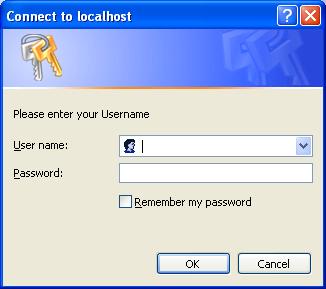
在服务器端,要让访问用户名,请使用下面的代码片段:-
Principal principal = request.getUserPrincipal();
String userName = principal.getName();
示例LDAP用户管理器(JBOSS):
public LdapContext getLdapContext() {
    // Set up environment for creating initial context
    Hashtable<String, Object> env = new Hashtable<String, Object>(11);

    env.put(Context.INITIAL_CONTEXT_FACTORY, "com.sun.jndi.ldap.LdapCtxFactory");
    // e.g., ldap://IP address of remote m/c:10389/dc=sevenseas,dc=com
    env.put(Context.PROVIDER_URL, LDAP_PROVIDER_URL + Constant.FORWARD_SLASH + LDAP_DOMAIN);

    // Authenticate as User and password
    env.put(Context.SECURITY_AUTHENTICATION, "simple");
    // e.g., "uid=admin,ou=system"
    env.put(Context.SECURITY_PRINCIPAL, LDAP_ADMIN);
    env.put(Context.SECURITY_CREDENTIALS, LDAP_DEFAULT_PASSWORD);

    try {
        // Create initial context
        ldapContext = new InitialLdapContext(env, null);
        if (ldapContext == null) {
            LogManager.fatal("Invalid LDAP system properties. Please contact your administrator.",
                    LDAPUserManager.class.getName());
        }
        System.out.println("Organization : " + ldapContext.getNameInNamespace());
    } catch (Exception e) {
        StringWriter stack = new StringWriter();
        e.printStackTrace(new PrintWriter(stack));
        LogManager.fatal(stack.toString(), LDAPUserManager.class.getName());
    }
    return ldapContext;
}
这将构造带有环境参数的初始上下文,以便与LDAP服务器连接。
现在,要从AD中获取用户数据,请使用以下代码:
try {
        SearchControls constraints = new SearchControls();
        constraints.setSearchScope(SearchControls.SUBTREE_SCOPE);
        String[] attrIDs = { "cn", "sn", "givenName", "uid", "mail", "userPassword" };

        constraints.setReturningAttributes(attrIDs);

        // Search for user in LDAP server by emailId
        NamingEnumeration<SearchResult> answer = ldapContext.search(LDAP_GROUP, "mail=" + emailId, constraints);
        if (answer.hasMore()) {
            LogManager.info("User with email id '" + emailId + "' found.", LDAPUserManager.class.getName());

            Attributes attrs = answer.next().getAttributes();

            userDTO = new UserDTO();

            // Store user details temporarily
            Attribute firstNameAttr = attrs.get("givenName");
            String firstName = "";
            if (firstNameAttr == null) {
                userDTO.setFirstName(firstName);
            } else {
                firstName = firstNameAttr.get().toString();
                if (firstName == null) {
                    userDTO.setFirstName("");
                }
                userDTO.setFirstName(firstName);
            }

            Attribute lastNameAttr = attrs.get("sn");
            String lastName = "";
            if (lastNameAttr == null) {
                userDTO.setLastName(lastName);
            } else {
                lastName = lastNameAttr.get().toString();
                if (lastName == null) {
                    userDTO.setLastName("");
                }
                userDTO.setLastName(lastName);
            }

            return userDTO;
        } else {
            LogManager.fatal("Invalid User.", LDAPUserManager.class.getName());
            return userDTO;
        }
    } catch (Exception e) {
        StringWriter stack = new StringWriter();
        e.printStackTrace(new PrintWriter(stack));
        LogManager.fatal(stack.toString(), LDAPUserManager.class.getName());
    }
希望这能帮到你。
https://stackoverflow.com/questions/26389358
复制相似问题
腾讯云开发者

Copyright © 2013 - 2026 Tencent Cloud. All Rights Reserved. 腾讯云 版权所有
深圳市腾讯计算机系统有限公司 ICP备案/许可证号:粤B2-20090059  粤公网安备44030502008569号
腾讯云计算(北京)有限责任公司 京ICP证150476号 | 京ICP备11018762号