
JOptionPane似乎使JPanel失去理智
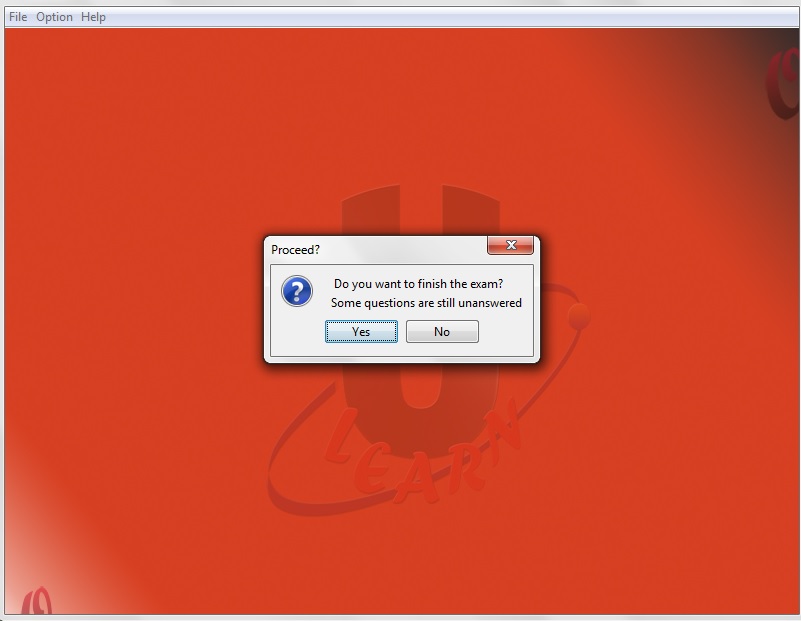
我目前正在开发一个测试程序,如果所有的问题都没有得到回答,就会出现一个JOptionpane确认对话框,询问用户是否想继续。起初,一切都很好,然后我决定在整个程序中使用paintComponent()方法。在这个实现之后,如果这个JOptionpane弹出,包含的Jpanel就会消失(将显示的所有问题都带走),那么只有背景仍然是可见的。一整天都在做这事。下面是出现问题的代码:
/*
 * To change this license header, choose License Headers in Project Properties.
 * To change this template file, choose Tools | Templates
 * and open the template in the editor.
 */

package operator;

import java.awt.BorderLayout;
import java.awt.FlowLayout;
import java.awt.Graphics;
import java.util.ArrayList;
import java.util.HashMap;
import java.util.Iterator;
import java.util.LinkedHashSet;
import java.util.Set;
import javax.swing.JOptionPane;
import static operator.Rules.examTimer;
import static operator.Welcome.image;

/**
 *
 * @author Hendy
 */

public class QuestionExams extends javax.swing.JPanel {
          QuestionCall on = new QuestionCall();
          int sBtn,nums = on.number();

    /**
     * Creates new form QuestionExams
     */
    public QuestionExams() {
        randomQuestion();
        initComponents();


        if (control == 0)
         previousButton.setEnabled(false);

           group.add(a);
           group.add(b);
           group.add(c);
           group.add(d);

       setSelected();
       if (counter>=(maximum()-1) && control >= (maximum()-1))
       {nextButton.setText("Finish");
         finish.setVisible(false);}

       if (counter== maximum() && control == maximum())
       {
           determinant();
       }
    }
    public void  determinant(){

                if (checkAdd()<maximum())
              {
                {
                   sBtn = JOptionPane.showConfirmDialog(null, "  Do you want to finish the exam?\n "
                                                                    + "Some questions are still unanswered",
                                                                    "Proceed?",
                                                          JOptionPane.YES_NO_OPTION);

                         if (sBtn == JOptionPane.YES_OPTION)
                            { wrongsAdd();
                              nextPage();
                            System.out.println("this shows the question key:"+wrongs.get(0));
                            System.out.println("this shows the question number:"+wrongNos.get(0));}
                         else
                         {
                                on.numberBack();
                                selection();
                                --control;
                                --key;

                                removeAll();
                                setLayout(new FlowLayout());
                                setLayout( new BorderLayout() );
                                invalidate();
                                QuestionExams oan = new QuestionExams();
                                add(oan,BorderLayout.NORTH );
                                revalidate();
                               System.out.println("counter:"+counter +" and "+"control:" +control);

                         }
                    }
              }


              else
              {
                     wrongsAdd();
                      nextPage();
              }


       }

    public void paintComponent(Graphics g)
    {
    g.drawImage(image, 0, 0, null);
    repaint();
    }


    @SuppressWarnings("unchecked")

    private void initComponents() {

        group = new javax.swing.ButtonGroup();
        jPanel2 = new javax.swing.JPanel();
        jPanel3 = new javax.swing.JPanel();
        jLabel1 = new javax.swing.JLabel();
        examTiming = new javax.swing.JLabel();
        jPanel1 = new javax.swing.JPanel();
        jLabel2 = new javax.swing.JLabel();
        jScrollPane2 = new javax.swing.JScrollPane();
        nameQ = new javax.swing.JTextArea();
        jPanel4 = new javax.swing.JPanel();
        jLabel5 = new javax.swing.JLabel();
        jLabel6 = new javax.swing.JLabel();
        a = new javax.swing.JRadioButton();
        jLabel7 = new javax.swing.JLabel();
        jLabel8 = new javax.swing.JLabel();
        b = new javax.swing.JRadioButton();
        c = new javax.swing.JRadioButton();
        d = new javax.swing.JRadioButton();
        jScrollPane1 = new javax.swing.JScrollPane();
        optA = new javax.swing.JTextArea();
        jScrollPane3 = new javax.swing.JScrollPane();
        optB = new javax.swing.JTextArea();
        jScrollPane4 = new javax.swing.JScrollPane();
        optC = new javax.swing.JTextArea();
        jScrollPane5 = new javax.swing.JScrollPane();
        optD = new javax.swing.JTextArea();
        quitButton = new javax.swing.JButton();
        previousButton = new javax.swing.JButton();
        nextButton = new javax.swing.JButton();
        finish = new javax.swing.JButton();


    private void finishActionPerformed(java.awt.event.ActionEvent evt) {
        // TODO add your handling code here:
        removeAll();
        setLayout(new FlowLayout());
        setLayout( new BorderLayout() );
        invalidate();
        AnswerCheck an = new AnswerCheck();
        add(an, BorderLayout.NORTH );
        revalidate();
        wrongsAdd();
    }

    private void nextButtonActionPerformed(java.awt.event.ActionEvent evt) {
        // TODO add your handling code here:

        {
            selection();

            if(control==counter){
                {newAnswer();

                    {if ((QuestionCall.display6E(balance.get(key+1))+ "").equals(objective.get(control)))
                        scores=1;
                        else
                        scores =0;}
                    newScore();
                    if ("nothing".equals(value)){
                        check=0;
                        newCheck();

                    }

                }
                ++counter;}

            if (control<counter){
                replaceAnswer();

                {if ((QuestionCall.display6E(balance.get(key+1))+ "").equals(objective.get(control)))
                    scores=1;
                    else
                    scores =0;}
                changeScore();
                if ("nothing".equals(value)){
                    check=0;
                    validateCheck();

                }
            }

            ++control;

            System.out.println(QuestionCall.display6E(balance.get(key+1)));

            ++key;

            removeAll();
            setLayout( new BorderLayout() );
            invalidate();
            QuestionExams oan = new QuestionExams();
            add(oan,BorderLayout.NORTH );
            revalidate();

            System.out.println(key);

            System.out.println("counter:"+counter +" and "+"control:" +control+" position: "+position);

        }
    }

    private void previousButtonActionPerformed(java.awt.event.ActionEvent evt) {
        // TODO add your handling code here:
        on.numberBack();
        selection();

        --control;
        --key;

        removeAll();
        setLayout(new FlowLayout());
        setLayout( new BorderLayout() );
        invalidate();
        QuestionExams oan = new QuestionExams();
        add(oan,BorderLayout.NORTH );
        revalidate();

        System.out.println(QuestionCall.display6E(balance.get(key+1)));

        System.out.println(key);
        System.out.println("counter:"+counter +" and "+"control:" +control);

    }

    private void quitButtonActionPerformed(java.awt.event.ActionEvent evt) {
        // TODO add your handling code here:
        int select = JOptionPane.showConfirmDialog(null, "Do you really want to quit the test?",
            "Quit?",
            JOptionPane.YES_NO_OPTION);
        if (select == JOptionPane.YES_OPTION)
        // to
        {

            examTimer.stop();
            on.clearFramework();

            removeAll();
            setLayout(new FlowLayout());
            setLayout( new BorderLayout() );
            invalidate();
            oktest an = new oktest();
            add(an, BorderLayout.NORTH );
            revalidate();}
    }


    }


    private javax.swing.JRadioButton a;
    private javax.swing.JRadioButton b;
    private javax.swing.JRadioButton c;
    private javax.swing.JRadioButton d;
    public static javax.swing.JLabel examTiming;
    private javax.swing.JButton finish;
    private javax.swing.ButtonGroup group;
    private javax.swing.JLabel jLabel1;
    private javax.swing.JLabel jLabel2;
    private javax.swing.JLabel jLabel5;
    private javax.swing.JLabel jLabel6;
    private javax.swing.JLabel jLabel7;
    private javax.swing.JLabel jLabel8;
    private javax.swing.JPanel jPanel1;
    public javax.swing.JPanel jPanel2;
    private javax.swing.JPanel jPanel3;
    private javax.swing.JPanel jPanel4;
    private javax.swing.JScrollPane jScrollPane1;
    private javax.swing.JScrollPane jScrollPane2;
    private javax.swing.JScrollPane jScrollPane3;
    private javax.swing.JScrollPane jScrollPane4;
    private javax.swing.JScrollPane jScrollPane5;
    private javax.swing.JTextArea nameQ;
    private javax.swing.JButton nextButton;
    private javax.swing.JTextArea optA;
    private javax.swing.JTextArea optB;
    private javax.swing.JTextArea optC;
    private javax.swing.JTextArea optD;
    private javax.swing.JButton previousButton;
    private javax.swing.JButton quitButton;

}
大多数布局代码都被忽略了。为了清晰起见,我还包括了一些图片。
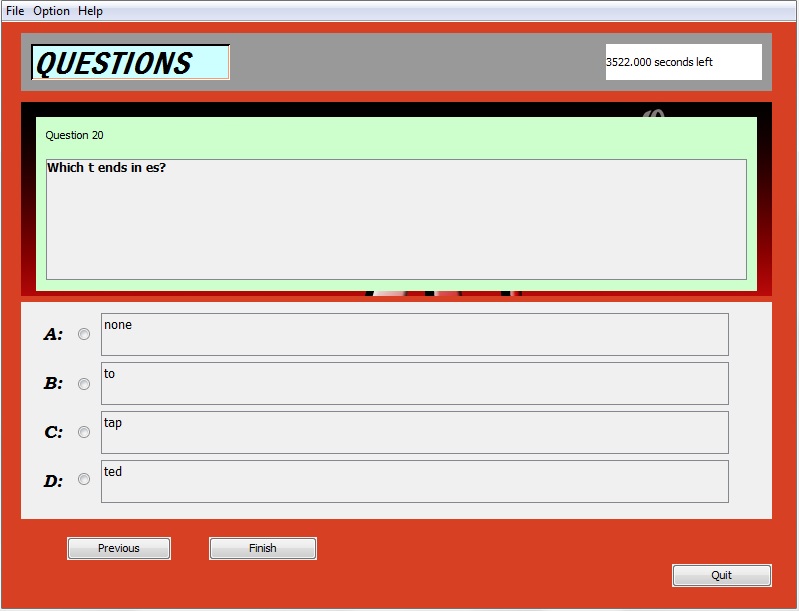
首先是最后一个问题页。
下一个是当我点击Next按钮(现在标签为finish)时会发生什么。
最后,这是最初的工作,在我完成paintComponent()方法之前,不幸的是,我已经没有这个方法的代码了(我只有.exe文件)
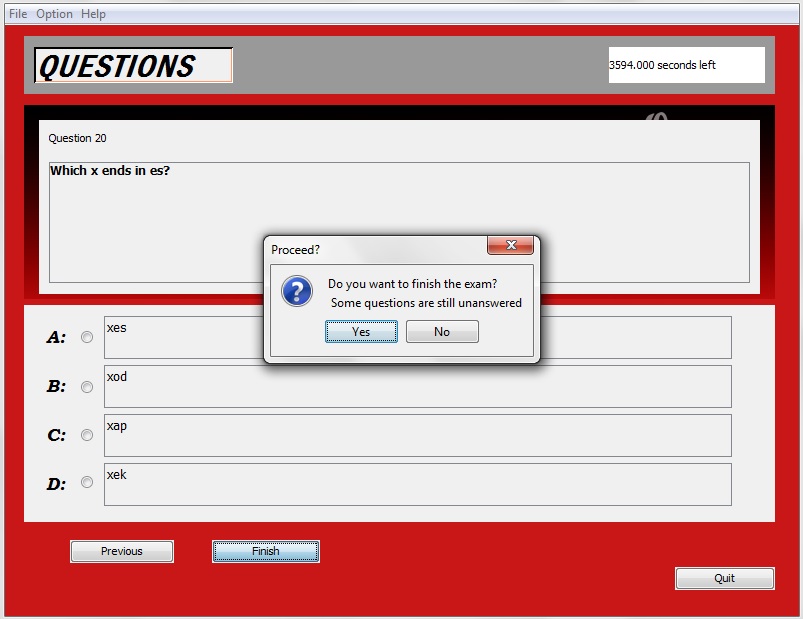
我不知道它是否是一个bug,因为退出按钮也显示了它自己的选项窗格,并且它显示得很完美。
回答 2
Stack Overflow用户
发布于 2014-10-15 20:30:06
解决了。我不太确定错误是否来自,所以我决定创建我自己的是-没有对话框。它一开始正常工作,但当我把它变成模态时,它有着与JOptionPane相同的问题,这使我得出结论,导致它的是JOptionPane的模态特性。但是,通过将JOptionPane操作移动到next按钮,而不是构造函数,事件再次发生,就像往常一样。
Stack Overflow用户
发布于 2014-10-15 14:58:36
不太确定,但是尝试在一个完全不同的线程中启动弹出。也许能行。
https://stackoverflow.com/questions/26385463
复制相似问题
腾讯云开发者

Copyright © 2013 - 2026 Tencent Cloud. All Rights Reserved. 腾讯云 版权所有
深圳市腾讯计算机系统有限公司 ICP备案/许可证号:粤B2-20090059  粤公网安备44030502008569号
腾讯云计算(北京)有限责任公司 京ICP证150476号 | 京ICP备11018762号