
wpf ClipToBounds的右下角
wpf ClipToBounds的右下角
提问于 2014-10-14 11:32:29
如何剪裁路径笔划?有了ClipToBounds="True",在严格和底部有多余的部分。
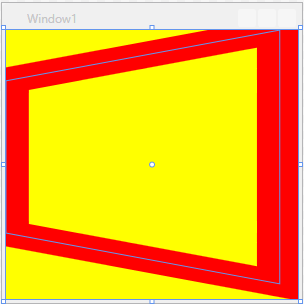
<Grid  Background="Yellow" ClipToBounds="True">
    <Viewbox Stretch="Fill">
        <Path Data="M30,0 L0,10 L0,40 L30,50 L30,0" Stroke="Red" StrokeThickness="5" />
    </Viewbox>
</Grid>
编辑
我发现我不需要缩放边框的厚度,所以解决方案是:
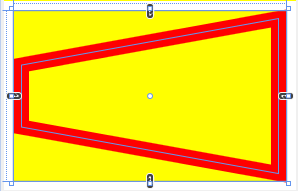
<Grid x:Name="grid" Grid.Row="2" Background="Yellow" >
    <Grid.Resources>
        <ScaleTransform x:Key="transform"
                ScaleX="{Binding ActualWidth, ElementName=grid}"
                ScaleY="{Binding ActualHeight, ElementName=grid}" />
    </Grid.Resources>
    <Path Stroke="Red" StrokeThickness="15" Stretch="Fill">
        <Path.Data>
            <PathGeometry Transform="{StaticResource transform}">
                <PathGeometry.Figures>
                    <PathFigureCollection>
                        <PathFigure IsClosed="True" StartPoint="0,0.7">
                            <PathFigure.Segments>
                                <PathSegmentCollection>
                                    <LineSegment Point="1,1" />
                                    <LineSegment Point="1,0" />
                                    <LineSegment Point="0,0.3" />
                                </PathSegmentCollection>
                            </PathFigure.Segments>
                        </PathFigure>
                    </PathFigureCollection>
                </PathGeometry.Figures>
            </PathGeometry>
        </Path.Data>
    </Path>
</Grid>回答 1
Stack Overflow用户
回答已采纳
发布于 2014-10-14 12:08:54
如果不缩放行程厚度是可以的,您可以删除Viewbox并直接在路径上设置Stretch="Fill":
<Grid Background="Yellow" ClipToBounds="True" Margin="20">
    <Path Stretch="Fill" Data="M30,0 L0,10 L0,40 L30,50 L30,0 Z"
          Stroke="Red" StrokeThickness="20" />
</Grid>否则,您可以在例如矩形中使用VisualBrush中的路径(该矩形需要显式设置一些大小):
<Grid Background="Yellow" ClipToBounds="True" Margin="20">
    <Viewbox Stretch="Fill">
        <Rectangle Width="1" Height="1">
            <Rectangle.Fill>
                <VisualBrush>
                    <VisualBrush.Visual>
                        <Path Data="M30,0 L0,10 L0,40 L30,50 L30,0 Z"
                              Stroke="R*emphasized text*ed" StrokeThickness="5" />
                    </VisualBrush.Visual>
                </VisualBrush>
            </Rectangle.Fill>
        </Rectangle>
    </Viewbox>
</Grid>还请注意,路径几何是封闭的尾随Z。
页面原文内容由Stack Overflow提供。腾讯云小微IT领域专用引擎提供翻译支持
原文链接:
https://stackoverflow.com/questions/26359800
复制相关文章
相似问题
腾讯云开发者

Copyright © 2013 - 2026 Tencent Cloud. All Rights Reserved. 腾讯云 版权所有
深圳市腾讯计算机系统有限公司 ICP备案/许可证号:粤B2-20090059  粤公网安备44030502008569号
腾讯云计算(北京)有限责任公司 京ICP证150476号 | 京ICP备11018762号