
css漏斗图
css漏斗图
提问于 2014-10-13 11:51:25
我正在尝试自定义一个漏斗图的基础上,我已经通过数据库的网页。所有工作良好,除了css渲染图表。
    <ul id="funnel-cht">
<li style="height:70px;width:50%;background-color:yellow">pendora</li>
<li style="height:70px;width:40%;background-color:#98bf26">pending</li>
<li style="height:70px;width:30%;background-color:orange">pen</li>
<li style="height:70px;width:20%;background-color:#c10000">Test</li>
</ul>
下面是它现在的样子- http://jsfiddle.net/m74ets8v/1/
我想根据实际的漏斗图来设计,举个例子-
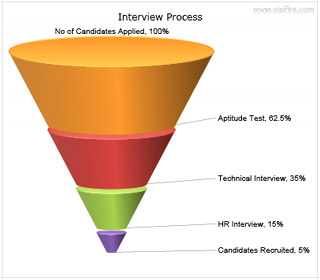
我将如何设计这张图表,使之对我有意义。
回答 3
Stack Overflow用户
回答已采纳
发布于 2018-09-07 06:12:56
.funnel_outer{width:420px;float: left;position: relative;padding:0 10%;}
.funnel_outer *{box-sizing:border-box}
	.funnel_outer ul{margin:0;padding:0;}
	.funnel_outer ul li{float: left;position: relative;margin:2px 0;height: 50px;clear: both;text-align: center;width:100%;list-style:none}
	.funnel_outer li span{ border-top-width: 50px;border-top-style:  solid; border-left: 25px solid transparent; border-right:25px solid transparent; height: 0;display: inline-block;vertical-align: middle; }
	.funnel_step_1 span{width:100%;border-top-color: #8080b6;}
	.funnel_step_2 span{width:calc(100% - 50px);border-top-color: #669966}
	.funnel_step_3 span{width:calc(100% - 100px);border-top-color: #a27417}
	.funnel_step_4 span{width:calc(100% - 150px);border-top-color: #ff66cc}
	.funnel_step_5 span{width:calc(100% - 200px);border-top-color: #0099ff}
	.funnel_step_6 span{width:calc(100% - 250px);border-top-color: #027002}
	.funnel_step_7 span{width:calc(100% - 300px);border-top-color: #ff0000;}
.funnel_outer ul li:last-child span{border-left: 0;border-right: 0;border-top-width: 40px;}
.funnel_outer ul li.not_last span{border-left: 5px  solid transparent;border-right:5px  solid transparent;border-top-width:50px;}
.funnel_outer ul li span p{margin-top: -30px;color:#fff;font-weight: bold;text-align: center;} <div class="funnel_outer">
<ul>
<li class="funnel_step_1"><span><p>1</p></span></li>
<li class="funnel_step_2"><span><p>2</p></span> </li>
<li class="funnel_step_3"><span><p>3</p></span></li>
<li class="funnel_step_4"><span><p>4</p></span></li>
<li class="funnel_step_5"><span><p>5</p></span></li>
<li class="funnel_step_6"><span><p>6</p></span></li>
<li class="funnel_step_7"><span><p>7</p></span></li>
</ul>
</div>
Stack Overflow用户
发布于 2014-10-13 12:24:11
诀窍是将margin: 0 auto用于li。设置左/右维度的自动边距计算将使块元素水平居中。(不幸的是,这种技术并不适用于垂直中心化,但这是另一回事。)
下面是您的代码,稍微修改一下,在一个工作示例中:
ul, li { margin: 0; padding: 0; list-style: none; }
ul { width: 400px; }
li { height: 70px; margin: 0 auto; }

/* NOTE: nth-child would be the better way to assign CSS to a set of
   uniform elements than one class per li, but let's keep it simple for now */

li.li1 { width: 50%; background-color: yellow; }
li.li2 { width: 40%; background-color: #98bf26; }
li.li3 { width: 30%; background-color: orange; }
li.li4 { width: 20%; background-color: #c10000; }<ul>
<li class='li1'>pendora</li>
<li class='li2'>pending</li>
<li class='li3'>pen</li>
<li class='li4'>Test</li>
</ul>
顺便说一句,正如注释中已经指出的:为了有实际的梯形,您(据我所知)需要使用SVG,当然,对于不支持SVG的浏览器也需要适当的退路。
Stack Overflow用户
发布于 2014-10-13 12:21:42
如果正如我从注释中看到的那样,您只需要对<li>元素进行居中,就可以设置自动边距。
#funnel-cht>li
{
    display:block;
    margin:0 auto;
}页面原文内容由Stack Overflow提供。腾讯云小微IT领域专用引擎提供翻译支持
原文链接:
https://stackoverflow.com/questions/26339338
复制相关文章
相似问题
腾讯云开发者

Copyright © 2013 - 2026 Tencent Cloud. All Rights Reserved. 腾讯云 版权所有
深圳市腾讯计算机系统有限公司 ICP备案/许可证号:粤B2-20090059  粤公网安备44030502008569号
腾讯云计算(北京)有限责任公司 京ICP证150476号 | 京ICP备11018762号