
matplotlib:用bbox_inches=‘紧’忽略注释保存无花果
看来,bbox_inches='tight'选项在savefig中忽略没有文本的注释。这是我的示例代码
import matplotlib.pyplot as plt

fig = plt.figure()
ax = fig.add_axes([0.2, 0.2, 0.6, 0.6])
arrow1 = ax.annotate('text', xy = [0.5,-0.2], xycoords = 'axes fraction', \
    xytext = [-72,0], textcoords = 'offset points', \
    arrowprops = dict(arrowstyle = '-|>', mutation_scale = 10.0, \
    shrinkA = 0, shrinkB = 0, linewidth = 1))
arrow2 = ax.annotate('', xy = [0.5,1.2], xycoords = 'axes fraction', \
    xytext = [-72,0], textcoords = 'offset points', \
    arrowprops = dict(arrowstyle = '-|>', mutation_scale = 10.0, \
    shrinkA = 0, shrinkB = 0, linewidth = 1))
fig.savefig('test.png')
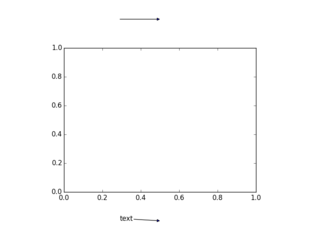
fig.savefig('test-tight.png', bbox_inches = 'tight')这里是test.png,显示了我有两个注释。一个注释,带有文本,在轴下面;一个注释,没有文本,在轴之上。
这里是test-tight.png,只显示一个注释。没有文本的轴上的注释已经被忽略了。
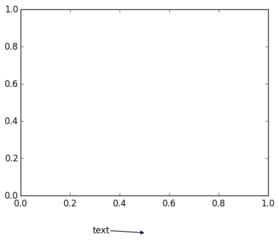
在源代码中,bbox_inches='tight'试图通过调用artist.get_window_extent()来查找艺术家的大小和位置。当我尝试arrow1.get_window_extent()时,我得到一个与文本相对应的边框。当我尝试arrow2.get_window_extent()时,我得到一个零高度和零宽度的边框。因此,问题的根源是.get_window_extent()不包括箭头。
对于如何以一种相当稳健的方式解决这一问题,有什么想法吗?如果我能为整个注释找到合适的边框,那么我就可以做生意了。但是,我似乎无法从arrow2中获取行对象或补丁对象。
如果有关系,我使用的是matplotlib 1.4.0、Python 2.7.6和MacOSX10.8.5
回答 2
Stack Overflow用户
发布于 2016-03-12 15:28:44
事实上,我在2014年将这个bug报告为第3816期,并在matplotlib v1.4.3中进行了修复。很抱歉没有提前发布此结果。
Stack Overflow用户
发布于 2016-03-12 10:23:56
也许您可以尝试通过在注释命令中添加以下参数来创建边界框:bbox=dict(facecolor='none', edgecolor='none', pad=1.0)或如果添加一些空格或白色字符,则自动创建边界框。
https://stackoverflow.com/questions/26321932
复制相似问题
腾讯云开发者

Copyright © 2013 - 2026 Tencent Cloud. All Rights Reserved. 腾讯云 版权所有
深圳市腾讯计算机系统有限公司 ICP备案/许可证号:粤B2-20090059  粤公网安备44030502008569号
腾讯云计算(北京)有限责任公司 京ICP证150476号 | 京ICP备11018762号