
如何使用Paint.NET直接引用C#程序集
我想直接引用Paint.NET程序集,并以这种方式使用它的功能。我不知道如何使用PaintDotNet.Core.dll文件.dll并在C# visual中使用它的功能。请
想要引用这些程序集:C:\ Files\Paint.NET\PaintDotNet.*.dll然后在这些命名空间中的类中穿插.
代码:-
  private void button2_Click(object sender, EventArgs e)
{
    OpenFileDialog ofd = new OpenFileDialog();
    string filename = "";

    if (ofd.ShowDialog() == DialogResult.OK)
    {
        filename = System.IO.Path.GetFullPath(ofd.FileName);
    }
   // MessageBox.Show(filename, "file");
    pictureBox1.ImageLocation = filename;
    pictureBox1.SizeMode = PictureBoxSizeMode.StretchImage;

    DialogResult result = MessageBox.Show("Do you wish to continue?", "Save Changes", MessageBoxButtons.YesNo, MessageBoxIcon.Question);
    if (result == DialogResult.Yes)
    {
        System.Diagnostics.Process.Start(@"C:\Program Files\Paint.NET\PaintDotNet.exe");
       // here i need to perform the function like
       //Open + O`
       //ctrl + Shift + L)` then `
       //(ctrl + Shift + G)`. then save
       //`ctrl + Shift + S`
    }
    else
    {
        return;
    }
}回答 2
Stack Overflow用户
发布于 2014-10-24 02:10:03
只需按照指示将快捷键发送到另一个应用程序即可。
将此命名空间添加到类中。
using System.Runtime.InteropServices;然后用SetForegroundWindow语句声明DllImport函数。这将创建在User32.dll中创建的方法的对象。
[DllImport ("User32.dll")]
static extern int SetForegroundWindow(IntPtr point);并将以下代码添加到您的按钮单击或项目中的任何位置。此代码将导航OpenFileDialog以打开Paint.NET应用程序中的现有文件。
private void button1_Click(object sender, EventArgs e)
{
    Process p = Process.GetProcessesByName("PaintDotNet").FirstOrDefault();
    if (p != null)
    {
        SetForegroundWindow(p.MainWindowHandle); //Set the Paint.NET application at front
        SendKeys.SendWait("^(o)"); //^(o) will sends the Ctrl+O key to the application.
    }
}大多数程序员在Ctrl+O和Ctrl+o之间犯的错误似乎相似,但是,这两个键的ascii值是不同的。因此,确保关键字符不是大写的。您还可以阅读有关SendKey方法在msdn上的全部信息。您可以进行任何键组合并通过SendWait()方法发送。
Stack Overflow用户
发布于 2014-10-09 23:35:35
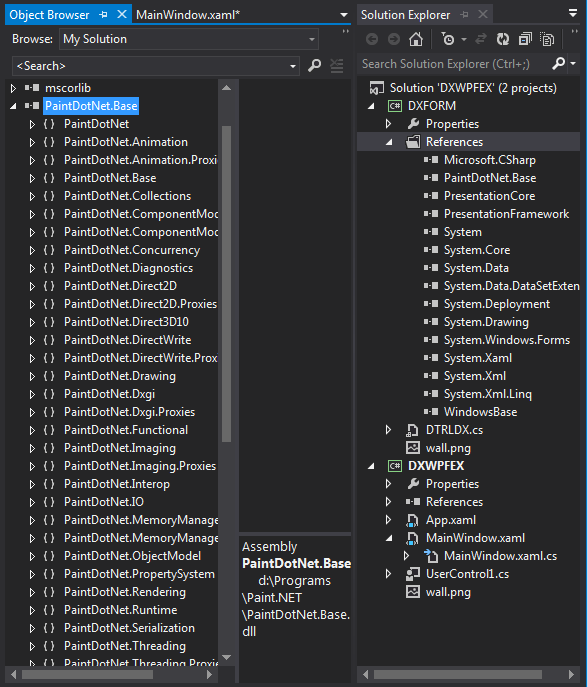
只需将一个或部分或全部库添加到项目中即可。作为测量状态,然后使用对象资源管理器。
注意:不要介意.xaml的内容或者我试图在wpf应用程序中呈现SharpDX D3D11的实际项目,以生成地图编辑器(而且没有工具箱(不要问我为什么)。(我疯了)。
我发誓昨晚我有密码你是想让paint.net自动化吗?你将不得不做一个插件,这将使流程更加简化,而不是必须启动第二个应用程序。
https://stackoverflow.com/questions/26287616
复制相似问题
腾讯云开发者

Copyright © 2013 - 2026 Tencent Cloud. All Rights Reserved. 腾讯云 版权所有
深圳市腾讯计算机系统有限公司 ICP备案/许可证号:粤B2-20090059  粤公网安备44030502008569号
腾讯云计算(北京)有限责任公司 京ICP证150476号 | 京ICP备11018762号