
如何在JavaFX TableView中行悬停时使某些事情发生?
如何在JavaFX TableView中行悬停时使某些事情发生?
提问于 2014-10-09 03:41:14
现在,当在表视图中选择一行时,我在鼠标位置显示了对话框。当我悬停在每一行时,我希望对话框显示出来,这里似乎有一个CSS :悬浮,所以我假设它可以以某种身份在java代码中捕捉到。
回答 1
Stack Overflow用户
回答已采纳
发布于 2014-10-09 20:51:25
您可以创建自定义表行工厂,该工厂将侦听器添加到行的悬停属性中,并在悬停状态更改时采取行动。
下面是一些示例代码,它在用户徘徊在表行上时更新标签:
table.setRowFactory(tableView -> {
    final TableRow<Person> row = new TableRow<>();

    row.hoverProperty().addListener((observable) -> {
        final Person person = row.getItem();

        if (row.isHover() && person != null) {
            label.setText("Address Book: "
                + person.getFirstName() + " "
                + person.getLastName()
            );
        } else {
            label.setText("Address Book");
        }
    });

    return row;
});
在示例图像中,鼠标指针(未显示)悬停在艾玛琼斯的行上方,因此标题标题被修改为“地址簿:艾玛琼斯”。
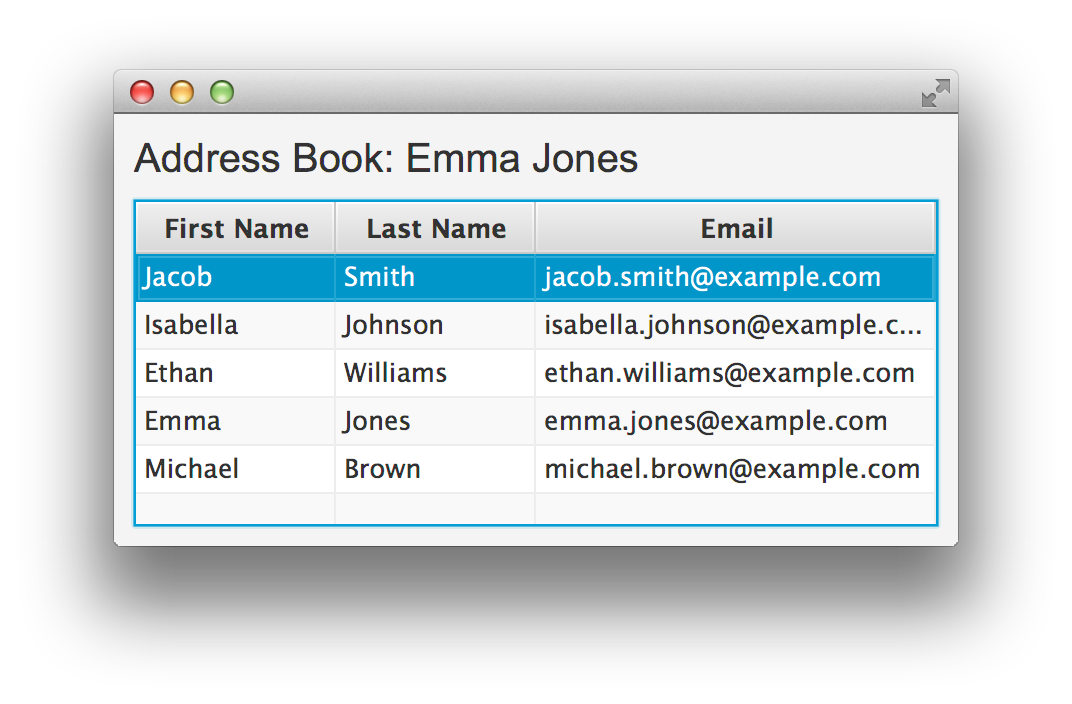
下面是从Oracle JavaFX TableView教程示例代码中采用的完整示例:
import javafx.application.Application;
import javafx.beans.property.SimpleStringProperty;
import javafx.collections.*;
import javafx.geometry.Insets;
import javafx.scene.*;
import javafx.scene.control.*;
import javafx.scene.control.cell.PropertyValueFactory;
import javafx.scene.layout.VBox;
import javafx.scene.text.Font;
import javafx.stage.Stage;

public class TableViewSample extends Application {

    private TableView<Person> table = new TableView<Person>();
    private final ObservableList<Person> data =
        FXCollections.observableArrayList(
            new Person("Jacob", "Smith", "jacob.smith@example.com"),
            new Person("Isabella", "Johnson", "isabella.johnson@example.com"),
            new Person("Ethan", "Williams", "ethan.williams@example.com"),
            new Person("Emma", "Jones", "emma.jones@example.com"),
            new Person("Michael", "Brown", "michael.brown@example.com")
        );

    public static void main(String[] args) {
        launch(args);
    }

    @Override
    public void start(Stage stage) {
        final Label label = new Label("Address Book");
        label.setFont(new Font("Arial", 20));

        table.setEditable(true);

        TableColumn<Person, String> firstNameCol = new TableColumn<>("First Name");
        firstNameCol.setMinWidth(100);
        firstNameCol.setCellValueFactory(
                new PropertyValueFactory<>("firstName"));

        TableColumn<Person, String> lastNameCol = new TableColumn<>("Last Name");
        lastNameCol.setMinWidth(100);
        lastNameCol.setCellValueFactory(
                new PropertyValueFactory<>("lastName"));

        TableColumn<Person, String> emailCol = new TableColumn<>("Email");
        emailCol.setMinWidth(200);
        emailCol.setCellValueFactory(
                new PropertyValueFactory<>("email"));

        table.setRowFactory(tableView -> {
            final TableRow<Person> row = new TableRow<>();
            row.hoverProperty().addListener((observable) -> {
                final Person person = row.getItem();
                if (row.isHover() && person != null) {
                    label.setText(
                       "Address Book: "
                               + person.getFirstName() + " "
                               + person.getLastName()
                    );
                } else {
                    label.setText("Address Book");
                }
            });

            return row;
        });

        table.setItems(data);
        table.getColumns().addAll(firstNameCol, lastNameCol, emailCol);

        final VBox vbox = new VBox(10);
        vbox.setPadding(new Insets(10));
        vbox.getChildren().addAll(label, table);

        Scene scene = new Scene(vbox);
        stage.setScene(scene);
        stage.show();
    }

    public static class Person {

        private final SimpleStringProperty firstName;
        private final SimpleStringProperty lastName;
        private final SimpleStringProperty email;

        private Person(String fName, String lName, String email) {
            this.firstName = new SimpleStringProperty(fName);
            this.lastName = new SimpleStringProperty(lName);
            this.email = new SimpleStringProperty(email);
        }

        public String getFirstName() {
            return firstName.get();
        }

        public void setFirstName(String fName) {
            firstName.set(fName);
        }

        public String getLastName() {
            return lastName.get();
        }

        public void setLastName(String fName) {
            lastName.set(fName);
        }

        public String getEmail() {
            return email.get();
        }

        public void setEmail(String fName) {
            email.set(fName);
        }
    }
} 页面原文内容由Stack Overflow提供。腾讯云小微IT领域专用引擎提供翻译支持
原文链接:
https://stackoverflow.com/questions/26269940
复制相关文章
相似问题
腾讯云开发者

Copyright © 2013 - 2026 Tencent Cloud. All Rights Reserved. 腾讯云 版权所有
深圳市腾讯计算机系统有限公司 ICP备案/许可证号:粤B2-20090059  粤公网安备44030502008569号
腾讯云计算(北京)有限责任公司 京ICP证150476号 | 京ICP备11018762号