
如何在ErrorProvider1上显示标签“错误”
如何在ErrorProvider1上显示标签“错误”
提问于 2014-10-08 15:35:07
目标
每当我收到错误时,我想显示标签上的"Error on ErrorProvider1“属性中的文本。请参阅下面标签的属性。
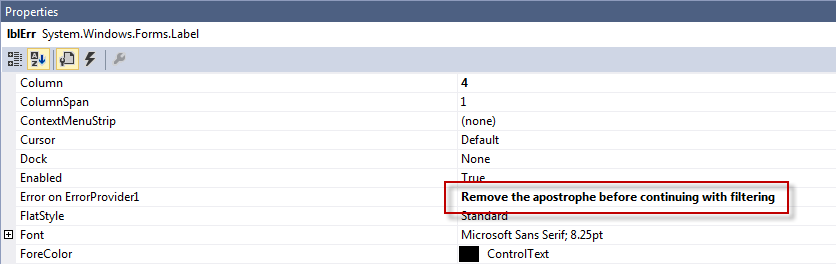
我尝试将红色矩形中的文本显示到我的ErrorProvider1 SetError(control, value)函数中。
 If TextBox1.Text.Trim.Contains("'") Then
    ErrorProvider1.SetError(lblErr, ErrorProvider1.GetError(lblErr))
Else
    ErrorProvider1.SetError(lblErr, "")
End If
如何从ErrorProvider1检索“lblErr上的错误”文本以将其显示在ErrorProvider1 SetError值中?
回答 2
Stack Overflow用户
回答已采纳
发布于 2014-10-08 15:46:56
您的问题是,在没有任何错误的情况下,您正在替换错误消息。正如您在下面的注释中所指出的,您正在标签的Tag中存储本地化错误消息,因此您可以执行以下操作:
If TextBox1.Text.Trim.Contains("'") Then
    ErrorProvider1.SetError(lblErr, lblErr.Tag)
Else
    ErrorProvider1.SetError(lblErr, "")
End If使用ErrorProvider1.GetError(Control)获取值是正确的。只是在检索之前,您很可能会用空字符串替换它。
Stack Overflow用户
发布于 2014-10-08 17:05:19
ErrorProvider组件很难有效地使用。不过,它是可修复的,我将在C#中给出一个示例,它用一些新的功能扩展了组件:
- 当enable参数为true时,ShowError(Control,bool )显示您在设计时输入的文本。更易于使用的SetError()版本。
- 如果显示任何活动警告图标,则HasErrors返回true。方便您的OK按钮的单击事件处理程序。
- FocusError()将焦点设置为具有警告图标(如果有的话)的第一个控件。如果不存在警告,则返回false。
- SetError()是ErrorProvider.SetError()的替代。只有在窗体的Load事件触发后添加任何控件或需要修改警告文本时,才需要该控件。
向项目中添加一个新类并粘贴下面所示的代码。编译。将它从工具箱的顶部放到窗体上。设计时的行为是相同的。谦逊地测试。
using System;
using System.Collections.Generic;
using System.ComponentModel;
using System.Windows.Forms;
using System.ComponentModel.Design;

class MyErrorProvider : ErrorProvider {
    public void ShowError(Control ctl, bool enable) {
        // Easy to use version of SetError(), uses design-time text
        if (!enable) base.SetError(ctl, "");
        else {
            if (errors.ContainsKey(ctl)) base.SetError(ctl, errors[ctl]);
            else base.SetError(ctl, "No error text available");
        }
    }

    public bool HasErrors {
        // True if any errors are present
        get {
            foreach (var err in errors)
                if (!string.IsNullOrEmpty(base.GetError(err.Key))) return true;
            return false;
        }
    }

    public bool FocusError() {
        // Set the focus to the first control with an active error
        foreach (var err in errors) {
            if (!string.IsNullOrEmpty(base.GetError(err.Key))) {
                err.Key.Focus();
                return true;
            }
        }
        return false;
    }

    public new void SetError(Control ctl, string text) {
        // Use this only to add/modify error text after the form's Load event
        if (!string.IsNullOrEmpty(text)) {
            if (errors.ContainsKey(ctl)) errors[ctl] = text;
            else errors.Add(ctl, text);
        }
        base.SetError(ctl, text);
    }

    private void initialize(object sender, EventArgs e) {
        // Preserve error text
        copyErrors(((Form)sender).Controls);
    }
    private void copyErrors(Control.ControlCollection ctls) {
        foreach (Control ctl in ctls) {
            var text = this.GetError(ctl);
            if (!string.IsNullOrEmpty(text)) {
                errors.Add(ctl, text);
                base.SetError(ctl, "");
            }
            copyErrors(ctl.Controls);
        }
    }

    private Dictionary<Control, string> errors = new Dictionary<Control, string>();

    // Plumbing to hook the form's Load event
    [Browsable(false)]
    public new ContainerControl ContainerControl {
        get { return base.ContainerControl; }
        set {
            if (base.ContainerControl == null) {
                var form = value.FindForm();
                if (form != null) form.Load += initialize;
            }
            base.ContainerControl = value;
        }
    }

    public override ISite Site {
        set {
            // Runs at design time, ensures designer initializes ContainerControl
            base.Site = value;
            if (value == null) return;
            IDesignerHost service = value.GetService(typeof(IDesignerHost)) as IDesignerHost;
            if (service == null) return;
            IComponent rootComponent = service.RootComponent;
            this.ContainerControl = rootComponent as ContainerControl;
        }
    }
}页面原文内容由Stack Overflow提供。腾讯云小微IT领域专用引擎提供翻译支持
原文链接:
https://stackoverflow.com/questions/26260857
复制相关文章
相似问题
腾讯云开发者

Copyright © 2013 - 2026 Tencent Cloud. All Rights Reserved. 腾讯云 版权所有
深圳市腾讯计算机系统有限公司 ICP备案/许可证号:粤B2-20090059  粤公网安备44030502008569号
腾讯云计算(北京)有限责任公司 京ICP证150476号 | 京ICP备11018762号