
IPhone 6加仿真器缩放
即使在将IPhone 6+模拟器缩放到50% (没有比这更小的选项)之后,使用它的大小仍然很大。怎样才能把它缩小到25%或更低?
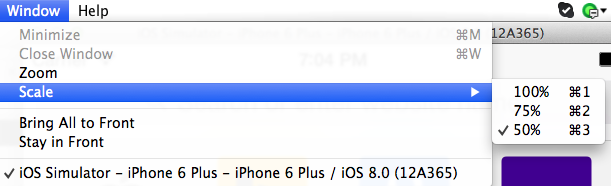
回答 3
Stack Overflow用户
发布于 2014-10-27 10:43:32
在终端中运行此命令:
默认情况下编写~/Library/Preferences/com.apple.iphonesimulator SimulatorWindowLastScale "0.4“
你可以根据自己的喜好改变"0.4“。然后,在模拟器中,硬件->设备-> iphone 6+。
Stack Overflow用户
发布于 2014-10-08 13:43:38
您可以对iOS模拟器进行缩放,以满足扩展的需要(我尝试过从.2扩展到1.4 ),它对我很有用。 为此,您必须转到/Library/Preferences并编辑com.apple.iphonesimulator.plist >文件。编辑键SimulatorWindowLastScale的值,以便进行缩放。 我在山狮的最新版本(10.8.4)和iOS 6.0模拟器上尝试了这一点。
(https://apple.stackexchange.com/questions/62757/how-do-i-resize-the-ios-simulator)
我在10.8.x (与其他模拟器设备)上进行了测试,但在10.9.x或10.10上没有测试
Stack Overflow用户
发布于 2015-06-02 05:30:39
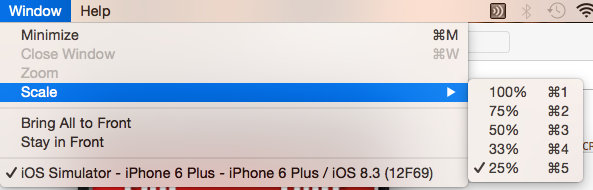
现在,您可以在Xcode 6.3.1中缩小到实际分辨率的25%
- 在模拟器上运行应用程序
- 选择窗口->刻度(选择要缩放的百分比)
快捷键:
Command Key + 1 : 100%
Command Key + 2 : 75%
Command Key + 3 : 50%
Command Key + 4 : 33%
Command Key + 5 : 25%
https://stackoverflow.com/questions/26258345
复制相似问题
腾讯云开发者

Copyright © 2013 - 2026 Tencent Cloud. All Rights Reserved. 腾讯云 版权所有
深圳市腾讯计算机系统有限公司 ICP备案/许可证号:粤B2-20090059  粤公网安备44030502008569号
腾讯云计算(北京)有限责任公司 京ICP证150476号 | 京ICP备11018762号