
android中的布局-如何生成3列?
android中的布局-如何生成3列?
提问于 2014-10-06 11:30:50
我试图创造这样的东西(颜色只是为了更好的理解,背景将是白色的):
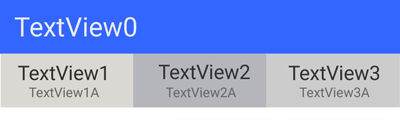
我的问题是包含两个TextViews的三个盒子,一个在另一个下面。
到目前为止,这是我的代码:
<?xml version="1.0" encoding="utf-8"?>
<LinearLayout xmlns:android="http://schemas.android.com/apk/res/android"
    android:orientation="vertical"
    android:layout_width="match_parent"
    android:layout_height="wrap_content"
    >

    <!-- row 1 -->
    <TextView
        android:layout_width="fill_parent"
        android:layout_height="wrap_content"
        android:text="TextView0"
        android:textSize="24dp"
        android:padding="16dp"
        android:background="#3366ff"/>
    <!-- row 1 end -->

    <!-- row 2 -->

        <!-- col 1 -->
            <TextView
                android:padding="8dp"
                android:layout_width="wrap_content"
                android:layout_height="wrap_content"
                android:text="TextView1"
                android:background="#aaaaaa"
                />

            <TextView
                android:padding="8dp"
                android:layout_width="wrap_content"
                android:layout_height="wrap_content"
                android:text="TextView1A"
                android:background="#cccccc"
                />
        <!-- col 1 end -->

        <!-- col 2 -->
            <TextView
                android:padding="8dp"
                android:layout_width="wrap_content"
                android:layout_height="wrap_content"
                android:text="TextView2"
                android:background="#bbbbbb"
                />

            <TextView
                android:padding="8dp"
                android:layout_width="wrap_content"
                android:layout_height="wrap_content"
                android:text="TextView2A"
                android:background="#dddddd"
                />

        <!-- col 2 end -->

        <!-- col 3 -->
            <TextView
                android:padding="8dp"
                android:layout_width="wrap_content"
                android:layout_height="wrap_content"
                android:text="TextView3"
                android:background="#cccccc"
                />

            <TextView
                android:padding="8dp"
                android:layout_width="wrap_content"
                android:layout_height="wrap_content"
                android:text="TextView3A"
                android:background="#eeeeee"
                />
        <!-- col 3 end -->

    <!-- row 2 end -->

</LinearLayout>
这是我的不完整代码的结果:
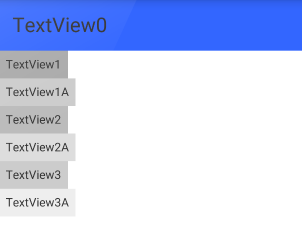
我在用LinearLayout和RelativeLayout做实验。我完全不明白最后一个。
回答 5
Stack Overflow用户
回答已采纳
发布于 2014-10-06 11:38:44
你可以试试这样的东西:
将每个列的两个文本视图放在一个LinearLayout (垂直)下,最后将三个LinearLayouts放在水平LinearLayout下:
<?xml version="1.0" encoding="utf-8"?>
<LinearLayout xmlns:android="http://schemas.android.com/apk/res/android"
    android:layout_width="match_parent"
    android:layout_height="wrap_content"
    android:orientation="vertical" >

    <!-- row 1 -->

    <TextView
        android:layout_width="fill_parent"
        android:layout_height="wrap_content"
        android:background="#3366ff"
        android:padding="16dp"
        android:text="TextView0"
        android:textSize="24dp" />
    <!-- row 1 end -->


    <!-- row 2 -->

    <LinearLayout
        android:layout_width="fill_parent"
        android:layout_height="wrap_content"
        android:orientation="horizontal"
        android:weightSum="3" >

        <!-- col 1 -->

        <LinearLayout
            android:layout_width="0dp"
            android:layout_height="wrap_content"
            android:layout_weight="1"
            android:orientation="vertical" >

            <TextView
                android:layout_width="wrap_content"
                android:layout_height="wrap_content"
                android:background="#aaaaaa"
                android:padding="8dp"
                android:text="TextView1" />

            <TextView
                android:layout_width="wrap_content"
                android:layout_height="wrap_content"
                android:background="#cccccc"
                android:padding="8dp"
                android:text="TextView1A" />
        </LinearLayout>
        <!-- col 1 end -->
        <!-- col 2 -->

        <LinearLayout
            android:layout_width="0dp"
            android:layout_height="wrap_content"
            android:layout_weight="1"
            android:orientation="vertical" >

            <TextView
                android:layout_width="wrap_content"
                android:layout_height="wrap_content"
                android:background="#bbbbbb"
                android:padding="8dp"
                android:text="TextView2" />

            <TextView
                android:layout_width="wrap_content"
                android:layout_height="wrap_content"
                android:background="#dddddd"
                android:padding="8dp"
                android:text="TextView2A" />
        </LinearLayout>
        <!-- col 2 end -->
        <!-- col 3 -->

        <LinearLayout
            android:layout_width="0dp"
            android:layout_height="wrap_content"
            android:layout_weight="1"
            android:orientation="vertical" >

            <TextView
                android:layout_width="wrap_content"
                android:layout_height="wrap_content"
                android:background="#cccccc"
                android:padding="8dp"
                android:text="TextView3" />

            <TextView
                android:layout_width="wrap_content"
                android:layout_height="wrap_content"
                android:background="#eeeeee"
                android:padding="8dp"
                android:text="TextView3A" />
        </LinearLayout>
    </LinearLayout>
    <!-- col 3 end -->

</LinearLayout>
对所有三列线性布局的等宽宽度使用权重。
截图:
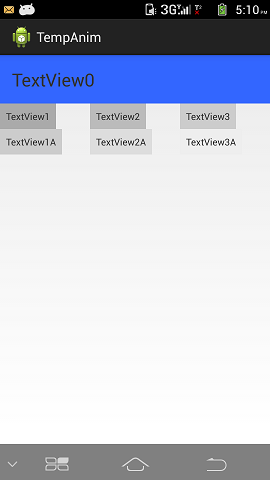
希望这能有所帮助。
Stack Overflow用户
发布于 2014-10-06 11:39:28
您需要在一些布局中放置3 TextView。
如果您想让3 TextView具有完全相同的宽度,则可能需要设置它们的权重。
像这样的东西
<!-- row 2 -->
<LinearLayout
    android:orientation="horizontal"
    android:layout_width="match_parent"
    android:layout_height="wrap_content"
    >
    <!-- col 1 -->

    <LinearLayout
        android:orientation="vertical"
        android:layout_weight="1"
        android:orientation="horizontal"
        android:layout_width="match_parent"
        android:layout_height="wrap_content" >
        <TextView
            android:padding="8dp"
            android:layout_width="wrap_content"
            android:layout_height="wrap_content"
            android:text="TextView1"
            android:background="#aaaaaa"
            />

        <TextView
            android:padding="8dp"
            android:layout_width="wrap_content"
            android:layout_height="wrap_content"
            android:text="TextView1A"
            android:background="#cccccc"
            />
    <!-- col 1 end -->
    </LinearLayout>
    <LinearLayout
        android:orientation="vertical"
        android:layout_weight="1"
        android:orientation="horizontal"
        android:layout_width="match_parent"
        android:layout_height="wrap_content" >
    <!-- col 2 -->
        <TextView
            android:padding="8dp"
            android:layout_width="wrap_content"
            android:layout_height="wrap_content"
            android:text="TextView2"
            android:background="#bbbbbb"
            />

        <TextView
            android:padding="8dp"
            android:layout_width="wrap_content"
            android:layout_height="wrap_content"
            android:text="TextView2A"
            android:background="#dddddd"
            />

    <!-- col 2 end -->

    </LinearLayout>
    <LinearLayout
        android:orientation="vertical"
        android:layout_weight="1"
        android:orientation="horizontal"
        android:layout_width="match_parent"
        android:layout_height="wrap_content" >
    <!-- col 3 -->
        <TextView
            android:padding="8dp"
            android:layout_width="wrap_content"
            android:layout_height="wrap_content"
            android:text="TextView3"
            android:background="#cccccc"
            />

        <TextView
            android:padding="8dp"
            android:layout_width="wrap_content"
            android:layout_height="wrap_content"
            android:text="TextView3A"
            android:background="#eeeeee"
            />
    <!-- col 3 end -->

    </LinearLayout>
<!-- row 2 end -->
</LinearLayout>Stack Overflow用户
发布于 2014-10-06 11:47:41
我们需要使用嵌套布局,布局应该是这样的
       <LinearLayout
        android:layout_width="match_parent"
        android:layout_height="wrap_content"
        android:orientation="vertical"
        android:padding="10dip" >

        <TextView
            android:id="@+id/email"
            android:layout_width="fill_parent"
            android:layout_height="fill_parent" />


        <LinearLayout
            android:layout_width="fill_parent"
            android:layout_height="fill_parent"
            android:orientation="horizontal">

            <TextView
                android:layout_width="0dp"
                android:layout_height="wrap_content"
                android:layout_weight="1" />

            <TextView
                android:layout_width="0dp"
                android:layout_height="wrap_content"
                android:layout_weight="1" />
             <TextView
                android:layout_width="0dp"
                android:layout_height="wrap_content"
                android:layout_weight="1" />
        </LinearLayout>
</LinearLayout>页面原文内容由Stack Overflow提供。腾讯云小微IT领域专用引擎提供翻译支持
原文链接:
https://stackoverflow.com/questions/26215298
复制相关文章
相似问题
腾讯云开发者

Copyright © 2013 - 2026 Tencent Cloud. All Rights Reserved. 腾讯云 版权所有
深圳市腾讯计算机系统有限公司 ICP备案/许可证号:粤B2-20090059  粤公网安备44030502008569号
腾讯云计算(北京)有限责任公司 京ICP证150476号 | 京ICP备11018762号