
保存在pyqt中的qcombobox中的选择。
保存在pyqt中的qcombobox中的选择。
提问于 2014-09-30 04:29:56
我对Pyqt编程很陌生。我试图构建一个简单的GUI,它看起来像图片中的那个:
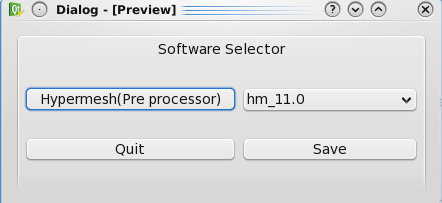
这就是我写的代码:
from PyQt4 import QtCore, QtGui
import subprocess
try:
    _fromUtf8 = QtCore.QString.fromUtf8
except AttributeError:
    def _fromUtf8(s):
        return s

try:
    _encoding = QtGui.QApplication.UnicodeUTF8
    def _translate(context, text, disambig):
        return QtGui.QApplication.translate(context, text, disambig, _encoding)
except AttributeError:
    def _translate(context, text, disambig):
        return QtGui.QApplication.translate(context, text, disambig)

class Ui_Dialog(object):
     Ui_Dialog.hypermesh =0
    def setupUi(self, Dialog):
        Dialog.setObjectName(_fromUtf8("Dialog"))
        Dialog.resize(435, 181)
        self.gridLayout_2 = QtGui.QGridLayout(Dialog)
        self.gridLayout_2.setObjectName(_fromUtf8("gridLayout_2"))
        self.groupBox = QtGui.QGroupBox(Dialog)
        self.groupBox.setObjectName(_fromUtf8("groupBox"))
        self.gridLayout = QtGui.QGridLayout(self.groupBox)
        self.gridLayout.setObjectName(_fromUtf8("gridLayout"))
        self.pushButton = QtGui.QPushButton(self.groupBox)
        self.pushButton.setObjectName(_fromUtf8("pushButton"))
        self.gridLayout.addWidget(self.pushButton, 0, 0, 1, 1)
        self.comboBox = QtGui.QComboBox(self.groupBox)
        self.comboBox.setObjectName(_fromUtf8("comboBox"))
        self.gridLayout.addWidget(self.comboBox, 0, 1, 1, 1)
        self.pushButton_3 = QtGui.QPushButton(self.groupBox)
        self.pushButton_3.setObjectName(_fromUtf8("pushButton_3"))
        self.gridLayout.addWidget(self.pushButton_3, 1, 0, 1, 1)
        self.pushButton_2 = QtGui.QPushButton(self.groupBox)
        self.pushButton_2.setObjectName(_fromUtf8("pushButton_2"))
        self.gridLayout.addWidget(self.pushButton_2, 1, 1, 1, 1)
        self.gridLayout_2.addWidget(self.groupBox, 0, 0, 1, 1)
        hypmv=[]
        cont=subprocess.Popen('ls /usr/local/bin/hm*',stdout=subprocess.PIPE,stdin=subprocess.PIPE,shell=True)
        contents = cont.stdout.readlines()
        for i in range(len(contents)):
            temp=contents[i].strip()
            temp=temp.split('/')
            size=len(temp)
            hypmv.append(temp[size-1])
            self.comboBox.addItem(_fromUtf8(""))
            self.comboBox.setItemText(i, _translate("Dialog", hypmv[i], None))
        self.retranslateUi(Dialog)
        QtCore.QObject.connect(self.pushButton_3, QtCore.SIGNAL(_fromUtf8("clicked()")), Dialog.reject)
        QtCore.QMetaObject.connectSlotsByName(Dialog)
        QtCore.QObject.connect(self.pushButton,QtCore.SIGNAL(_fromUtf8("clicked()")),self.hypm)
    def retranslateUi(self, Dialog):
        Dialog.setWindowTitle(_translate("Dialog", "Dialog", None))
        self.groupBox.setTitle(_translate("Dialog", "Software Selector", None))
        self.pushButton.setText(_translate("Dialog", "Hypermesh(Pre processor)", None))
        self.pushButton_3.setText(_translate("Dialog", "Quit", None))
        self.pushButton_2.setText(_translate("Dialog", "Save", None))
    def hypm(self):
        Ui_Dialog.hypermesh  = unicode(self.comboBox.currentText())
        subprocess.Popen(Ui_Dialog.hypermesh,shell=True)

if __name__ == "__main__":
    import sys
    app = QtGui.QApplication(sys.argv)
    Dialog = QtGui.QDialog()
    ui = Ui_Dialog()
    ui.setupUi(Dialog)
    Dialog.show()
    sys.exit(app.exec_())
在代码中,当gui逐步化时,当我按下按钮时,combobox项就会被初始化,应该打开当前在combobox中选择的软件版本。这个功能做得很好。
但是现在我想保存用户所做的选择,这样每次调用gui时,他都不应该再次选择以前在组合框中使用的版本。
因此,如果他第一次选择hm_11.0,那么每次"hm_11.0“都应该是”hm_11.0“,直到他更改为止。我该怎么做??
回答 1
Stack Overflow用户
回答已采纳
发布于 2014-09-30 05:02:08
这是您想要阅读的类:http://pyqt.sourceforge.net/Docs/PyQt4/qsettings.html
里面有一个小教程(ctrl+f恢复GUI应用程序的状态)。
您将使用setValue存储带有keyToSetting / value的信息,并使用值keyToSetting进行读取。
示例:从PyQt4 import QtGui,QtCore导入sys
class Example(QtGui.QWidget):

    def __init__(self):
        super(Example, self).__init__()

        self.initUI()

    def initUI(self):

        self.readSettings()
        self.setWindowTitle('Simple')

        self.show()

    def readSettings(self):
        settings = QtCore.QSettings("AyaanTech", "SoftwareTest")
        self.setGeometry(settings.value("geometry", QtCore.QRect(300, 300, 250, 150)).toRect());

    def writeSettings(self):
        settings = QtCore.QSettings("AyaanTech", "SoftwareTest")
        settings.setValue("geometry", self.geometry());

    def closeEvent(self, event):
        quit_msg = "Do you want to save position and size?"
        reply = QtGui.QMessageBox.question(self, 'Message',
                     quit_msg, QtGui.QMessageBox.Yes, QtGui.QMessageBox.No, QtGui.QMessageBox.Cancel)

        if reply == QtGui.QMessageBox.Yes:
            self.writeSettings()
            event.accept()
        elif reply == QtGui.QMessageBox.No:
            event.accept()
        else:
            event.ignore()

def main():

    app = QtGui.QApplication(sys.argv)
    ex = Example()
    sys.exit(app.exec_())


if __name__ == '__main__':
main() 页面原文内容由Stack Overflow提供。腾讯云小微IT领域专用引擎提供翻译支持
原文链接:
https://stackoverflow.com/questions/26112816
复制相关文章
相似问题
腾讯云开发者

Copyright © 2013 - 2026 Tencent Cloud. All Rights Reserved. 腾讯云 版权所有
深圳市腾讯计算机系统有限公司 ICP备案/许可证号:粤B2-20090059  粤公网安备44030502008569号
腾讯云计算(北京)有限责任公司 京ICP证150476号 | 京ICP备11018762号