
如何在自定义键盘扩展ios8中使用自动建议视图?
如何在自定义键盘扩展ios8中使用自动建议视图?
提问于 2014-09-26 05:40:11
如何在我自己的iOS8自定义键盘扩展中实现苹果的预测输入面板?
苹果公司的自定义键盘API 自定义键盘声明:
RequestsOpenAccesssetBOOL在info.plist中可以通过UILexicon类访问基本的autocorrection词典。使用这个类以及您自己设计的词汇表,在用户输入文本时提供suggestions和autocorrections。
但是我找不到如何在我的自定义键盘中使用UILexicon。我将RequestsOpenAccess设置设置为YES
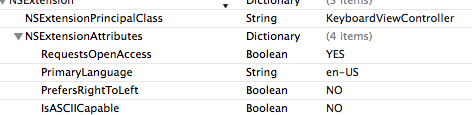
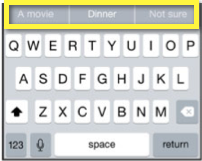
但是仍然不能像苹果的iOS8默认键盘那样访问自定义字典以获得单词建议:
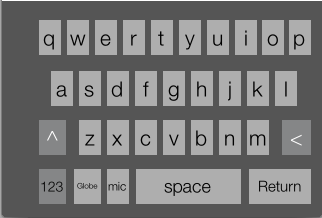
我的自定义键盘看起来如下:
编辑:
我找到了像这样用于UILexicon class的UILexicon class,我尝试使用以下代码来实现它:
 - (void)viewDidLoad {
    [super viewDidLoad];

    [self requestSupplementaryLexiconWithCompletion:^(UILexicon *appleLex) {
        appleLexicon = appleLex;
        NSUInteger lexEntryCount = appleLexicon.entries.count;

        for(UILexiconEntry *entry in appleLexicon.entries) {
            NSString *userInput = [entry userInput];
            NSString *documentText = [entry documentText];

            lable.text=userInput;
            [lable setNeedsDisplay];
        }
    }];
}回答 2
Stack Overflow用户
回答已采纳
发布于 2014-10-10 13:30:20
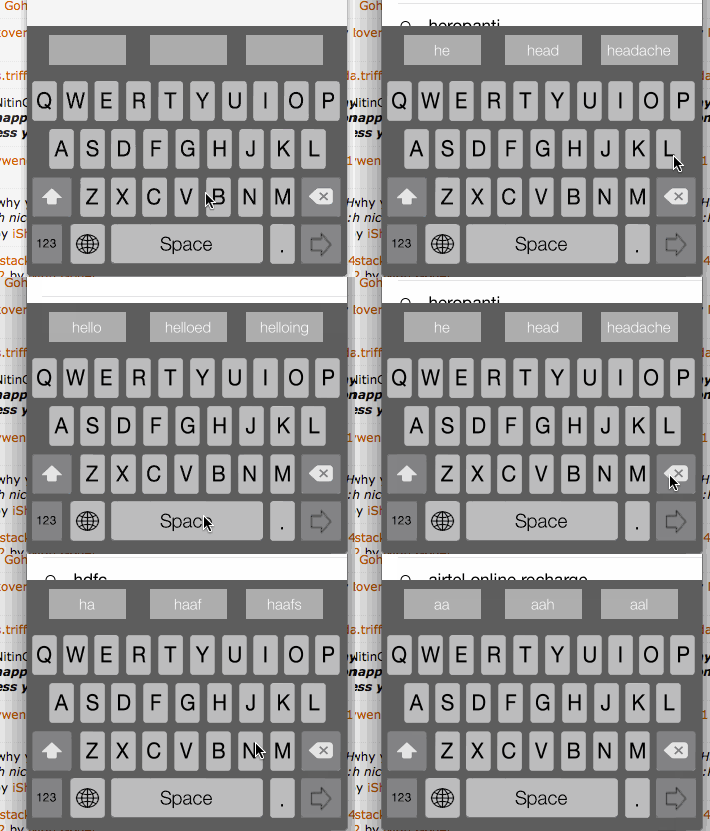
最后我做到了!我建议使用sqlite静态数据库,并使用类似的查询获得前三项建议工作,如下代码所示:
NSString *precedingContext = self.textDocumentProxy.documentContextBeforeInput; //here i get enter word string.


    __block NSString *lastWord = nil;

    [precedingContext enumerateSubstringsInRange:NSMakeRange(0, [precedingContext length]) options:NSStringEnumerationByWords | NSStringEnumerationReverse usingBlock:^(NSString *substring, NSRange subrange, NSRange enclosingRange, BOOL *stop) {
        lastWord = substring;
        *stop = YES;
    }];
    NSLog(@"==%@",lastWord); // here i get last word from full of enterd string

    NSString *str_query = [NSString stringWithFormat:@"select * from suggestion where value LIKE '%@%%' limit 3",lastWord];
    NSMutableArray *suggestion  = [[DataManager initDB] RETRIVE_Playlist:str_query];

    NSLog(@"arry %@",suggestion); i get value in to array using like query
    if(suggestion.count>0)
    {

        if(suggestion.count==1)
        {
            [self.ObjKeyLayout.FirstButton setTitle:[suggestion objectAtIndex:0] forState:UIControlStateNormal];

        }
        else if(suggestion.count==2)
        {
            [self.ObjKeyLayout.FirstButton setTitle:[suggestion objectAtIndex:0] forState:UIControlStateNormal];
            [self.ObjKeyLayout.secondButton setTitle:[suggestion objectAtIndex:1] forState:UIControlStateNormal];
        }
        else
        {

            [self.ObjKeyLayout.FirstButton setTitle:[suggestion objectAtIndex:0] forState:UIControlStateNormal];
            [self.ObjKeyLayout.secondButton setTitle:[suggestion objectAtIndex:1] forState:UIControlStateNormal];
            [self.ObjKeyLayout.thirdButton setTitle:[suggestion objectAtIndex:2] forState:UIControlStateNormal];
        }


    }
    else
    {

        [self.ObjKeyLayout.FirstButton setTitle:@"" forState:UIControlStateNormal];
        [self.ObjKeyLayout.secondButton setTitle:@"" forState:UIControlStateNormal];
        [self.ObjKeyLayout.thirdButton setTitle:@"" forState:UIControlStateNormal];
    }
我知道我的键盘输出是:
Stack Overflow用户
发布于 2015-12-09 11:22:16
也许这个答案对某人有帮助。
+ (void)getSuggestionsFor:(NSString *)word WithCompletion:(void(^)(NSArray *))completion
{
    NSString *prefix = [word substringToIndex:word.length - 1];
    // Won't get suggestions for correct words, so we are scrambling the words
    NSString *scrambledWord = [NSString stringWithFormat:@"%@%@",word, [self getRandomCharAsNSString]];
    UITextChecker *checker = [[UITextChecker alloc] init];
    NSRange checkRange = NSMakeRange(0, scrambledWord.length);
    NSRange misspelledRange = [checker rangeOfMisspelledWordInString:scrambledWord range:checkRange startingAt:checkRange.location wrap:YES  language:@"en_US"];

    NSArray *arrGuessed = [checker guessesForWordRange:misspelledRange inString:scrambledWord language:@"en_US"];
    // NSLog(@"Arr ===== %@",arrGuessed);
    // Filter the result based on the word
    NSPredicate *predicate = [NSPredicate predicateWithFormat:@"SELF BEGINSWITH[c] %@",word];
    NSArray *arrayfiltered = [arrGuessed filteredArrayUsingPredicate:predicate];
    if(arrayfiltered.count == 0)
    {
        // Filter the result based on the prefix
        NSPredicate *newPredicate = [NSPredicate predicateWithFormat:@"SELF BEGINSWITH[c] %@",prefix];
        arrayfiltered = [arrGuessed filteredArrayUsingPredicate:newPredicate];
    }
    completion(arrayfiltered);
}

+ (NSString *)getRandomCharAsNSString {
    return [NSString stringWithFormat:@"%c", arc4random_uniform(26) + 'a'];
}页面原文内容由Stack Overflow提供。腾讯云小微IT领域专用引擎提供翻译支持
原文链接:
https://stackoverflow.com/questions/26052764
复制相关文章
相似问题
腾讯云开发者

Copyright © 2013 - 2026 Tencent Cloud. All Rights Reserved. 腾讯云 版权所有
深圳市腾讯计算机系统有限公司 ICP备案/许可证号:粤B2-20090059  粤公网安备44030502008569号
腾讯云计算(北京)有限责任公司 京ICP证150476号 | 京ICP备11018762号