
嵌套片段(选项卡中的多窗格)
嵌套片段(选项卡中的多窗格)
提问于 2014-09-22 18:58:56
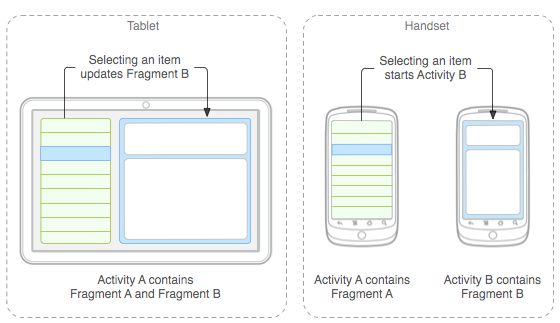
我在片段中使用片段有问题。第一个片段是一个选项卡视图,一个在一个选项卡中,我希望有一个像这样的多窗格布局:
错误是:
android.view.InflateException:二进制XML文件行#8:错误充气类片段
制表符片段(SettingsFragmentBox):
import android.content.Intent;
import android.os.Bundle;
import android.support.v4.app.Fragment;
import android.view.LayoutInflater;
import android.view.View;
import android.view.ViewGroup;

public class SettingsFragmentBox extends Fragment implements SettingsFragmentBoxList.OnItemSelectedListener{
    @Override
    public View onCreateView(LayoutInflater inflater, ViewGroup container, Bundle savedInstanceState) {
        View rootView = inflater.inflate(R.layout.fragment_settings_box, container, false);
        return rootView;
    }

    public void onBoxSelect(int id) {
        SettingsFragmentBoxDetail fragment = (SettingsFragmentBoxDetail) getFragmentManager().findFragmentById(R.id.box_detail);
        if (fragment != null && fragment.isInLayout()) {
            fragment.setText(id);
        } else {
            Intent intent = new Intent(getActivity(),SettingsActivityBoxDetail.class);
            intent.putExtra(SettingsActivityBoxDetail.EXTRA_ID, id);
            startActivity(intent);
        }
    }
}
xml (fragment_settings_box.xml):
<?xml version="1.0" encoding="utf-8"?>
<LinearLayout
    xmlns:android="http://schemas.android.com/apk/res/android"
    xmlns:tools="http://schemas.android.com/tools"
    android:layout_width="fill_parent"
    android:layout_height="fill_parent"
    android:orientation="horizontal" >

    <fragment
        android:id="@+id/box_list"
        android:layout_width="0dp"
        android:layout_height="match_parent"
        android:layout_weight="1"
        class="de.resper.e2cast.SettingsFragmentBoxList"
        tools:layout="@layout/fragment_settings_box_list">
    </fragment>

    <fragment
        android:id="@+id/box_detail"
        android:layout_width="0dp"
        android:layout_height="match_parent"
        android:layout_weight="2"
        class="de.resper.e2cast.SettingsFragmentBoxDetail"
        tools:layout="@layout/fragment_settings_box_detail">
    </fragment>

</LinearLayout>回答 2
Stack Overflow用户
发布于 2014-09-22 19:14:46
这通常是在活动中使用片段来完成的,而不是在其他片段中。你确定你真的想要其他片段中的片段吗?
顺便说一下,您所指的图片显示了这个场景(活动包含片段A或B)。
Stack Overflow用户
发布于 2014-09-22 19:48:53
您应该阅读http://developer.android.com/training/multiscreen/screensizes.html来处理不同的屏幕大小。有一个例子,其中包含两个片段的布局。还学习如何通过阅读这个http://developer.android.com/training/multiscreen/adaptui.html来适应它。
页面原文内容由Stack Overflow提供。腾讯云小微IT领域专用引擎提供翻译支持
原文链接:
https://stackoverflow.com/questions/25981286
复制相关文章
相似问题
腾讯云开发者

Copyright © 2013 - 2026 Tencent Cloud. All Rights Reserved. 腾讯云 版权所有
深圳市腾讯计算机系统有限公司 ICP备案/许可证号:粤B2-20090059  粤公网安备44030502008569号
腾讯云计算(北京)有限责任公司 京ICP证150476号 | 京ICP备11018762号