
理解Java ExecutorService
我正在尝试学习如何使用Java的executorservice,
我正在读下面的讨论Java线程简单队列
在这里有一个示例
ExecutorService service = Executors.newFixedThreadPool(10);
// now submit our jobs
service.submit(new Runnable() {
    public void run() {
    do_some_work();
   }
});
// you can submit any number of jobs and the 10 threads will work on them
// in order
...
// when no more to submit, call shutdown
service.shutdown();
// now wait for the jobs to finish
service.awaitTermination(Long.MAX_VALUE, TimeUnit.NANOSECONDS);
我试着实现这个解决方案,为此我创建了一个表单并放置了“开始”和“停止”按钮,但我面临的问题是,如果我在“开始”按钮上调用这个过程,它将挂起完整的表单,我们需要等到所有过程完成。
我还试着阅读以下multithreading.html
但是到目前为止,我还无法理解如何使它工作,因为在单击start按钮之后,我应该可以获得访问权,假设我想停止这个过程。
有人能引导我朝正确的方向前进吗?
谢谢
为了使我的情况更清楚,我正在添加我正在测试的代码。
问题
1)程序执行时,完整的表单仍保持冻结状态。2) Progressbar不工作,只有在所有进程完成后才会显示状态。
private void btnStartActionPerformed(java.awt.event.ActionEvent evt) {
  TestConneciton();

}

private void btnStopActionPerformed(java.awt.event.ActionEvent evt) {
    flgStop = true;
}

   private static final int MYTHREADS = 30;
private boolean flgStop = false;
public  void TestConneciton() {
    ExecutorService executor = Executors.newFixedThreadPool(MYTHREADS);
    String[] hostList = { "http://crunchify.com", "http://yahoo.com",
            "http://www.ebay.com", "http://google.com",
            "http://www.example.co", "https://paypal.com",
            "http://bing.com/", "http://techcrunch.com/",
            "http://mashable.com/", "http://thenextweb.com/",
            "http://wordpress.com/", "http://wordpress.org/",
            "http://example.com/", "http://sjsu.edu/",
            "http://ebay.co.uk/", "http://google.co.uk/",
            "http://www.wikipedia.org/",
            "http://en.wikipedia.org/wiki/Main_Page" };

    pbarStatus.setMaximum(hostList.length-1);
    pbarStatus.setValue(0);
    for (int i = 0; i < hostList.length; i++) {

        String url = hostList[i];
        Runnable worker = new MyRunnable(url);
        executor.execute(worker);
    }
    executor.shutdown();
    // Wait until all threads are finish
//        while (!executor.isTerminated()) {
//
//        }
    System.out.println("\nFinished all threads");
}

public  class MyRunnable implements Runnable {
    private final String url;

    MyRunnable(String url) {
        this.url = url;
    }

    @Override
    public void run() {

        String result = "";
        int code = 200;
        try {
            if(flgStop == true)
            {
                //Stop thread execution
            }
            URL siteURL = new URL(url);
            HttpURLConnection connection = (HttpURLConnection) siteURL
                    .openConnection();
            connection.setRequestMethod("GET");
            connection.connect();

            code = connection.getResponseCode();
            pbarStatus.setValue(pbarStatus.getValue()+1);
            if (code == 200) {
                result = "Green\t";
            }
        } catch (Exception e) {
            result = "->Red<-\t";
        }
        System.out.println(url + "\t\tStatus:" + result);
    }
}回答 3
Stack Overflow用户
发布于 2014-09-21 20:27:53
根据ExecutorService API,这个块:
service.awaitTermination(Long.MAX_VALUE, TimeUnit.NANOSECONDS);API引用:
块,直到所有任务在关闭请求后完成执行,或超时发生,或当前线程被中断,以先发生者为准。
如果您不希望这样阻塞当前线程,那么也许您应该在另一个线程中调用它。另外,是您的Swing应用程序,然后考虑使用SwingWorker,我认为它使用的是ExecutorServices“在引擎盖下”。
根据你最新的代码,我会用
- 管理所有后台线程的SwingWorker。
- 我会给SwingWorker一个ExecutorService
- 还有一个ExecutorCompletionService,它是用ExecutorService初始化的,因为这样我就可以在任务结果完成时获取它们
- 我会用可调用的而不是 Runnables来填充它,因为这将允许任务返回一些东西,可能是一个字符串来指示进度。
- 我会将SwingWorker的进度属性设置为(100 * taskCount) / totalTaskCount,并使我的JProgressBar从0变为100。
- 然后,我将使用SwingWorker的发布/处理方法对来提取可调用的字符串。
- 我会在我的图形用户界面上用一个SwingWorker来听PropertyChangeListener的进展
- 然后在此侦听器中对GUI进行更改。
- 为了避免神奇的数字,我会将
if (code == 200) {改为if (code == HttpURLConnection.HTTP_OK) {。 - JButton的操作将禁用自身,然后创建一个新的SwingWorker对象,将工人的ProperChangeListener添加到工作人员,然后执行工作人员。
例如
import java.awt.Font;
import java.awt.event.ActionEvent;
import java.awt.event.KeyEvent;
import java.beans.PropertyChangeEvent;
import java.beans.PropertyChangeListener;
import java.net.HttpURLConnection;
import java.net.URL;
import java.util.List;
import java.util.concurrent.Callable;
import java.util.concurrent.CompletionService;
import java.util.concurrent.ExecutionException;
import java.util.concurrent.ExecutorCompletionService;
import java.util.concurrent.ExecutorService;
import java.util.concurrent.Executors;
import java.util.concurrent.TimeUnit;

import javax.swing.AbstractAction;
import javax.swing.Action;
import javax.swing.DefaultListModel;
import javax.swing.JButton;
import javax.swing.JFrame;
import javax.swing.JList;
import javax.swing.JPanel;
import javax.swing.JProgressBar;
import javax.swing.JScrollPane;
import javax.swing.SwingUtilities;
import javax.swing.SwingWorker;

@SuppressWarnings("serial")
public class SwingExecutorCompletionService extends JPanel {
   public static final int MYTHREADS = 10;
   private static final int LIST_PROTOTYPE_SIZE = 120;
   private static final String LIST_PROTOTYPE_STRING = "%" + LIST_PROTOTYPE_SIZE + "s";
   public static final String[] HOST_LIST = {
      "http://crunchify.com",
      "http://yahoo.com",
      "http://www.ebay.com",
      "http://google.com",
      "http://www.example.co",
      "https://paypal.com",
      "http://bing.com/",
      "http://techcrunch.com/",
      "http://mashable.com/",
      "http://thenextweb.com/",
      "http://wordpress.com/",
      "http://wordpress.org/",
      "http://example.com/",
      "http://sjsu.edu/",
      "http://ebay.co.uk/",
      "http://google.co.uk/",
      "http://www.wikipedia.org/",
      "http://en.wikipedia.org/wiki/Main_Page" };

   private JProgressBar pbarStatus = new JProgressBar(0, 100);
   private JButton doItButton = new JButton(new DoItAction("Do It", KeyEvent.VK_D));
   private DefaultListModel<String> listModel = new DefaultListModel<>();
   private JList<String> resultList = new JList<>(listModel);

   public SwingExecutorCompletionService() {
      resultList.setVisibleRowCount(10);
      resultList.setPrototypeCellValue(String.format(LIST_PROTOTYPE_STRING, ""));
      resultList.setFont(new Font(Font.MONOSPACED, Font.PLAIN, 12));

      add(pbarStatus);
      add(doItButton);
      add(new JScrollPane(resultList, JScrollPane.VERTICAL_SCROLLBAR_ALWAYS,
            JScrollPane.HORIZONTAL_SCROLLBAR_AS_NEEDED));
   }

   public void addToCompletionList(String element) {
      listModel.addElement(element);
   }

   public void setStatusValue(int progress) {
      pbarStatus.setValue(progress);
   }

   class DoItAction extends AbstractAction {
      public DoItAction(String name, int mnemonic) {
         super(name);
         putValue(MNEMONIC_KEY, mnemonic);
      }

      @Override
      public void actionPerformed(ActionEvent e) {
         setEnabled(false);
         DoItWorker worker = new DoItWorker(HOST_LIST, MYTHREADS);
         SwingExecutorCompletionService gui = SwingExecutorCompletionService.this;
         PropertyChangeListener workerListener = new WorkerChangeListener(gui, this);
         worker.addPropertyChangeListener(workerListener);
         worker.execute();
      }
   }

   private static void createAndShowGui() {
      SwingExecutorCompletionService mainPanel = new SwingExecutorCompletionService();

      JFrame frame = new JFrame("Swing ExecutorCompletionService");
      frame.setDefaultCloseOperation(JFrame.DISPOSE_ON_CLOSE);
      frame.getContentPane().add(mainPanel);
      frame.pack();
      frame.setLocationByPlatform(true);
      frame.setVisible(true);
   }

   public static void main(String[] args) {
      SwingUtilities.invokeLater(new Runnable() {
         public void run() {
            createAndShowGui();
         }
      });
   }
}

class MyCallable implements Callable<String> {
   private static final String RED = "->Red<-";
   private static final String GREEN = "Green";
   private final String url;
   private volatile boolean flgStop;

   MyCallable(String url) {
      this.url = url;
   }

   @Override
   public String call() throws Exception {
      String result = "";
      int code = HttpURLConnection.HTTP_OK;
      try {
         // if(flgStop == true)
         if (flgStop) {
            // Stop thread execution
         }
         URL siteURL = new URL(url);
         HttpURLConnection connection = (HttpURLConnection) siteURL
               .openConnection();
         connection.setRequestMethod("GET");
         connection.connect();

         code = connection.getResponseCode();

         // No don't set the prog bar in a background thread!
         // !! pbarStatus.setValue(pbarStatus.getValue()+1);
         // avoid magic numbers
         if (code == HttpURLConnection.HTTP_OK) {
            result = GREEN;
         }
      } catch (Exception e) {
         result = RED;
      }
      return String.format("%-40s %s", url + ":", result);
   }

}

class WorkerChangeListener implements PropertyChangeListener {
   private Action action;
   private SwingExecutorCompletionService gui;

   public WorkerChangeListener(SwingExecutorCompletionService gui, Action button) {
      this.gui = gui;
      this.action = button;
   }

   @Override
   public void propertyChange(PropertyChangeEvent evt) {
      DoItWorker worker = (DoItWorker)evt.getSource();
      if (evt.getNewValue() == SwingWorker.StateValue.DONE) {
         action.setEnabled(true);
         try {
            worker.get();
         } catch (InterruptedException e) {
            e.printStackTrace();
         } catch (ExecutionException e) {
            e.printStackTrace();
         }
      } else if (DoItWorker.INTERMEDIATE_RESULT.equals(evt.getPropertyName())) {
         gui.addToCompletionList(evt.getNewValue().toString());
      } else if ("progress".equals(evt.getPropertyName())) {
         gui.setStatusValue(worker.getProgress());
      }
   }
}

class DoItWorker extends SwingWorker<Void, String> {
   public static final String INTERMEDIATE_RESULT = "intermediate result";
   private static final long TIME_OUT = 5;
   private static final TimeUnit UNIT = TimeUnit.MINUTES;

   private String intermediateResult;
   private ExecutorService executor;
   private CompletionService<String> completionService;
   private String[] hostList;

   public DoItWorker(String[] hostList, int myThreads) {
      this.hostList = hostList;
      executor = Executors.newFixedThreadPool(myThreads);
      completionService = new ExecutorCompletionService<>(executor);
   }

   @Override
   protected Void doInBackground() throws Exception {
      for (int i = 0; i < hostList.length; i++) {

         String url = hostList[i];
         Callable<String> callable = new MyCallable(url);
         completionService.submit(callable);
      }
      executor.shutdown();
      for (int i = 0; i < hostList.length; i++) {
         String result = completionService.take().get();
         publish(result);
         int progress = (100 * i) / hostList.length;
         setProgress(progress);
      }
      executor.awaitTermination(TIME_OUT, UNIT);
      setProgress(100);
      return null;
   }

   @Override
   protected void process(List<String> chunks) {
      for (String chunk : chunks) {
         setIntermediateResult(chunk);
      }
   }

   private void setIntermediateResult(String intermediateResult) {
      String oldValue = this.intermediateResult;
      String newValue = intermediateResult;
      this.intermediateResult = intermediateResult;
      firePropertyChange(INTERMEDIATE_RESULT, oldValue, newValue);
   }

}
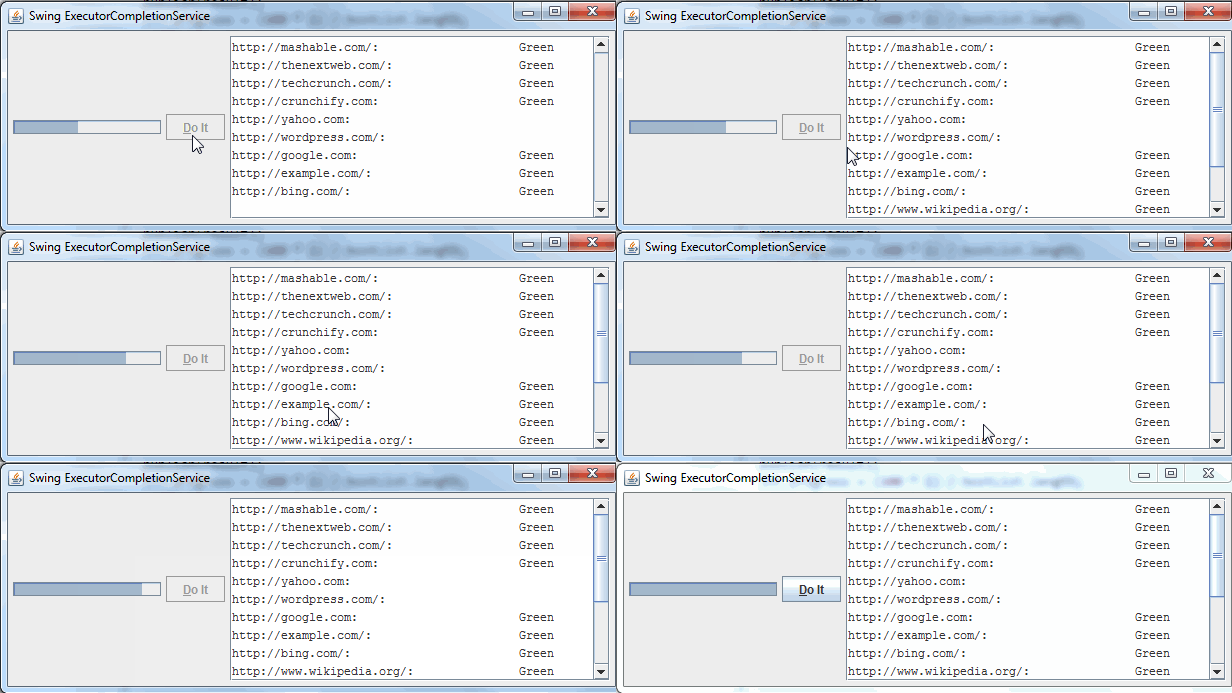
看上去和跑起来都像:
Stack Overflow用户
发布于 2014-09-21 20:41:47
如果要取消已经启动的作业,则必须使用Callable而不是Runnable。当您提交一个作业时,您会得到一个Future,您可以调用cancel() on。
public static void main(String[] args) {
  ExecutorService es = Executors.newFixedThreadPool(10);
  Callable<Integer> callable1 = new CallableImpl();
  Future<Integer> future1 = es.submit(callable1);

  // if you decide to cancel your task gracefully
  future1.cancel()
...然后由您在可调用的实现中处理ThreadInterrupt。
public class CallableImpl implements Callable<Integer> {
@Override
public Integer call() throws Exception {
     try {
        while(true) {
            // do something

            if(Thread.currentThread().isInterrupted()) {
                System.out.println("detected interrupt flag");
                break;
            }
        }
    }
    catch(InterruptedException ie) {
        System.out.println("interrupted");
}@Hovercraft可能是对的,如果您正在编写Swing应用程序,那么SwingWorker就是您想要使用的。
Stack Overflow用户
发布于 2014-09-21 20:36:29
如果您使用的是JButton和ExecutorService,那么您可能应该创建一个新线程并释放事件调度线程(EDT):
button.setActionListener(new Action() {
  public void actionPerformed(ActionEvent e) {
    button.setEnabled(false); // disable the button
    new Thread(new Runnable() {
      public void run() {
        ... your code ...
        button.setEnabled(true);
      }
    }).start();
  }
});就像全是鳗鱼的Hovercraft说的,awaitTermination是一种阻塞操作。
在Swing的情况下,您可能会在Action中执行此操作(如我的示例),并且阻止EDT执行各种操作,例如响应用户输入:)
注意: ExecutorService有一个很好的invokeAll,它可能比使用awaitTermination更有用。这也会阻塞,如果需要的话,您仍然需要在另一个线程中完成您的工作。
https://stackoverflow.com/questions/25963481
复制相似问题
腾讯云开发者

Copyright © 2013 - 2026 Tencent Cloud. All Rights Reserved. 腾讯云 版权所有
深圳市腾讯计算机系统有限公司 ICP备案/许可证号:粤B2-20090059  粤公网安备44030502008569号
腾讯云计算(北京)有限责任公司 京ICP证150476号 | 京ICP备11018762号