
iPhone 6不同的故事板?
当我们有了iPhone 4 and 5时,我们检查了屏幕大小,并为每个iPhone制作了两个故事板。
 //iPhone 4
    if (height == 480)
    {
        storyboard = [UIStoryboard storyboardWithName:@"StoryboardiPhone" bundle:nil];
         NSLog(@"Device has a 3.5inch Display.");
    }
    //iPhone 5
    else  if (height == 568)
    {
        storyboard = [UIStoryboard storyboardWithName:@"StoryboardiPhone5" bundle:nil];
          NSLog(@"Device has a 4inch Display.");
    }
    //iPads
    else
    {
        storyboard = [UIStoryboard storyboardWithName:@"Storyboard" bundle:nil];
        NSLog(@"Device has a iPad Display  ");

}现在又有两个iPhones,问题是,让5 storyboards用于iPhones和iPad是正确的吗?在我看来,这似乎是一件错误的事情,但我无法找到一种方法来安排在一个设备中的视图,并使它适合所有其他的-and --确保它总是工作得很好。
现在的正确方法是什么?
回答 3
Stack Overflow用户
发布于 2014-09-15 19:12:24
不,您应该使用AutoLayout并编写适当的约束,让系统根据不同的大小调整UI的大小。
Stack Overflow用户
发布于 2014-09-28 12:31:06
最好的方法是使用AutoLayout,但是如果您仍然由于某些原因而不得不使用不同的故事板,那么下面是一段工作代码。
if ([UIDevice currentDevice].userInterfaceIdiom == UIUserInterfaceIdiomPad) {
    //iPad
    storyBoard = [UIStoryboard storyboardWithName:@"MainStoryboard_iPad" bundle:nil];
}else{
    if ([UIDevice currentDevice].userInterfaceIdiom == UIUserInterfaceIdiomPhone){
        // The iOS device = iPhone or iPod Touch
        CGSize iOSDeviceScreenSize = [[UIScreen mainScreen] bounds].size;
        if (iOSDeviceScreenSize.height == 480){
            // iPhone 3/4x
            storyBoard = [UIStoryboard storyboardWithName:@"MainStoryboard_iPhone3_4X" bundle:nil];
        }else if (iOSDeviceScreenSize.height == 568){
            // iPhone 5 - 5s - 4 inch
            storyBoard = [UIStoryboard storyboardWithName:@"MainStoryboard_iPhone5_5S" bundle:nil];
        }else if (iOSDeviceScreenSize.height == 667){
            // iPhone 6 4.7 inch
            storyBoard = [UIStoryboard storyboardWithName:@"MainStoryboard_iPhone6" bundle:nil];
        } else if (iOSDeviceScreenSize.height == 736){
            // iPhone 6 Plus 5.5 inch
            storyBoard = [UIStoryboard storyboardWithName:@"MainStoryboard_iPhone6Plus" bundle:nil];
        }

    }
}
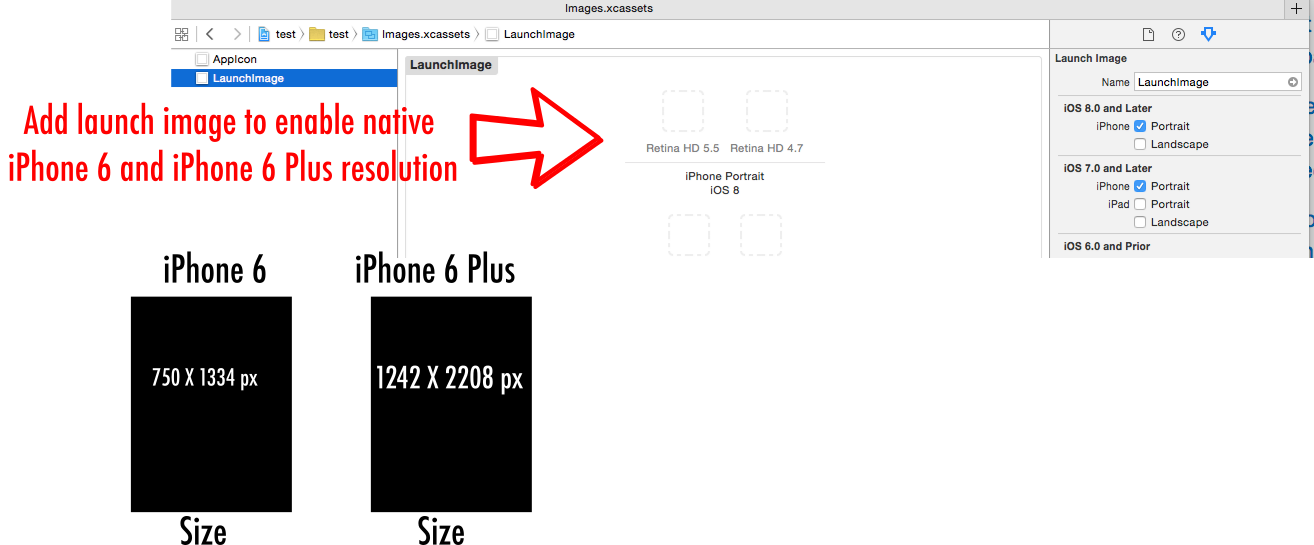
要启用本机iPhone 6和iPhone 6加上屏幕分辨率,请添加启动映像
Stack Overflow用户
发布于 2014-09-24 01:10:06
您应该为Interface中的wAny/hAny "size类“设计UI。应用自动布局约束来描述视图应该如何适应不同大小的类。如果需要,可以重写特定大小类的一些约束。
您之前根据设备选择了要加载的情节提要的代码应该被删除。如果您使用size类,则不再需要它。
有一个优秀的WWDC视频,介绍了自适应UI和大小类。我建议你看一看。
https://stackoverflow.com/questions/25855055
复制相似问题
腾讯云开发者

Copyright © 2013 - 2026 Tencent Cloud. All Rights Reserved. 腾讯云 版权所有
深圳市腾讯计算机系统有限公司 ICP备案/许可证号:粤B2-20090059  粤公网安备44030502008569号
腾讯云计算(北京)有限责任公司 京ICP证150476号 | 京ICP备11018762号