
页面布局
页面布局
提问于 2014-09-06 09:17:57
我想我的dataGrid旁边有另一张桌子,漂浮在它的左边。像这样,位于主div中:
|     |      |
|  A  |   B  |
|     |      |
,其中A是当前的dataGrid,包含所有用户和B将是新内容。我尝试在主div中创建一个表,并将左和右部分放在一行中的2列中,但是B退出了主div的字段。我试着把CSS放在左和右,并增加两个额外的div,但它看起来仍然不是这样。B在A下面,请给我一个建议,怎么做?这是页面的来源。
我页面的代码是:
<html xmlns="http://www.w3.org/1999/xhtml"
    xmlns:ui="http://java.sun.com/jsf/facelets"
    xmlns:h="http://java.sun.com/jsf/html"
    xmlns:f="http://java.sun.com/jsf/core"
    xmlns:p="http://primefaces.org/ui"
    xmlns:c="http://java.sun.com/jsp/jstl/core">

<ui:composition template="/WEB-INF/templates/BasicTemplate.xhtml">

    <ui:define name="content">
        <div id="container" style="min-height: 100%; position: relative;">
            <div id="left"
                style="background-image: url('#{resource['images/left.png']}'); background-repeat: repeat-y; height: 1800px; width: 163px; float: left;">
                <br />
            </div>
            <div id="main" style="width: 920px; float: left;">
                <f:view>

                    <h:form rendered="#{not empty loginBean.name}">

                        <h:outputStylesheet library="css" name="css.css" />
                        <center>
                            <h2>My Profile</h2>
                        </center>

                        <p:dataGrid var="user" value="#{profileBean.userList}">
                            <p:panelGrid columns="2">
                                <f:facet name="header">
                                    <p:graphicImage value="#{profileBean.image}" alt="${user.name}"
                                        width="150px" height="150px">

                                        <f:param name="userId" value="#{user.id}" />
                                    </p:graphicImage>
                                </f:facet>

                                <h:outputText value="Name: " />
                                <h:inputText value="#{user.name}" />

                                <h:outputText value="Phone: " />
                                <h:inputText value="#{user.phone}" required="true">
                                    <f:validateRegex pattern="[0-9]+" />
                                </h:inputText>


                                <h:outputText value="Role: " />
                                <h:outputText value="#{user.userRole.roleName}">
                                </h:outputText>

                                <f:facet name="footer">
                                    <h:panelGroup style="display:block; text-align:center">
                                        <p:commandButton id="submit" value="Save changes"
                                            actionListener="#{profileBean.editUser()}" >

                                <f:attribute name="profileBean.selectedUser" value="#{user}" />
                                            </p:commandButton>
                                    </h:panelGroup>
                                </f:facet>


                            </p:panelGrid>
                        </p:dataGrid>
                        <hr />
                    </h:form>
                </f:view>
            </div>
        </div>

        <div id="right"
            style="background-image: url('#{resource['images/right.png']}'); background-repeat: repeat-y; height: 1800px; width: 150px; float: right;">
            <br />
        </div>
    </ui:define>
</ui:composition>
</html>回答 2
Stack Overflow用户
回答已采纳
发布于 2014-09-06 09:42:17
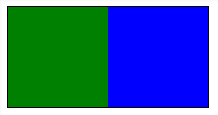
可能正在使用display:table和display:table-cell会帮助你
这是一个DEMO
标记
<div class="container">
    <div class="left"></div>
    <div class="right"></div>
</div>
CSS
.container {
    display:table;
    border:1px solid #000;
}
.left {
    display:table-cell;
    width:100px;
    height:100px;
    background-color:green;
}
.right {
    display:table-cell;
    width:100px;
    height:100px;
    background-color:Blue;
}
结果:
Stack Overflow用户
发布于 2014-09-06 09:35:00
您需要设置“右”和“左”的宽度以适应屏幕的宽度。您可以通过按比例设置div宽度来做到这一点。例如width=25%
页面原文内容由Stack Overflow提供。腾讯云小微IT领域专用引擎提供翻译支持
原文链接:
https://stackoverflow.com/questions/25698725
复制相关文章
相似问题
腾讯云开发者

Copyright © 2013 - 2026 Tencent Cloud. All Rights Reserved. 腾讯云 版权所有
深圳市腾讯计算机系统有限公司 ICP备案/许可证号:粤B2-20090059  粤公网安备44030502008569号
腾讯云计算(北京)有限责任公司 京ICP证150476号 | 京ICP备11018762号