
如何在css框中只放置div的某些元素
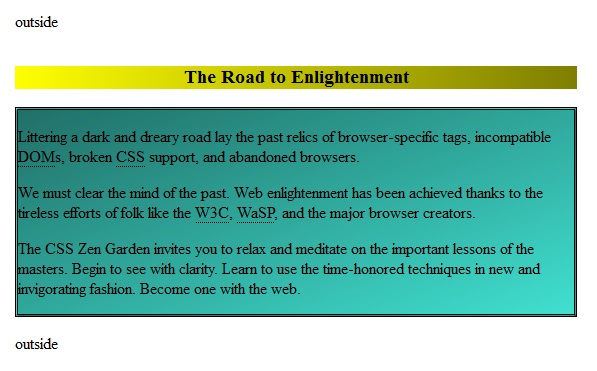
我要参加CSSzenGarden挑战赛。我必须在不改变它的情况下对html进行样式设计。我试图把这些段落放在一个盒子里,而不是把h3放在那个盒子里。我希望h3在包含段落的方框上方。
    <div class="preamble" id="zen-preamble" role="article">
        <h3>The Road to Enlightenment</h3>
        <p>Littering a dark and dreary road lay the past relics of browser-specific tags, incompatible <abbr title="Document Object Model">DOM</abbr>s, broken <abbr title="Cascading Style Sheets">CSS</abbr> support, and abandoned browsers.</p>
        <p>We must clear the mind of the past. Web enlightenment has been achieved thanks to the tireless efforts of folk like the <abbr title="World Wide Web Consortium">W3C</abbr>, <abbr title="Web Standards Project">WaSP</abbr>, and the major browser creators.</p>
        <p>The CSS Zen Garden invites you to relax and meditate on the important lessons of the masters. Begin to see with clarity. Learn to use the time-honored techniques in new and invigorating fashion. Become one with the web.</p>
    </div>
当我使用.preamble作为css选择器时,它会将整个div放在框内。当我使用.preamble p作为选择器时,它将每个段落放在一个单独的框中。
如何在不包括h3的情况下将所有段落作为一个组进行选择?
回答 3
Stack Overflow用户
发布于 2014-08-30 10:47:24
使用带有正值和负值的margin-top。
.preamble {
    border: 1px solid black;
    margin-top: 20px
}
.preamble h3 {
    margin: -20px 0px;
}
http://jsfiddle.net/3ez4qh3m/
至于特定的选择器:您不能这样做。您可以选择整个容器.preamble或单个元素.preamble p、.preamble h3,但不能在排除其子容器的同时选择容器。
Stack Overflow用户
发布于 2014-08-30 10:55:17
您可以选择p元素中的所有div.preamble元素,如下所示:
div.preamble > p {
    /* some nice styling goes here */
}这将选择作为段落元素的所有直接子元素div.preable元素。
您还可以选择以下类型的所有子类(不一定是直接的):
div.preamble * {
    /* even more nice styling goes here */
}您可以将星号替换为任何您喜欢的元素,也可以将它留在那里,并选择div.preamble的所有儿童。我希望这能把事情弄清楚,祝你好运!
我只是注意到我没有完全回答你的问题。你不能在段落周围“制作一个盒子”,因为一个盒子并不意味着什么,除了可能把你的段落封装在一个实际的元素中,比如一个div。但是,您可以给所有段落以相同的背景颜色:
div.preamble > p {
    background-color: red;
}
或者在他们周围设一个边界:
/* put a border around all paragraphs and remove their margin */
div.preamble > p {
    margin: 0;
    border: 1px solid green;
}

/* remove the bottom margin of the first and second paragraph
 * (remember that they are preceded by a heading element, so the
 * first paragraph is the second child) */
div.preamble > p:nth-child(2), div.preamble > p:nth-child(3) {
    border-bottom: none;
}

/* remove the top margin of the second and third paragraph */
div.preamble > p:nth-child(3), div.preamble > p:nth-child(4) {
    border-top: none;
}
我认为这是你所能得到的最接近你的一盒段落。再次祝你好运。
Stack Overflow用户
发布于 2014-08-30 11:18:09
这个答案是额外的可能性,因为你已经完成了。
这里的表布局是有用的,并将保持文档的常规流程中的所有内容:演示。
基本CSS:
.preamble {
  display:table;
  width:100%;
  table-layout:fixed;
  background:/* whatever */;
  border:double; /* whatever, optionnal */
}
.preamble h3 {
  display:table-caption;
  background:/* whatever */;
  text-align:center;/* whatever, optionnal */
  margin:1em 0;/* whatever, optionnal */
}<edit data-why="any feed back ?"/>
https://stackoverflow.com/questions/25581484
复制相似问题
腾讯云开发者

Copyright © 2013 - 2026 Tencent Cloud. All Rights Reserved. 腾讯云 版权所有
深圳市腾讯计算机系统有限公司 ICP备案/许可证号:粤B2-20090059  粤公网安备44030502008569号
腾讯云计算(北京)有限责任公司 京ICP证150476号 | 京ICP备11018762号