
如何显示文本并清除合作伙伴to 7220-UN客户显示/极显示的文本
如何显示文本并清除合作伙伴to 7220-UN客户显示/极显示的文本
提问于 2014-08-29 08:57:17
我有一个合作伙伴CD7220-U1.0客户显示器,我正在尝试开发一个使用C#的POS系统。我需要显示单位价格和总金额使用客户显示。因此,我搜索了谷歌,发现很少有解决方案来显示显示的文本。下面是我跟踪的链接,
1)http://www.codeproject.com/Questions/67846/How-to-display-text-on-USB-Posiflex-Customer-Displ
2)http://www.codeproject.com/Tips/658377/PartnerTech-CD-POS-Customer-Display-NET-Class
在示例(1)中
    using Microsoft.PointOfService;

private const string WelcomeMessage = "Welcome\r\n";
private PosExplorer posExplorer;
private LineDisplay posLineDisplay;
private DeviceInfo posLineDisplaydevice;

public void LineDisplayUnit()
{
this.posExplorer = new PosExplorer(this);
this.posLineDisplaydevice = this.posExplorer.GetDevice("LineDisplay", "POSIFLEX_LINEDISPLAY");

try
{
this.posLineDisplay = (LineDisplay)this.posExplorer.CreateInstance(this.posLineDisplaydevice);
this.posLineDisplay.Open();
this.posLineDisplay.Claim(1000);
this.posLineDisplay.DeviceEnabled = true;
this.posLineDisplay.DisplayText(WelcomeMessage);
this.posLineDisplay.DisplayTextAt(2, 1, this.LeftAlign("Amount", 7) + this.RightAlign(this.GrandTotalAmount.ToString("0.00"), 12));
this.posLineDisplay.Close();

}
catch (Exception)
{

}
}
我有以下例外
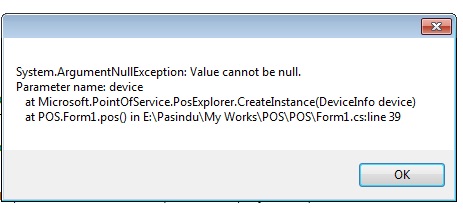
例如,我可以将文本发送到客户显示器。但我无法清除屏幕。
这是密码
public void WriteSomethingRedToPrinterThroughDisplay()
    {
        cUSB.OpenPort(); // Open the USB Port
        cUSB.WritePort(Strings.Chr(12));   // Clear pole display
        cUSB.WritePort(Strings.Chr(27) + Strings.Chr(61) +
        Strings.Chr(1));   // Send print through pole display
        cUSB.WritePort(Strings.Chr(27) + Strings.Chr(64));   // Initialize printer
        cUSB.WritePort(Strings.Chr(27) + Strings.Chr(114) +
        Strings.Chr(1));   // Select Red color to print
        cUSB.WritePort(string.Format("{0,-10}{1,7:-0.000}
        {2,10:0.00}{3,13:-0.00}", tempitemid, tempunits,
        tempunitprice, tempsubtotal) + Strings.Chr(10));   // Print text and new line
        cUSB.WritePort(Strings.Chr(27) + Strings.Chr(114) +
        Strings.Chr(0));   // Set color to default Black
        cUSB.WritePort(Strings.Chr(27) + Strings.Chr(61) +
        Strings.Chr(2));   // De-select printer and enable pole display
        cUSB.ClosePort();  // Close the USB Port
    }
请寄给我正确的教程或正确的方法在显示单元中显示文本。您的帮助将不胜感激。
回答 1
Stack Overflow用户
回答已采纳
发布于 2014-08-29 14:44:08
使用上面提到的第二环节。
您可以按原样使用public class USB。使用cUSB.WritePort("\f")清除极显示。
private void button1_Click(object sender, EventArgs e)
{
cUSB.OpenPort(); // Open the USB Port
cUSB.WritePort("\f"); // Clear pole display
cUSB.ClosePort();
}
我想下面的代码也会对你有用。
\f -透明屏幕
\n -带选项卡的新行
\r -下一行
\t -标签
\v -第一行第一列
页面原文内容由Stack Overflow提供。腾讯云小微IT领域专用引擎提供翻译支持
原文链接:
https://stackoverflow.com/questions/25564937
复制相关文章
相似问题
腾讯云开发者

Copyright © 2013 - 2026 Tencent Cloud. All Rights Reserved. 腾讯云 版权所有
深圳市腾讯计算机系统有限公司 ICP备案/许可证号:粤B2-20090059  粤公网安备44030502008569号
腾讯云计算(北京)有限责任公司 京ICP证150476号 | 京ICP备11018762号