
这个复选框是如何工作的?我如何使用它?
我最近注册了oneplusone网站https://account.oneplus.net/sign-up,并注意到了这个复选框recaptcha
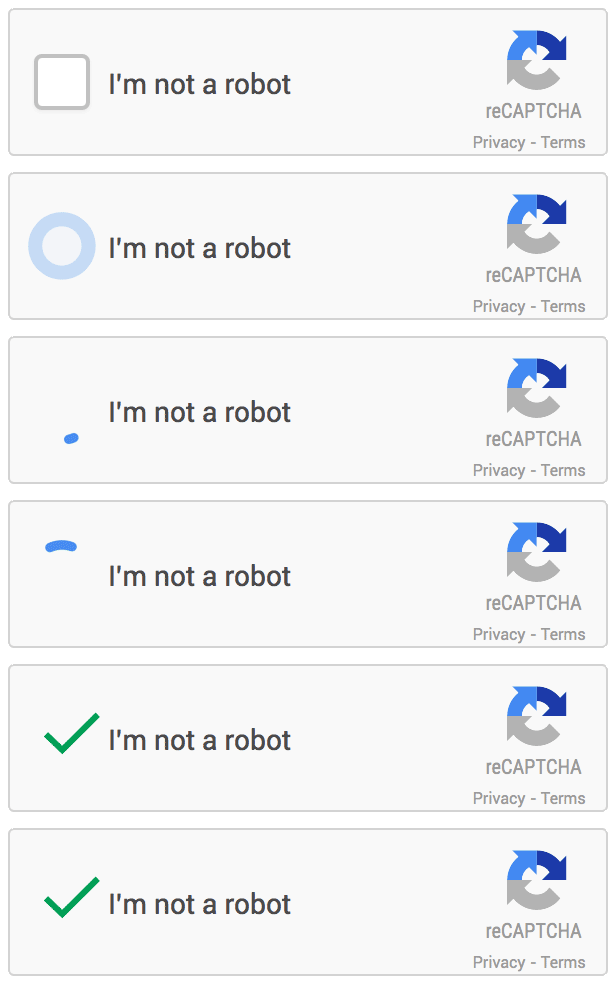
它是如何工作的,我如何在我的网站上使用它?比那些神秘的字/数字好得多:)
该网站没有提到任何新的recaptcha方法.https://www.google.com/recaptcha/intro/index.html
回答 4
Stack Overflow用户
发布于 2014-09-09 12:24:19
这是一个用于reCAPTCHA的beta API。我从他们的JS的源代码中收集到这些信息:https://www.google.com/recaptcha/api.js引用"API2“。我还发现:http://jaswsinc.com/recaptcha-ads/,(存档),很明显,他们做了一个只邀请他们的“没有验证码的reCAPTCHA”的测试版,所以.你可能还不能让它在你的网站上运行。我找不到任何关于选择进入测试版的信息,但是如果你搜索“”,你可以看到很多人提到从谷歌收到电子邮件让他们加入。
如果你找到一个地方进入测试版,请分享!否则它看起来会在2015年发布.
Stack Overflow用户
发布于 2015-04-23 16:31:57
下面是我在PHP中运行的代码,没有问题:
客户端:
<div class="g-recaptcha" data-sitekey="PUBLIC_KEY"></div>服务器端:
if (isset($_POST['g-recaptcha-response'])) {
    $captcha = $_POST['g-recaptcha-response'];
    $privatekey = "SECRET_KEY";
    $url = 'https://www.google.com/recaptcha/api/siteverify';
    $data = array(
        'secret' => $privatekey,
        'response' => $captcha,
        'remoteip' => $_SERVER['REMOTE_ADDR']
    );

    $curlConfig = array(
        CURLOPT_URL => $url,
        CURLOPT_POST => true,
        CURLOPT_RETURNTRANSFER => true,
        CURLOPT_POSTFIELDS => $data
    );

    $ch = curl_init();
    curl_setopt_array($ch, $curlConfig);
    $response = curl_exec($ch);
    curl_close($ch);
}

$jsonResponse = json_decode($response);

if ($jsonResponse->success == "true")
    doSomething();
else
    doSomeOtherThing();
:)
Stack Overflow用户
发布于 2016-03-08 16:30:06
我来到这里寻找,没有看到任何答案,所以我继续寻找。
经过我的搜索,这个窗口仍然打开,所以我正在用我的发现更新这篇文章。
这里是您可以了解reCAPTCHA的地方
http://scraping.pro/no-captcha-recaptcha-challenge/
不过,基本上,您可以将以下内容添加到您的网页中:
<script src="https://www.google.com/recaptcha/api.js" >;
<form method="post">
    <div class="g-recaptcha" data-sitekey="[site key issued by google]"></div>
    <input value="submit" type="submit" />
</form>要获得reCAPTCHA密钥,请访问以下谷歌站点:
https://www.google.com/recaptcha/intro/index.html
一旦您使用了上面的链接,您就可以使用以下Google信息更深入地了解这方面的编码:
https://developers.google.com/recaptcha/
注意:
来自Google文档:
必须使用HTTPS协议加载脚本,并且可以不受限制地从页面上的任何点加载脚本。
下面是我如何让它工作的一个例子:
<html>
<head>
    <title>Contact</title>
    <script src="https://www.google.com/recaptcha/api.js" async defer></script>
    <script>
    var onloadCallback = function () {
        grecaptcha.render('dvCaptcha', {
            'sitekey': '<%=ReCaptcha_Key %>',
            'callback': function (response) {
                $.ajax({
                    type: "POST",
                    url: "CS.aspx/VerifyCaptcha",
                    data: "{response: '" + response + "'}",
                    contentType: "application/json; charset=utf-8",
                    dataType: "json",
                    success: function (r) {
                        var captchaResponse = jQuery.parseJSON(r.d);
                        if (captchaResponse.success) {
                            $("[id*=txtCaptcha]").val(captchaResponse.success);
                            $("[id*=lblAlarm]").hide();
                        } else {
                            $("[id*=txtCaptcha]").val("");
                            $("[id*=lblAlarm]").show();
                            var error = captchaResponse["error-codes"][0];
                            $("[id*=lblAlarm]").html("RECaptcha error. " + error);
                        }
                    }
                });
            }
        });
    };
    </script>
</head>
<body>
    <form action="?" method="POST">
        <div id="dvCaptcha" class="g-recaptcha" data-sitekey="[site key issued by google]"></div>
        <br />
        <asp:Button ID="btnSubmit" runat="Server" Text="Send" OnClick="btnSubmit_Click" />
        <asp:Label ID="lblAlarm" runat="server" ForeColor="Red"></asp:Label>
    </form>
</body>
</html>
如果需要在ASP.NET代码隐藏中进行验证,只需验证“”控件是否已被填充:
protected static string ReCaptcha_Key, ReCaptcha_Secret;

protected void btnSubmit_Click(object sender, EventArgs e)
{
    if (!String.IsNullOrEmpty(Request.Form["g-recaptcha-response"]))
    {
        // other code
    } else
    {
       lblAlarm.Text = "reCAPTCHA failed.";
    }
}
希望你们中的一些人觉得这很有用。
https://stackoverflow.com/questions/25545514
复制相似问题
腾讯云开发者

Copyright © 2013 - 2026 Tencent Cloud. All Rights Reserved. 腾讯云 版权所有
深圳市腾讯计算机系统有限公司 ICP备案/许可证号:粤B2-20090059  粤公网安备44030502008569号
腾讯云计算(北京)有限责任公司 京ICP证150476号 | 京ICP备11018762号