
无法在Anaconda中安装软件包
刚刚下载并安装了anaconda 3.6.2在Mac小牛上,我需要安装一个软件包seaborn,它不是预先安装在anaconda上的。
$ conda install seaborn
Fetching package metadata: ..
Error: No packages found in current osx-64 channels matching: seaborn

You can search for this package on Binstar with

    binstar search -t conda seaborn

You may need to install the Binstar command line client with

conda install binstar接下来,我尝试使用pip来安装软件包。
$ which pip
/Users/username/anaconda/bin/pip

$ pip install seaborn
Could not find an activated virtualenv (required).再次尝试激活root Anaconda env,但仍然不起作用
$ source activate root
discarding /Users/username/anaconda/bin from PATH
prepending /Users/username/anaconda/bin to PATH

$ pip install seaborn
Could not find an activated virtualenv (required).接下来,我尝试激活virualenv和pip install工作。
workon testEnv
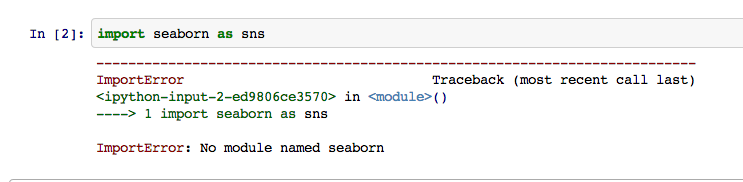
pip install seaborn现在我从Anaconda的发射器上发射了iPython notebook。但是seaborn包似乎没有被找到!
seaborn包真的安装了吗?
在~/bashprofile中,我有:
# virutalenvwrapper
export WORKON_HOME=$HOME/.virtualenvs
source /Users/username/.virtualenvs/datasci/bin/virtualenvwrapper.sh

# added by Anaconda 2.0.1 installer
export PATH="/Users/username/anaconda/bin:$PATH"
更新
删除了两个虚拟包装器行,重新加载.bash_profile,但是pip install仍然给出了错误Could not find an activated virtualenv (required).,激活另一个conda环境source activate testenv没有帮助。
$ source activate ~/.bash_profile
$ pip install seaborn
Could not find an activated virtualenv (required).

$ source activate testenv
discarding /Users/username/anaconda/bin from PATH
prepending /Users/username/anaconda/envs/testenv/bin to PATH
$ pip install seaborn
Could not find an activated virtualenv (required).回答 5
Stack Overflow用户
发布于 2014-12-08 14:39:55
您需要安装pip的anaconda版本。只管跑:
conda install pip这将在激活的conda环境中安装pip。
Stack Overflow用户
发布于 2015-02-09 16:04:49
我也遇到了同样的问题,使用Mac安装ggplot。如果您从终端执行:
/anaconda/bin/pip install module_name它起作用了。希望能帮上忙!
MC
Stack Overflow用户
发布于 2014-08-25 15:49:21
从bashprofile中移除虚拟包装行。使用Anaconda时,您应该使用conda环境而不是虚拟环境,使用virtualenvs最终会破坏conda环境。
https://stackoverflow.com/questions/25467595
复制相似问题
腾讯云开发者

Copyright © 2013 - 2026 Tencent Cloud. All Rights Reserved. 腾讯云 版权所有
深圳市腾讯计算机系统有限公司 ICP备案/许可证号:粤B2-20090059  粤公网安备44030502008569号
腾讯云计算(北京)有限责任公司 京ICP证150476号 | 京ICP备11018762号