
曲线(Bezier)梯度
曲线(Bezier)梯度
提问于 2014-08-21 17:54:30
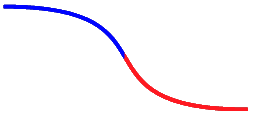
如何用两种颜色绘制bezier?就像下面的照片?我已经画了bezier,我可以填充任何颜色,但我不能梯度工作。
这就是im所做的,我使用路径创建bezier,顺便说一句。
    private void test()
    {
        System.Windows.Media.GradientStop GradientStop1 = new System.Windows.Media.GradientStop();
        System.Windows.Media.GradientStop GradientStop2 = new System.Windows.Media.GradientStop();
        System.Windows.Media.LinearGradientBrush p_Fill; p_Fill = new System.Windows.Media.LinearGradientBrush(Colors.Blue, Colors.Red, new Point(0, 0.5), new Point(1, 0.5));
        p_Fill.GradientStops.Add(GradientStop1);
        p_Fill.GradientStops.Add(GradientStop2);
        Bez.Fill = p_Fill;
    }
应该是这样的
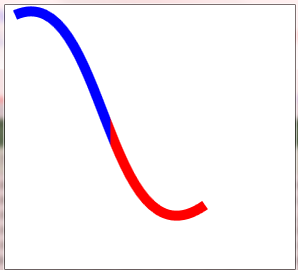
这就是我得到的

回答 1
Stack Overflow用户
回答已采纳
发布于 2014-08-21 18:03:09
如果你需要在两个颜色的半部之间锐减,你需要更多的GradientStops。
var grad3 = new System.Windows.Media.GradientStop()
                  {Offset = 0.5, Color=Colors.Blue};
var grad4 = new System.Windows.Media.GradientStop()
                  {Offset = 0.5, Color=Colors.Red};
GradientStop2.Offset = 1;
p_Fill.GradientStops.Add(GradientStop1);
p_Fill.GradientStops.Add(grad3);
p_Fill.GradientStops.Add(grad4);
p_Fill.GradientStops.Add(GradientStop2);另外,您必须为Brush设置Stroke,而不是Fill。StrokeThickness决定曲线的厚度:
Bez.Stroke = p_Fill;
Bez.StrokeThickness = new Thickness(10);
页面原文内容由Stack Overflow提供。腾讯云小微IT领域专用引擎提供翻译支持
原文链接:
https://stackoverflow.com/questions/25432867
复制相关文章
相似问题
腾讯云开发者

Copyright © 2013 - 2026 Tencent Cloud. All Rights Reserved. 腾讯云 版权所有
深圳市腾讯计算机系统有限公司 ICP备案/许可证号:粤B2-20090059  粤公网安备44030502008569号
腾讯云计算(北京)有限责任公司 京ICP证150476号 | 京ICP备11018762号