
json2html -创建HTML
我试图找到一个好的JS插件,它将帮助我生成HTML结构,并用<table /> 数据填充它。
我发现json2html,但不幸的是,我没有看到任何有用的例子或文件插件的官方网站,也没有任何第三方的网站,我可以调查。
我创建了一个function(),它将为我生成一些随机数据,我将在这个演示示例中使用该数据。将JSON模板存储在变量中,用于json2html,并创建了一个带有ID的<div />,该ID将用于使用该插件解析JSON生成的数据。
// Demo function to generate random content
// ->
function generateChartData() {
 for (var i = 0; i < 5; i++) {
    var file_id = Math.floor(Math.random() * 90000) + 10000,
        file_name = 'Dummy File ' + Math.floor(Math.random() * 20) + 30 + '.zip',
        file_clicks = Math.round(Math.random() * 480) + 820,
        file_downloads = Math.round(Math.random() * 160) + 420,
        file_conversion = (file_clicks / file_downloads).toFixed(2),
        file_profit = Math.round(Math.random() * 120) + 310,
        file_cpa = (file_profit / file_downloads).toFixed(2),
        file_epc = (file_profit / file_clicks).toFixed(2);

    chartData.push({
      file_id: file_id,
      file_name: file_name,
      file_clicks: file_clicks,
      file_downloads: file_downloads,
      file_conversion: file_conversion,
      file_cpa: file_cpa,
      file_epc: file_epc,
      file_profit: file_profit
    });
  }

  // create variables but no values
  var total_clicks, total_downloads, total_conversion, total_profit, total_cpa, total_epc;
}
// <-

// Create html template for further json parsing
var template = {
  "tag": "table",
  "class": "table table-striped table-hover",
  "children": [
    {
      "tag": "thead",
      "id": "json-head",
      "children": [
        {
          "tag": "tr",
          "children": [
            {
              "tag": "th",
              "html": "ID"
            },
            {
              "tag": "th",
              "html": "File Name"
            },
            {
              "tag": "th",
              "html": "Clicks"
            },
            {
              "tag": "th",
              "html": "Downloads"
            },
            {
              "tag": "th",
              "html": "Conversion"
            },
            {
              "tag": "th",
              "html": "Average CPA"
            },
            {
              "tag": "th",
              "html": "EPC"
            },
            {
              "tag": "th",
              "html": "Profit"
            }
          ]
        }
      ]
    },
    {
      "tag": "tbody",
      "id": "json-body",
      "children": [
        {
          "tag": "tr",
          "children": [
            {
              "tag": "td",
              "html": "${file_id}"
            },
            {
              "tag": "td",
              "html": "${file_name}"
            },
            {
              "tag": "td",
              "html": "${file_clicks}"
            },
            {
              "tag": "td",
              "html": "${file_downloads}"
            },
            {
              "tag": "td",
              "html": "${file_conversion}"
            },
            {
              "tag": "td",
              "html": "${file_cpa}"
            },
            {
              "tag": "td",
              "html": "${file_epc}"
            },
            {
              "tag": "td",
              "html": "${file_profit}"
            }
          ]
        }
      ]
    },
    {
      "tag": "tfoot",
      "id": "json-foot",
      "children": [
        {
          "tag": "tr",
          "children": [
            {
              "tag": "td",
              "colspan": "2",
              "html": "Total / Average"
            },
            {
              "tag": "td",
              "html": "${total_clicks}"
            },
            {
              "tag": "td",
              "html": "${total_downloads}"
            },
            {
              "tag": "td",
              "html": "${total_conversion}"
            },
            {
              "tag": "td",
              "html": "${total_cpa}"
            },
            {
              "tag": "td",
              "html": "${total_epc}"
            },
            {
              "tag": "td",
              "html": "${total_profit}"
            }
          ]
        }
      ]
    }
  ]
};

// Empty array for json data
var chartData = [];

// Calling DEMO function to generate json data
generateChartData();

// Parse json data and generate html
$("#json-parse").json2html(chartData, template);但是,您可能会注意到,我的JSON模板或json2html调用有问题。它为每个JSON数据解析创建无效表并生成表。所以不幸的是,这不是我想要的。
我的想法是创建下面的模板并将所需的信息解析到<tbody /> & <tfoot />中,而不是再次创建它们。
<table class="table table-striped table-hover">
<thead id="json-head">
    <tr>
        <th>ID</th>
        <th>File Name</th>
        <th>Clicks</th>
        <th>Downloads</th>
        <th>Conversion</th>
        <th>Average CPA</th>
        <th>EPC</th>
        <th>Profit</th>
    </tr>
</thead>

<tbody id="json-body">
    <tr>
        <td>${file_id}</td>
        <td>${file_name}</td>
        <td>${file_clicks}</td>
        <td>${file_downloads}</td>
        <td>${file_conversion}</td>
        <td>${file_cpa}</td>
        <td>${file_epc}</td>
        <td>${file_profit}</td>
    </tr>
</tbody>

<tfoot id="json-foot">
    <tr>
        <td colspan="2">Total / Average</td>
        <td>${total_clicks}</td>
        <td>${total_downloads}</td>
        <td>${total_conversion}</td>
        <td>${total_cpa}</td>
        <td>${total_epc}</td>
        <td>${total_profit}</td>
    </tr>
</tfoot>
不幸的是,我不能提供JSFiddle,因为我找不到任何CDN。但是这里是截图,它会告诉你不想要的结果是什么样子。
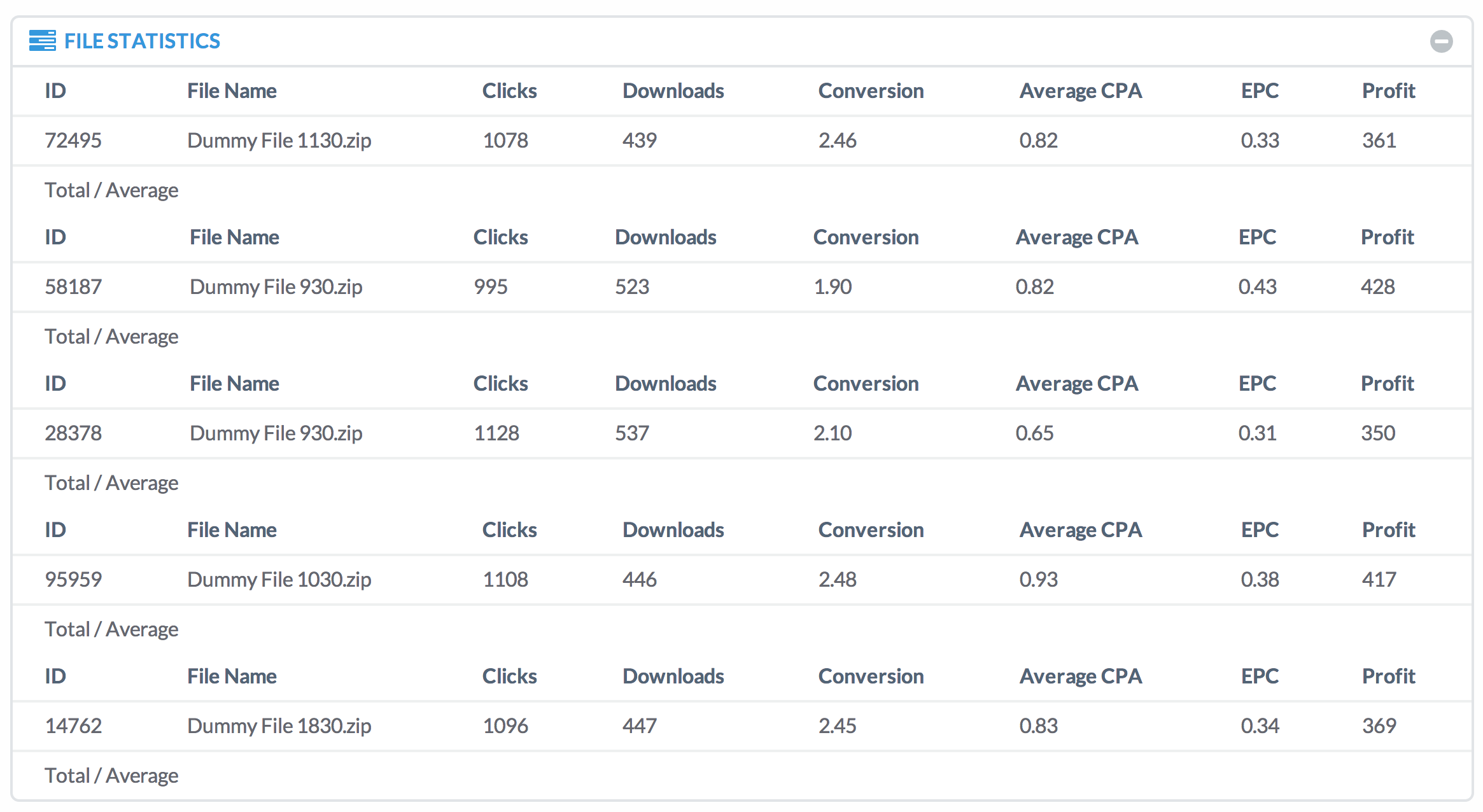
我知道这是我的JSON或插件调用的结构,我没有正确地设置,但是如果您不介意在这里帮助我的话。这确实令人头痛,但也可能对其他用户有所帮助。
回答 1
Stack Overflow用户
发布于 2014-08-23 20:41:49
json2Html在循环中生成模板,其计数器与json对象计数相等。所以你看到的结果是没有错的。如果不想重复页眉和页脚,只需使用它们作为另一个带有对象数组的模板。
更新:感谢示例 @Volune。
// Create html template for further json parsing
        var headertemplate = {
            "tag": "thead",
              "id": "json-head",
              "children": [
                {
                  "tag": "tr",
                  "children": [
                    {
                      "tag": "th",
                      "html": "ID"
                    },
                    {
                      "tag": "th",
                      "html": "File Name"
                    },
                    {
                      "tag": "th",
                      "html": "Clicks"
                    },
                    {
                      "tag": "th",
                      "html": "Downloads"
                    },
                    {
                      "tag": "th",
                      "html": "Conversion"
                    },
                    {
                      "tag": "th",
                      "html": "Average CPA"
                    },
                    {
                      "tag": "th",
                      "html": "EPC"
                    },
                    {
                      "tag": "th",
                      "html": "Profit"
                    }
                  ]
                }
              ]
        }
        var footertemplate = {
              "tag": "tfoot",
              "id": "json-foot",
              "children": [
                {
                  "tag": "tr",
                  "children": [
                    {
                      "tag": "td",
                      "colspan": "2",
                      "html": "Total / Average"
                    },
                    {
                      "tag": "td",
                      "html": "${total_clicks}"
                    },
                    {
                      "tag": "td",
                      "html": "${total_downloads}"
                    },
                    {
                      "tag": "td",
                      "html": "${total_conversion}"
                    },
                    {
                      "tag": "td",
                      "html": "${total_cpa}"
                    },
                    {
                      "tag": "td",
                      "html": "${total_epc}"
                    },
                    {
                      "tag": "td",
                      "html": "${total_profit}"
                    }
                  ]
                }
              ]
        }
        var template = {
          "tag": "table",
          "class": "table table-striped table-hover",
          "children": [
            {
              "tag": "tbody",
              "id": "json-body",
              "children": [
                {
                  "tag": "tr",
                  "children": [
                    {
                      "tag": "td",
                      "html": "${file_id}"
                    },
                    {
                      "tag": "td",
                      "html": "${file_name}"
                    },
                    {
                      "tag": "td",
                      "html": "${file_clicks}"
                    },
                    {
                      "tag": "td",
                      "html": "${file_downloads}"
                    },
                    {
                      "tag": "td",
                      "html": "${file_conversion}"
                    },
                    {
                      "tag": "td",
                      "html": "${file_cpa}"
                    },
                    {
                      "tag": "td",
                      "html": "${file_epc}"
                    },
                    {
                      "tag": "td",
                      "html": "${file_profit}"
                    }
                  ]
                }
              ]
            }
          ]
        };

    // Empty array for json data
    var chartData = [];

    // Calling DEMO function to generate json data
    generateChartData();
    // Parse json data and generate html
    $("#json-parse").json2html(chartData[0], headertemplate);
    $("#json-parse").json2html(chartData, template);
$("#json-parse").json2html(chartData[0], footertemplate); //use your total json object with one array inside, instead chartData[0];https://stackoverflow.com/questions/25431505
复制相似问题
腾讯云开发者

Copyright © 2013 - 2026 Tencent Cloud. All Rights Reserved. 腾讯云 版权所有
深圳市腾讯计算机系统有限公司 ICP备案/许可证号:粤B2-20090059  粤公网安备44030502008569号
腾讯云计算(北京)有限责任公司 京ICP证150476号 | 京ICP备11018762号