
使用IAccessible结合Google返回不完全树
我正在尝试为Google创建一个QA自动化,以模拟点击和接收标签按钮上的点击事件。
我使用接口和API接口来获得完整的可访问元素树。
当使用AccExplorer 2.0来查看树时,它看起来很棒(见最后的图像)。
但是我的程序只显示了部分树,并且名称与我在AccExplorer上看到的不匹配。
我在跑:
- 铬37β
- Win 7 64位
知道为什么我不能看到整棵树吗?
谢谢
这是我的程序的源代码(C++) : (类似于MSDN示例)
int _tmain(int argc, _TCHAR* argv[])
{
    int i=0;
    HWND hWndChrome = NULL;
    hWndChrome = (HWND)0x000702c0;
    wcout << L"\n\nChrome_WidgetWin_1 = "<< hex << hWndChrome << "\n--------------------------";

    CComPtr<IAccessible> pAccMain;
    ::AccessibleObjectFromWindow(hWndChrome, OBJID_CLIENT, IID_IAccessible, (void**)(&pAccMain));

    WalkTreeWithAccessibleChildren(pAccMain, 0);
    _getch();

    return 0;
}

HRESULT WalkTreeWithAccessibleChildren(__in CComPtr<IAccessible> pAcc, __in int depth)
{
    long childCount = 0;
    long returnCount = 0;

    HRESULT hr = pAcc->get_accChildCount(&childCount);

    if (childCount == 0)
        return S_FALSE;

    CComVariant* pArray = new CComVariant[childCount];
    hr = ::AccessibleChildren(pAcc, 0L, childCount, pArray, &returnCount);
    if (FAILED(hr))
        return hr;

    // Iterate through children.
    for (int x = 0; x < returnCount; x++)
    {
        CComVariant vtChild = pArray[x];
        // If it's an accessible object, get the IAccessible, and recurse.
        if (vtChild.vt == VT_DISPATCH)
        {
            CComPtr<IDispatch> pDisp = vtChild.pdispVal;
            CComQIPtr<IAccessible> pAccChild = pDisp;
            if (!pAccChild)
                continue;

            // Print current accessible element
            wcout << endl;
            for (int y = 0; y < depth; y++) wcout << L"    ";
            wcout << L"* " << GetName(pAccChild, CHILDID_SELF).data() << L"  |  " << GetRole(pAccChild, CHILDID_SELF).data() << L" (Object)";

            WalkTreeWithAccessibleChildren(pAccChild, depth + 1);
        }
        // Else it's a child element so we have to call accNavigate on the parent,
        //   and we do not recurse because child elements can't have children.
        else
        {
            // Print current accessible element
            wcout << endl;
            for (int y = 0; y < depth; y++) wcout << L"    ";
            wcout << L"* " << GetName(pAcc, vtChild.lVal).data() << L"  |  " << GetRole(pAcc, vtChild.lVal).data() << " (Child)";
        }
    }
    delete[] pArray;
    return S_OK;
}

wstring GetName(__in CComPtr<IAccessible> pAcc, __in CComVariant varChild)
{
    if (!pAcc)
        return L"";
    CComBSTR bstrName;
    HRESULT hr = pAcc->get_accName(varChild, &bstrName);
    if (FAILED(hr))
        return L"";
    if (!bstrName.m_str)
        return L"<NULL>";
    return bstrName.m_str;
}

wstring GetRole(__in CComPtr<IAccessible> pAcc, __in CComVariant varChild)
{
    if (!pAcc)
        return L"";
    CComVariant varRoleID;
    HRESULT hr = pAcc->get_accRole(varChild, &varRoleID);
    if (FAILED(hr))
        return L"";
    WCHAR sRoleBuff[1024] = {0};
    hr = ::GetRoleText(varRoleID.lVal, sRoleBuff, 1024);
    if (FAILED(hr))
        return L"";
    return sRoleBuff;
}
,这是控制台输出:
    Chrome_WidgetWin_1 = 000702C0
    --------------------------
    * Chrome Legacy Window  |  window (Object)
        * System  |  menu bar (Object)
        * <NULL>  |  title bar (Object)
            * IME  |  push button (Child)
            * Minimize  |  push button (Child)
            * Maximize  |  push button (Child)
            * Context help  |  push button (Child)
            * Close  |  push button (Child)
        * Application  |  menu bar (Object)
        * Chrome Legacy Window  |  client (Object)
    //  -----> { there should be a big sub-tree here } <----- //
        * Vertical  |  scroll bar (Object)
            * Line up  |  push button (Child)
            * Page up  |  push button (Child)
            * Position  |  indicator (Child)
            * Page down  |  push button (Child)
            * Line down  |  push button (Child)
        * Horizontal  |  scroll bar (Object)
            * Column left  |  push button (Child)
            * Page left  |  push button (Child)
            * Position  |  indicator (Child)
            * Page right  |  push button (Child)
            * Column right  |  push button (Child)
* <NULL> | grip (Object)这里是一个显示完整树的AccExplorer屏幕截图:(一些节点被折叠)
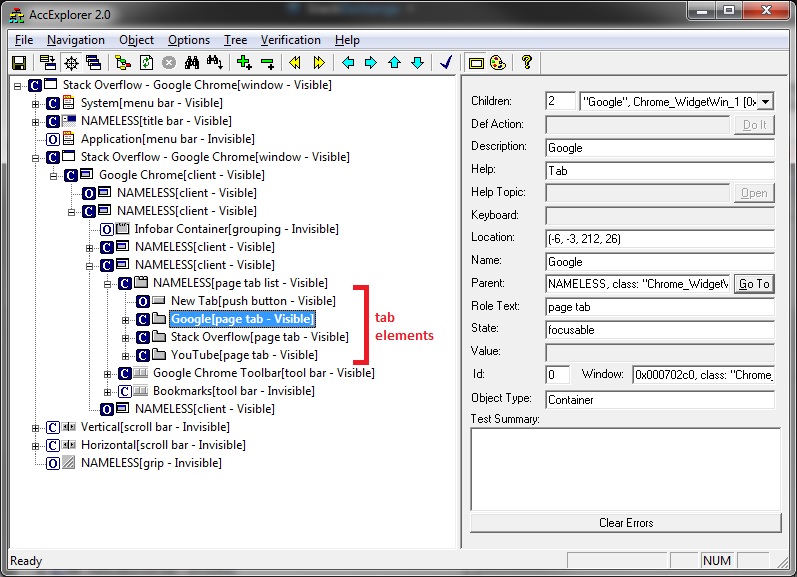
编辑:
当使用OBJID_WINDOW而不是OBJID_WINDOW时(如在AccessibleObjectFromWindow中的示例中)--我得到了一棵具有更多节点的树,但仍然看不到选项卡元素。
回答 1
Stack Overflow用户
发布于 2014-08-21 17:23:38
好吧,过了太久后,我发现了一个小的小东西让一切都变了.
我忘了使用CoInitialize()..。
有趣的是,没有CoInitialize(),它可以工作,但只有部分,没有HRESULT指出这一点(没有得到类似于CO_E_NOTINITIALIZED的任何信息)。
无论如何-如果你使用IAccessible wihtout CoInitialize -期望事情不能正常工作.
https://stackoverflow.com/questions/25351277
复制相似问题
腾讯云开发者

Copyright © 2013 - 2026 Tencent Cloud. All Rights Reserved. 腾讯云 版权所有
深圳市腾讯计算机系统有限公司 ICP备案/许可证号:粤B2-20090059  粤公网安备44030502008569号
腾讯云计算(北京)有限责任公司 京ICP证150476号 | 京ICP备11018762号