
swing does布局preferredSize不会自动更改
我想要一个FlowLayout来为MyPanel添加一些任意的按钮。我在JFrame north中添加了JFrame( JFrame有一个BorderLayout)。我的问题是:
当MyPanel中的按钮占用多行时,将不会显示它们。
换句话说,preferredSize of MyPanel不会自动更改以显示其全部内容。它只显示一行按钮。
 public class NewMain {
   public static void main(String[] args) {
     JFrame mainFrame = new JFrame();
     mainFrame.getContentPane().setLayout(new BorderLayout());
     mainFrame.setSize(new Dimension(500,500));

     JPanel p1 = new MyPanel();
     p1.setLayout(new FlowLayout());
     mainFrame.add(p1,BorderLayout.NORTH);
     mainFrame.add(new JButton("center"),BorderLayout.CENTER);
     p1.add(new JButton("helllloo1"));
     p1.add(new JButton("helllloo2"));
     p1.add(new JButton("helllloo3"));
     p1.add(new JButton("helllloo4"));
     p1.add(new JButton("helllloo5"));
     p1.add(new JButton("helllloo6"));
     p1.add(new JButton("helllloo7"));

    mainFrame.setVisible(true);
  }

  public static class MyPanel extends JPanel{

  }
}
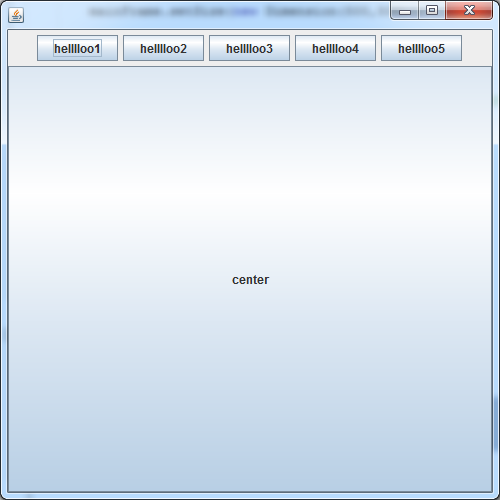
当我更改MyPanel使其覆盖getPreferredSize并设置常量大小时,它会正常工作。
public static class MyPanel extends JPanel{

    @Override
    public Dimension getPreferredSize(){
        return new Dimension(-1,100);
    }
}
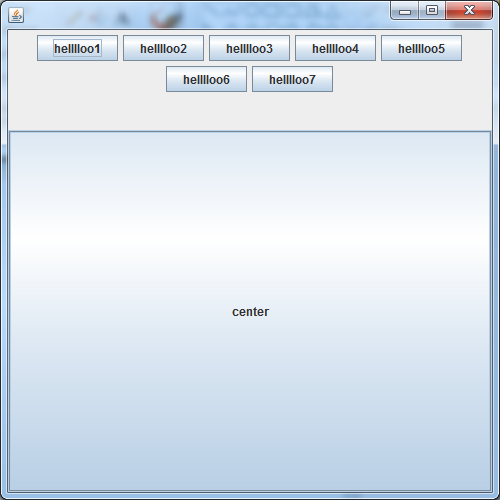
但我希望它能自动工作。
任何帮助都将不胜感激。
回答 2
Stack Overflow用户
发布于 2014-08-16 06:08:00
布局管理器有两个主要功能:
- 确定容器的首选大小
- 根据布局规则布局容器中的组件
FlowLayout是一种奇怪的动物。它完成了这两种功能。容器的首选大小假定所有组件都将放置在一行中。当遇到容器的最大宽度时,布局代码将组件包装到下一行。然而,问题是函数之间不相互交谈。当组件被包装到新行时,首选的大小不会改变,因此您永远看不到额外行上的组件。
我们想要的是当容器的大小发生变化时动态计算的首选大小。换句话说,随着容器宽度的变化,还需要重新计算高度。WrapLayout扩展了FlowLayout以实现此功能。这将导致容器的首选大小与容器的布局同步。
在下面的示例中,按钮面板添加到BorderLayout的北部,蓝色面板添加到中心。您使用WrapLayout的方式与使用FlowLayout相同:
buttons.setLayout(new WrapLayout());
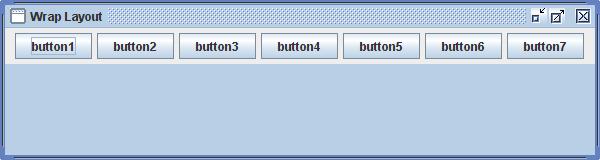
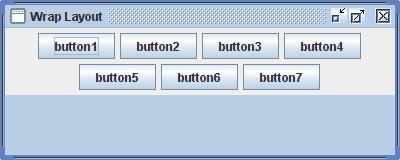
当框架变小时,按钮面板将增加高度,蓝色面板将减少:
将面板添加到滚动窗格时,滚动窗格的大小不会更改,但水平和垂直滚动条将按需要显示。
布局管理器的初始首选大小计算仍然假定所有组件都将显示在单行上。因此,如果您打包()一个框架,那么首选的宽度可能会过大。可以使用以下方法限制容器的宽度:
buttons.setSize(new Dimension(300, 1));WrapLayout的整个代码:
import java.awt.*;
import javax.swing.JScrollPane;
import javax.swing.SwingUtilities;

/**
*  FlowLayout subclass that fully supports wrapping of components.
*/
public class WrapLayout extends FlowLayout
{
private Dimension preferredLayoutSize;

/**
* Constructs a new <code>WrapLayout</code> with a left
* alignment and a default 5-unit horizontal and vertical gap.
*/
public WrapLayout()
{
    super();
}

/**
* Constructs a new <code>FlowLayout</code> with the specified
* alignment and a default 5-unit horizontal and vertical gap.
* The value of the alignment argument must be one of
* <code>WrapLayout</code>, <code>WrapLayout</code>,
* or <code>WrapLayout</code>.
* @param align the alignment value
*/
public WrapLayout(int align)
{
    super(align);
}

/**
* Creates a new flow layout manager with the indicated alignment
* and the indicated horizontal and vertical gaps.
* <p>
* The value of the alignment argument must be one of
* <code>WrapLayout</code>, <code>WrapLayout</code>,
* or <code>WrapLayout</code>.
* @param align the alignment value
* @param hgap the horizontal gap between components
* @param vgap the vertical gap between components
*/
public WrapLayout(int align, int hgap, int vgap)
{
    super(align, hgap, vgap);
}

/**
* Returns the preferred dimensions for this layout given the
* <i>visible</i> components in the specified target container.
* @param target the component which needs to be laid out
* @return the preferred dimensions to lay out the
* subcomponents of the specified container
*/
@Override
public Dimension preferredLayoutSize(Container target)
{
    return layoutSize(target, true);
}

/**
* Returns the minimum dimensions needed to layout the <i>visible</i>
* components contained in the specified target container.
* @param target the component which needs to be laid out
* @return the minimum dimensions to lay out the
* subcomponents of the specified container
*/
@Override
public Dimension minimumLayoutSize(Container target)
{
    Dimension minimum = layoutSize(target, false);
    minimum.width -= (getHgap() + 1);
    return minimum;
}

/**
* Returns the minimum or preferred dimension needed to layout the target
* container.
*
* @param target target to get layout size for
* @param preferred should preferred size be calculated
* @return the dimension to layout the target container
*/
private Dimension layoutSize(Container target, boolean preferred)
{
synchronized (target.getTreeLock())
{
    //  Each row must fit with the width allocated to the containter.
    //  When the container width = 0, the preferred width of the container
    //  has not yet been calculated so lets ask for the maximum.

    int targetWidth = target.getSize().width;

    if (targetWidth == 0)
        targetWidth = Integer.MAX_VALUE;

    int hgap = getHgap();
    int vgap = getVgap();
    Insets insets = target.getInsets();
    int horizontalInsetsAndGap = insets.left + insets.right + (hgap * 2);
    int maxWidth = targetWidth - horizontalInsetsAndGap;

    //  Fit components into the allowed width

    Dimension dim = new Dimension(0, 0);
    int rowWidth = 0;
    int rowHeight = 0;

    int nmembers = target.getComponentCount();

    for (int i = 0; i < nmembers; i++)
    {
        Component m = target.getComponent(i);

        if (m.isVisible())
        {
            Dimension d = preferred ? m.getPreferredSize() : m.getMinimumSize();

            //  Can't add the component to current row. Start a new row.

            if (rowWidth + d.width > maxWidth)
            {
                addRow(dim, rowWidth, rowHeight);
                rowWidth = 0;
                rowHeight = 0;
            }

            //  Add a horizontal gap for all components after the first

            if (rowWidth != 0)
            {
                rowWidth += hgap;
            }

            rowWidth += d.width;
            rowHeight = Math.max(rowHeight, d.height);
        }
    }

    addRow(dim, rowWidth, rowHeight);

    dim.width += horizontalInsetsAndGap;
    dim.height += insets.top + insets.bottom + vgap * 2;

    //  When using a scroll pane or the DecoratedLookAndFeel we need to
    //  make sure the preferred size is less than the size of the
    //  target containter so shrinking the container size works
    //  correctly. Removing the horizontal gap is an easy way to do this.

    Container scrollPane = SwingUtilities.getAncestorOfClass(JScrollPane.class, target);

    if (scrollPane != null && target.isValid())
    {
        dim.width -= (hgap + 1);
    }

    return dim;
}
}

/*
 *  A new row has been completed. Use the dimensions of this row
 *  to update the preferred size for the container.
 *
 *  @param dim update the width and height when appropriate
 *  @param rowWidth the width of the row to add
 *  @param rowHeight the height of the row to add
 */
private void addRow(Dimension dim, int rowWidth, int rowHeight)
{
    dim.width = Math.max(dim.width, rowWidth);

    if (dim.height > 0)
    {
        dim.height += getVgap();
    }

    dim.height += rowHeight;
}
}参考资料:http://tips4java.wordpress.com/2008/11/06/wrap-layout/
Stack Overflow用户
发布于 2014-08-16 10:57:33
发生这种情况的原因在于您正在嵌套两个布局管理器。换句话说,遇到的行为是FlowLayout和BorderLayout管理人员如何协同工作的结果。
FlowLayout让它的孩子保持他们喜欢的大小。面板本身的首选大小取决于最高部件的高度(首选高度)和子级宽度的之和(首选宽度)。
BorderLayout计算北部地区的方式如下:它从左向右伸展它的孩子(而不是它的首选宽度),并将它的高度设置为它的孩子的首选高度(尊重它的首选高度)。
因此,BorderLayout会影响带有按钮的面板的行为。它不允许为按钮创建第二行。选择像BoxLayout这样的不同的布局管理器,不适合在一行中的按钮出现在另一行中。
补充意见:
mainFrame.getContentPane().setLayout(new BorderLayout());JFrame's内容窗格的默认布局管理器是BorderLayout,不需要显式设置它。
    JPanel p1 = new MyPanel();
p1.setLayout(new FlowLayout());实例化面板的默认管理器是FlowLayout。因此,再次没有必要显式地设置它。
https://stackoverflow.com/questions/25337235
复制相似问题
腾讯云开发者

Copyright © 2013 - 2026 Tencent Cloud. All Rights Reserved. 腾讯云 版权所有
深圳市腾讯计算机系统有限公司 ICP备案/许可证号:粤B2-20090059  粤公网安备44030502008569号
腾讯云计算(北京)有限责任公司 京ICP证150476号 | 京ICP备11018762号